


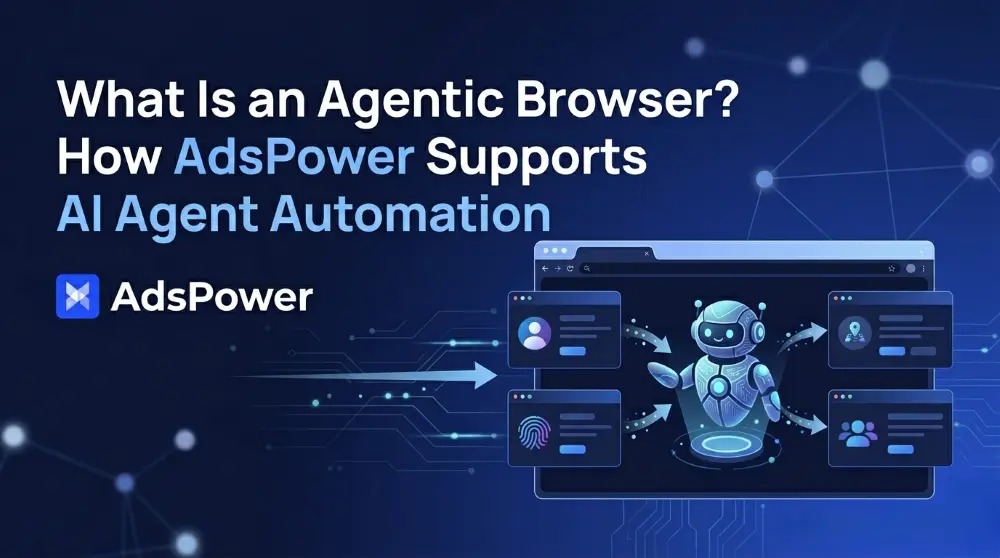
AI agents are becoming powerful enough to write code, plan workflows, and automate complex tasks. But when these agents move into real browsers, things often become less stable than expected. When run at scale, simple tasks like logging into accounts, posting content, or collecting data often fail. Often, the problem isn't with the agent, but with the environment in which it runs.
This is why browsers are becoming crucial to AI automation. With the rise of real-time web interactions, a new category of browser is emerging: agentic browsers. Rather than relying solely on external scripts or APIs, these browsers allow AI agents to operate directly inside live browsing sessions.
In this context, AdsPower Agentic Browser provides multi-account automation and scalable workflows. By separating browser profiles from fingerprints and providing API-based control, it allows AI agents to run in stable and independent environments.
The following sections explore how AdsPower fits into this new world of browser-based automation, whether you are experimenting with AI agents or building large-scale systems.
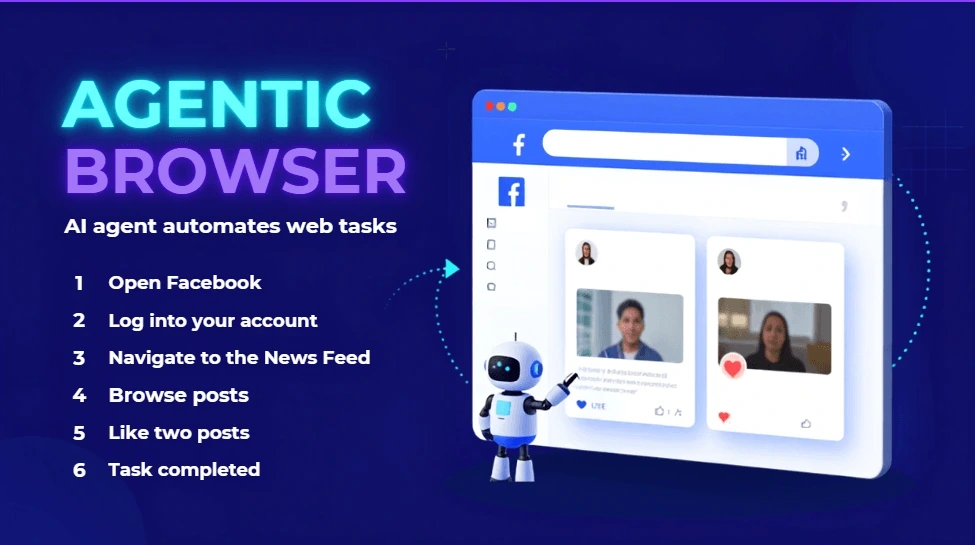
Real-time agentic browsers allow AI agents to perform tasks within browser sessions. As an example, a user might instruct the AI agent to log into Facebook, browse the News Feed, and like two posts. To complete this request, the agent may break it down into several actions:
Open Facebook
Log into your account
Navigate to the News Feed
Browse posts
Like two posts
Completed the task
The browser executes each step on a website, while AI agents understand goals and plan workflows. An "agentic" browser allows AI agents to interact with websites, carry out actions, and perform tasks on behalf of users instead of simply displaying web pages.
With AdsPower Agentic Browser, AI agents can perform a wide range of tasks based on a browser, including:
Visit websites and retrieve information
Log into accounts and maintain active sessions
Fill in the forms and submit the request
Interact with web applications
Collect, organize, and process online data
Execute repetitive tasks without manual intervention
Allow you to manage multiple Facebook accounts in isolated browser profiles, helping keep account environments separate and reducing the likelihood of account association
With AI agents taking on more and more browser-based tasks, the browser itself becomes an increasingly important component of automation. For AI workflows to be reliable and stable, it is essential to understand the browser environment.
It is common for people to look at the prompt, workflow, or script first when they encounter problems with AI automation projects. It is likely that the task will succeed if the logic is correct.
The truth is that things are often more complicated than they appear. Even if an AI agent generates the right plan and executes the right actions, it is still possible that tasks may fail during logging in, managing accounts, publishing content, or gathering data. Sometimes it's not the agent itself that's causing a problem, but the browser environment.
Automating workflows in browsers becomes more important as AI-driven workflows move into the browser.
Besides just analyzing user behavior, modern websites take into account a variety of factors. In addition to fingerprints, cookies, session data, device information, language settings, and time zone information, they also analyze the browser environment behind each visit.
By combining these signals, websites can better understand whether a visitor appears to be a real user and whether different sessions may be connected. These checks happen continuously in the background whenever someone opens a website, signs into an account, or performs actions online.
For AI agents, the same rules apply. Every automated task runs within a browser environment, making that environment a crucial factor in how websites interpret and respond to automated activity.
When automation is scaled beyond a single account, problems become more apparent. A website may detect overlapping signals if multiple accounts are sharing the same browser environment, such as fingerprints, cookies, session data, or device characteristics. The platform may view these accounts as connected even if they are using different workflows.
Thus, teams may encounter account linking, additional verification requests, login challenges, or automation interruptions. When there are many accounts involved, browser isolation becomes even more essential for maintaining stable and consistent AI automation workflows.
As AI automation becomes more complex, having a browser is no longer enough. Agents require an environment in which accounts, sessions and browser identities can execute independently but persist reliably during the life cycle of tasks.
This is where AdsPower Agentic Browser comes in. Rather than AI-assisted browsing, AdsPower gives the browser infrastructure to allow AI agents to function in stable and isolated environments.
AdsPower is built on the principle that one account = one browser environment. Instead of using the same browser to run multiple accounts, you can create separate profiles that work independently.
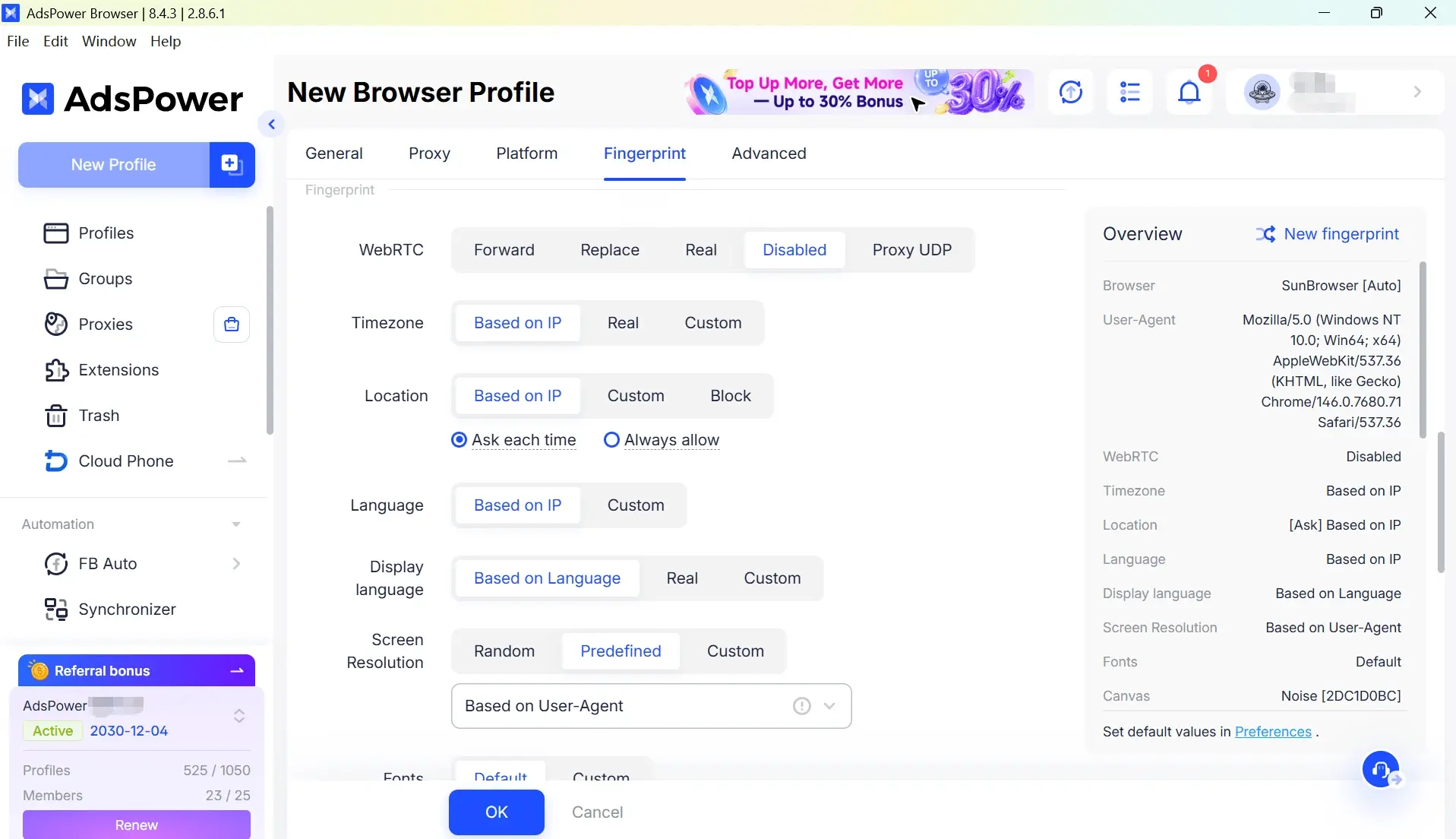
Each profile is uniquely identifiable by its browser, OS, language settings, timezone, cookies, and local storage. It helps to make all your accounts look as if they have been operated from a different device, not a single computer.
Therefore, one profile may be a Windows user in Berlin, and another may be a MacBook user in Toronto. The environments appear independent of the website and are hard to detect as related.
Browser fingerprinting is a commonly used technique for identifying browser environments. AdsPower enables every profile to have unique fingerprint traits, such as Canvas, WebGL, and AudioContext fingerprints. This is independently of hardware and browser-specific signals. In this way, overlapping profiles are reduced, creating a more realistic browsing environment.
With AdsPower, you can choose from two browser kernels: SunBrowser, based on Chrome, and FlowerBrowser, based on Firefox. By supporting multiple browser engines, AdsPower adds additional fingerprint diversity to the profiles of different browsers.
AdsPower comes with open APIs and Automation interfaces, which enable direct interaction between AI agents and browser profiles. This allows agents to run in real browsers instead of depending on external APIs or scripts.
When integrated, the AI agents can conduct many web tasks through a browser like:
Logging into accounts
Filling out forms
Publishing content
Collecting page data
Handling CAPTCHAs
Simulating user actions inside websites
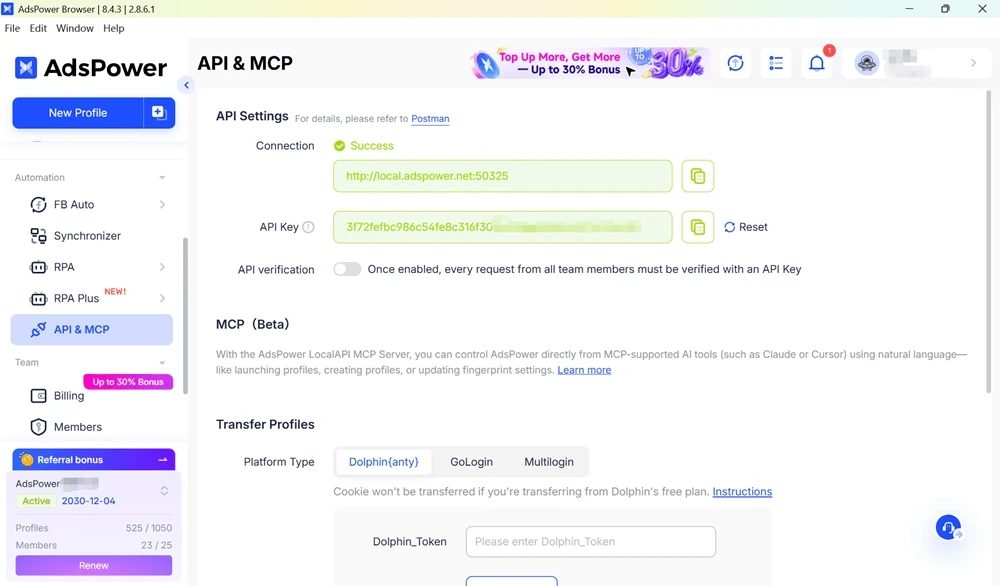
Additionally, AdsPower provides local API access and integration with popular browser automation frameworks such as Playwright and Puppeteer to automate workflows. An MCP connection is supported to pair your AI agent framework runtime and browser environments for agent-driven workflows as well.
On top of that, AdsPower offers even greater customization with Chromium and Firefox browser engines, as well as over 50 fingerprint parameters that can be adjusted. To test browser profiles, API connections, and automation workflows, users can also begin with the free plan.
With the increase in automation projects, managing browser environments gives more headaches than actually writing the automation logic.
AdsPower allows teams to create, organize, and manage thousands of browser profiles from a single place. Each workflow runs in its own sandbox with no cookies, sessions, or browser fingerprints from other accounts shared.
As such, AdsPower is ideal for any AI Business-related projects involving multi-account handling in bulk, content operations, and large-scale data/scripting, which will make workflows much faster in fields such as affiliate marketing, data collection, or browser-based work.
In an actual AI automation project, the agent is merely one step of the process. It also requires a browser environment for performing actions or execution and an uninterrupted internet connection to access the websites to perform tasks.
This is exactly why numerous teams integrate AI agents with AdsPower browser profiles along with reliable proxy service like IPcook to construct automation workflows. The AI agent performs planning and determines actions, while AdsPower creates isolated browser environment to let all the tasks being executed. On the network side, companies like IPcook can assign various IPs to each browser session, while AdsPower can connect seamlessly with proxies or residential IPs so that the connections seem more natural throughout a series of automation workflows.
Now, to elaborate what an agentic browser should look like in practice, we can take OpenClaw as an example of real AI.
First, create a browser profile in AdsPower. Each profile runs in its own isolated environment with separate fingerprints, cookies, session data, and browser settings.
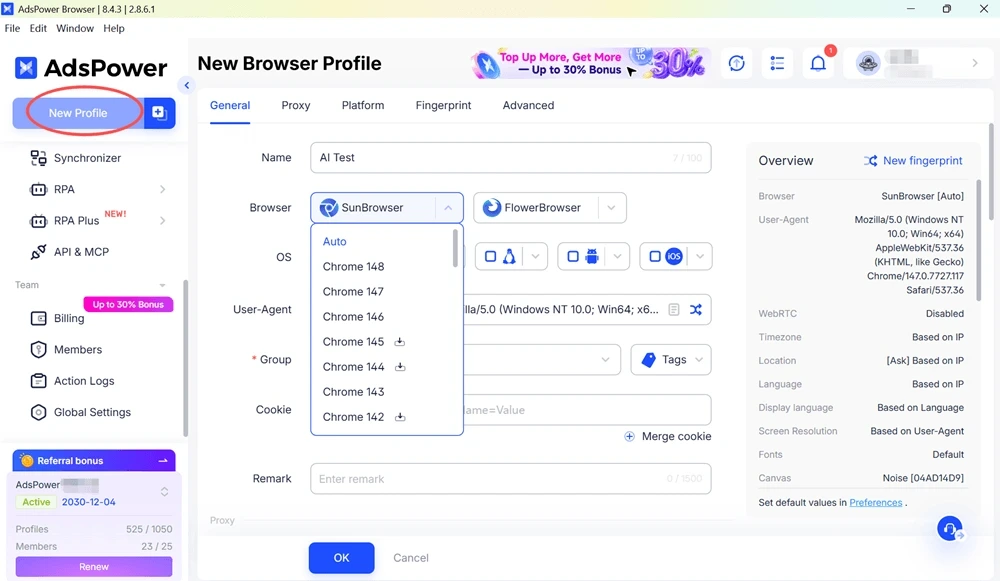
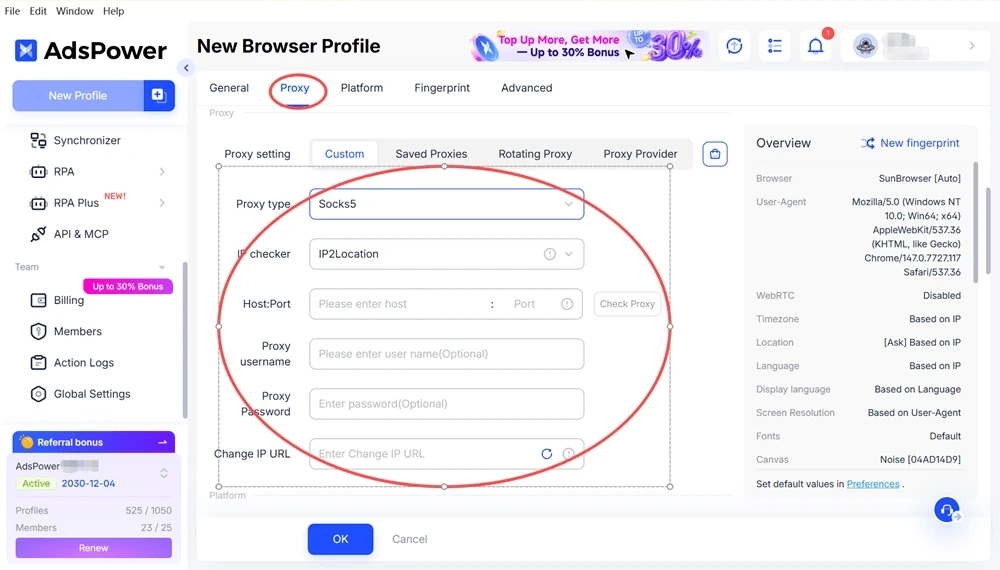
If you need a proxy for your workflow, you can configure it before starting the browser profile. Proxy providers, like IPcook, help users assign different IP addresses to different browser environments.
You simply need to subscribe to IPcook, choose the appropriate proxy plan, and create proxy credentials.
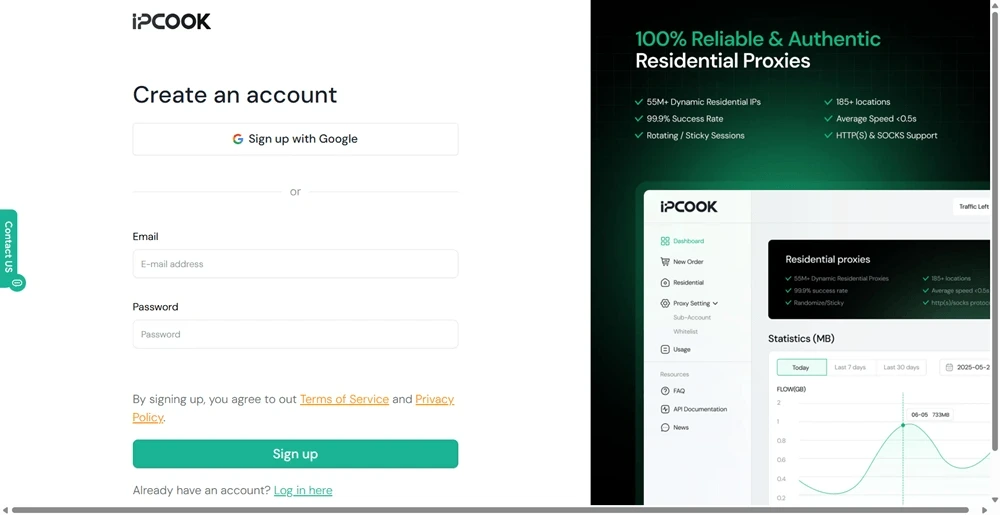
Then go back to AdsPower and enter them into your profile settings.
In OpenClaw, use the Local API endpoint to let the agent discover available browser profiles in AdsPower.
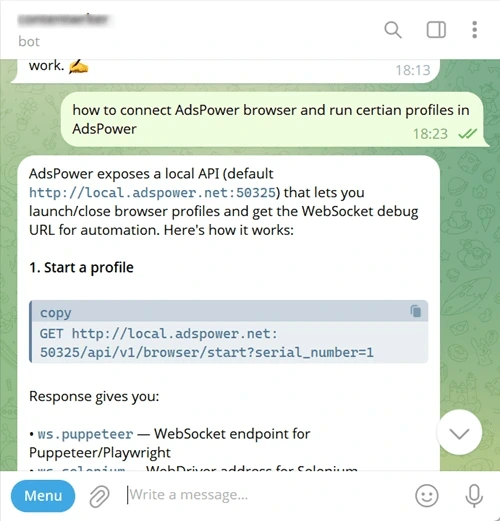
If you are using a control layer such as a Telegram bot, you can also trigger OpenClaw to connect to AdsPower and run specific profiles through simple commands. Tell the agent which browser profile to use. OpenClaw calls the AdsPower API, launches the selected profile, and retrieves a WebSocket URL for the active browser session.
OpenClaw connects to the running browser session through CDP (Chrome DevTools Protocol). At this point, the AI agent gains full control of the browser inside an isolated AdsPower environment. It can navigate websites, click elements, type input, and extract data just like a real user.
As AI agents become more powerful, automation is shifting from model performance to task execution environments. Browsers are no longer simply interfaces. They are fundamental elements that enable workflows to scale and run reliably.
In this evolution, browser-based automation is becoming a component of infrastructure rather than just a tool.
AdsPower is widely recognized as a leading anti-detect browser for multi-account management, and it is also increasingly being used in AI-driven automation workflows that rely on isolated and controllable browser environments.

