


Need to get a random IP address? The easiest method may be to use an IP generator, but that does not always provide a real or usable IP. Depending on your goal, you might need a randomly generated address for testing, or an actual IP that represents a different network or location.
This guide walks you through the different ways to get a random IP address, from online generators and coding methods to VPNs and rotating proxies. We'll break down how each option works, where it falls short, and when it makes sense to use one over another.
A random IP address refers to an IP address that is generated or selected without being assigned to a specific device, user, or network connection. The term "random" means the address is chosen without a fixed pattern or connection to your actual online identity.
IP addresses mainly come in two formats: IPv4 and IPv6.
IPv4 is the most widely used format and is commonly used for everyday internet connections and testing. For example, an IPv4 address may look like 192.168.1.1, which is a familiar format used in many home networks and devices.
IPv6 is a newer format that provides a much larger address space to support more connected devices. A typical IPv6 address looks like 2001:0db8:85a3:0000:0000:8a2e:0370:7334
However, a random IP address does not always mean a real, active IP address. Some random IPs are created only for testing and development, while others belong to real networks and can be used for internet access. The key difference is whether the IP address is assigned to an actual device, server, or network.
Random IP Address | Real IP Address | |
Meaning | Randomly generated | Assigned to a device or network |
Purpose | Testing or simulations | Internet communication |
Connection | May not be usable online | Connected to a real network |
There are several ways to get a random IP address, from using online generators to creating one with code. For simple testing, you can generate a random IP with a tool or code. If you need a different IP address for online access, VPNs and proxies provide another approach.
An online random IP generator is the easiest way to create a random IP address. These tools generate an IP address instantly without requiring any technical setup.
How to Generate a Random IP Address Online:
Open a random IP generator tool.
Choose the IP format, such as IPv4 or IPv6 (if available).
Click the "Generate" button and "Copy" the generated IP address.
These tools are mainly useful for developers, QA testers, and users who need sample IP addresses for testing, simulations, or demonstrations. However, they only create IP address values and do not change your public IP address or provide a real network connection.
Developers can generate random IP addresses directly with programming languages such as Python or JavaScript. For IPv4 addresses, the basic approach is to generate four random numbers between 0 and 255 and combine them with periods (.). When creating multiple IP addresses, developers can use a set to remove duplicates.
How to Generate Random IP Addresses with Python:
Define the number of IP addresses you want to generate.
Create random values for each IPv4 segment (0–255).
Combine the four values into an IPv4 format.
Store the results in a set to avoid duplicate IP addresses.
Example: Generate Multiple Unique Random IPv4 Addresses with Python
import random

def generate_random_ips(count):
    ips = set()

    while len(ips) < count:
        ip = ".".join(str(random.randint(0, 255)) for _ in range(4))
        ips.add(ip)

    return list(ips)

# Example usage
for ip in generate_random_ips(5):
    print(ip)
Developers can also generate random IPv6 addresses by creating eight hexadecimal groups separated by colons (:), following the IPv6 format.
Example: Generate a Random IPv6 Address with Python
import random

def generate_random_ipv6():
    return ":".join(f"{random.randint(0, 0xFFFF):04x}" for _ in range(8))

print(generate_random_ipv6())
This approach is suitable for developers who need customized IP generation for software testing, automated workflows, or creating sample datasets. However, randomly generated IP addresses are only address values by default. For more advanced scenarios, developers may need to add validation rules to exclude private, reserved, or unusable IP ranges.
A VPN can help you get a random real IP address by connecting you to one of its available VPN servers. Each VPN server has a different public IP address, so choosing another server location allows you to get a different real IP address.
How to Get a Different IP Address with a VPN:
Choose a VPN service and install the VPN application.
Select a server location.
Connect to the VPN and check your new IP address.
VPNs are suitable when you only need a different IP address for personal browsing, accessing location-based content, or basic IP changes. However, VPN services usually provide a limited number of server IPs, making them less suitable for tasks that require many different IP addresses or frequent IP changes.
If you need a random IP address for real internet access, you are looking for a different usable IP rather than just a randomly generated address value. Residential proxies provide IPs from real networks, and with IP rotation, they can assign different residential IPs for different requests. In other words, a rotating residential proxy helps you get random-looking IP changes from real network environments, instead of creating random IP addresses that may not be usable.
How to Get Random IPs with Rotating Proxies:
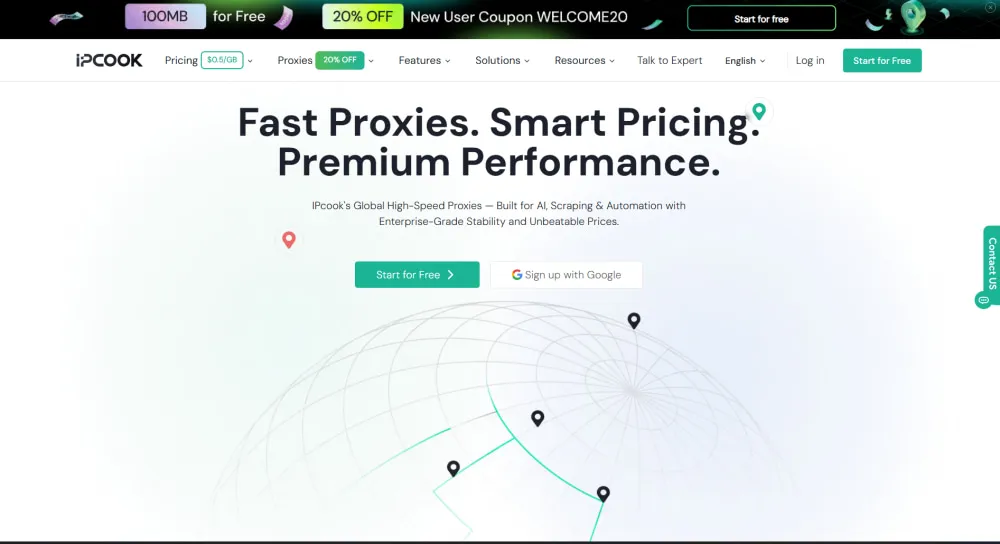
Step 1. Create an account with a reliable rotating proxy provider, such as IPcook. If you already have an account, click Login. New users can click Start for Free to create an account or Sign up with Google.

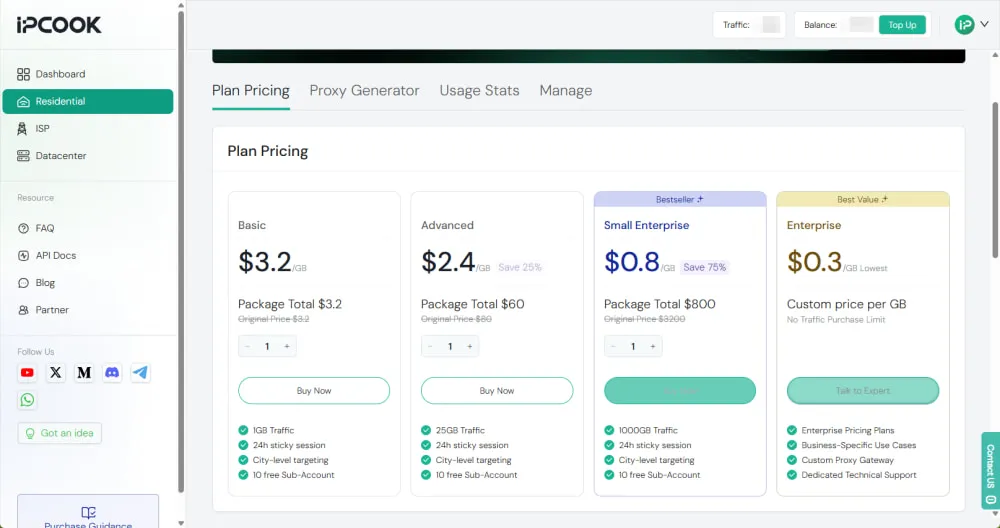
Step 2. After logging in to IPcook, select Residential Proxy and choose a plan on Plan Pricing based on your usage needs. Select your preferred payment method and complete the purchase. IPcook supports multiple payment options, including PayPal and Google Pay.
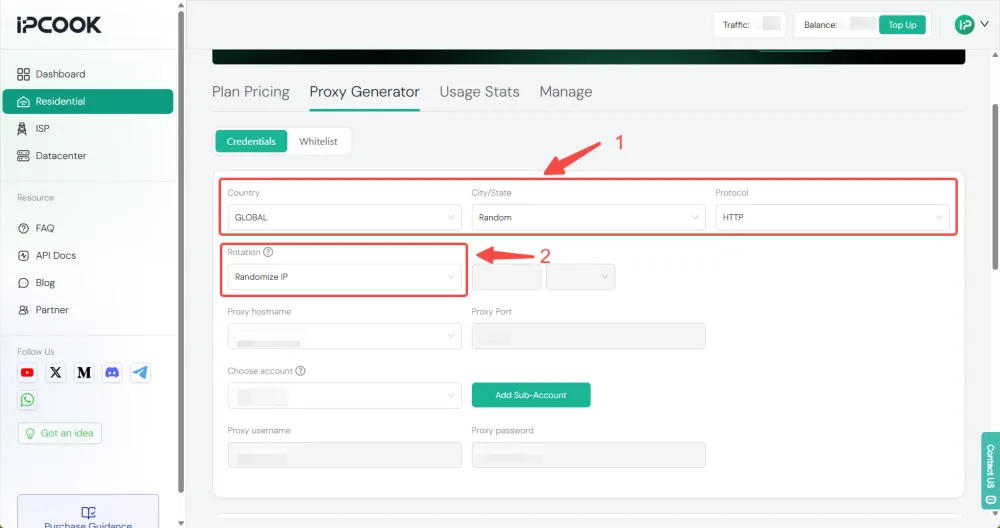
Step 3. In the Credentials section of IPcook's Proxy Generator, select your target country, city/state, and protocol. Choose Randomize IP to rotate residential IPs between requests, then Copy the generated API link or proxy credentials for connection.
Step 4. Use the generated proxy credentials or API link to connect the residential proxy in your browser, application, or automation tool. After connecting, visit an IP checker to confirm the IP address assigned to your connection. With the Randomize IP option, your proxy IP can change when new requests are sent.
💡For a complete setup guide, check:
IPcook User Guide: A Quick Start to Proxy Setup and Configuration
Rotating proxies are suitable for tasks that require multiple real IP addresses, such as web scraping, SEO monitoring, ad verification, and location-based testing. They are commonly used by businesses and teams that need reliable access to different IP addresses at scale.
The best method depends on whether you need a generated IP value or a real IP address for internet access. Here is a quick comparison of the 4 main options.
Method | IP Creation | Public IP Change | Real Network IP | Suitable For |
Random IP Generator | ✅ | ❌ | ❌ | Testing, demos, and sample data |
Code | ✅ | ❌ | ❌ | Developers and automated testing |
VPN | ❌ Uses existing server IPs | ✅ | ✅ | Personal browsing and location-based access |
Rotating Proxy | ❌ Uses proxy IP pool | ✅ | ✅ | Business tasks requiring multiple IPs |
Rotating residential proxies are commonly used when a project requires a large pool of real IP addresses, multiple locations, and automatic IP rotation. Compared with simple generators that only create IP addresses or VPNs that typically offer a limited number of server IPs, rotating residential proxies provide access to a broader pool of real IPs.
IPcook offers rotating residential proxies with a pool of 55M+ residential IPs across 185+ locations. Its residential IPs come from real residential users and ISP networks, with coverage across the United States, Canada, and Australia. IP rotation can be customized based on your needs. You can choose to switch IPs after each request or set a time-based rotation interval, such as changing the IP every minute.
For automated use cases, IPcook also supports one-line API integration, allowing developers to assign proxies with a single API call and add proxy access directly into their workflows.
More Features of IPcook Residential Proxies:
Flexible Pricing: Starting at $0.3/GB with volume discounts available. Pay only for the traffic you use, and your remaining data never expires.
Usage Monitoring: Track traffic usage and connection status through a real-time console and statistics dashboard, with detailed report export available.
Protocol Compatibility: Support HTTP and SOCKS5 protocols, making it easier to connect with different clients and automation tools.
Fast Connection Speed: Global average response time is under 0.5s, with latency as low as 50ms in key regions.
Team Management: Create up to 10 free sub-accounts to simplify team collaboration and proxy management.
Dedicated Support: Get customized technical assistance to optimize anti-bot strategies and improve scraping efficiency and success rates.
A random IP address can be real, but not every random IP is assigned to an active device or network. IP generators often create valid-looking addresses for testing, while real IP addresses are assigned to actual networks and can be used for online connections.
A generated random IP address cannot change your real IP. To change the IP visible online, you need a service such as a VPN or proxy that routes your connection through another network.
You can get a random US IP address by connecting to a US-based VPN server or using a US residential proxy. VPNs are suitable for simple IP changes, while proxies are better for tasks requiring multiple US IPs.
A random IP value created by a generator cannot be traced because it is not assigned to a real device. Real IP addresses from VPNs or proxies may be traceable to their network provider, depending on the service and available records.
There are several ways to get a random IP address, including IP generators, code, VPNs, and proxies. Generators and code work well for creating sample IP values, while VPNs and proxies can provide IPs for real online access. Among these options, rotating residential proxies are commonly used when real IP access and flexible IP changes are required. IPcook Residential Proxies provide a practical option for business and automation needs, and you can start with a 100MB free trial.

