


Proxy vs VPN: The Real Differences You Need to Know in 2026

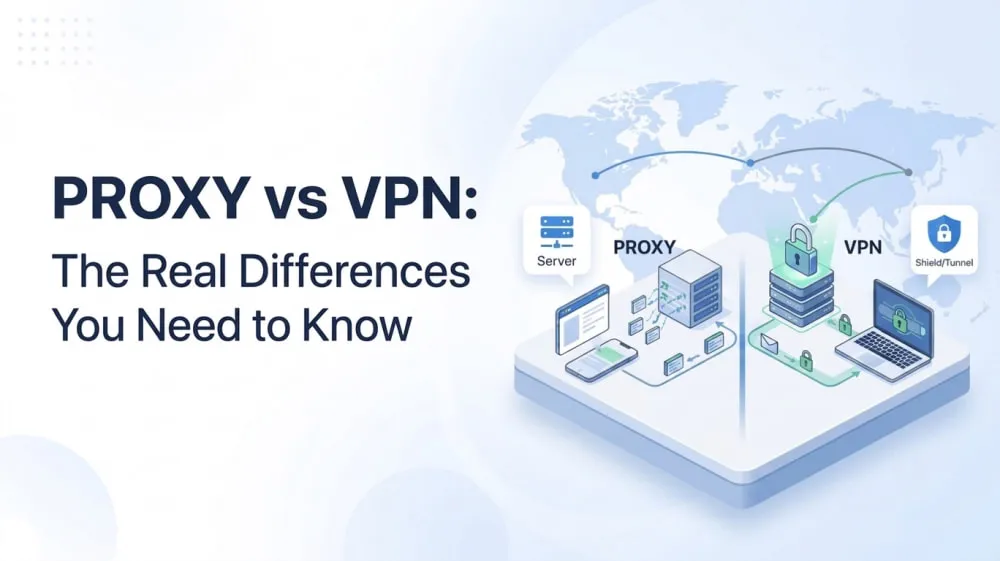
Need to hide your IP address, improve online privacy, or access content from a different location? Finding the right solution can be confusing, especially when two popular options, proxies and VPNs, seem to offer similar benefits. Both tools can change your IP address and route your internet traffic through another server, but they are not the same. They work differently and are better suited for different situations.
In this guide, we'll compare proxies and VPNs, explain their key differences, and help you decide which option is the right choice for your needs.
What Is a Proxy? And How Do They Work?
A proxy is an intermediary server that sits between your device and the internet. It mainly works by forwarding your internet requests through another server and replacing your original IP address with the proxy server's IP. This helps provide IP masking, improve privacy, and control how your traffic connects to online services. Proxies come in different types depending on where the IP addresses come from and how the service is provided.
Proxy Type | Description |
Residential Proxy | Uses real residential IP addresses assigned by ISPs, making connections appear as regular user traffic. |
Datacenter Proxy | Uses IP addresses generated from data centers, offering fast connections and high scalability. |
ISP Proxy | Uses ISP-provided IP addresses hosted on servers, combining the stability of datacenter proxies with the trust level of residential IPs. |
Free Proxy | Publicly available proxy servers that can be used without payment, but usually come with limited performance and potential security risks. |
Paid Proxy | Proxy services that provide dedicated resources, better performance, and more reliable connections. |
👀Related Reading:
Types of Proxies Explained: Which One Should You Actually Use?
What Is a VPN? And How Do They Work?
A VPN (Virtual Private Network) creates a secure connection between your device and a VPN server. When you connect to a VPN, your device first establishes an encrypted tunnel with the VPN server. Your online traffic is then sent through this tunnel to the internet, while websites and online services see the VPN server's IP address instead of your actual IP address.
Key Features of a VPN:
Traffic encryption: Encrypts your internet connection to help protect your data from unauthorized access.
IP address masking: Replaces your real IP address with the VPN server's IP address.
Full-device protection: Routes traffic from your entire device through the VPN connection, including browsers and applications.
Privacy protection: Helps reduce exposure of your online activity to third parties.
Why Are Proxies and VPNs Often Compared?
Proxies and VPNs are often compared because they appear to solve similar problems. When users want to hide their IP address, improve online privacy, or connect through a different location, both tools can seem like possible solutions.
The confusion comes from the fact that both proxies and VPNs work by routing your internet traffic through another server. Instead of connecting directly to a website, your connection goes through an intermediary server, which replaces your original IP address with a different one. As a result, websites and online services see the IP address of the proxy server or VPN server rather than your actual IP address.
However, proxies and VPNs are built for different purposes. In the next section, we'll compare their key differences in detail.
Proxy vs VPN: The Real Differences
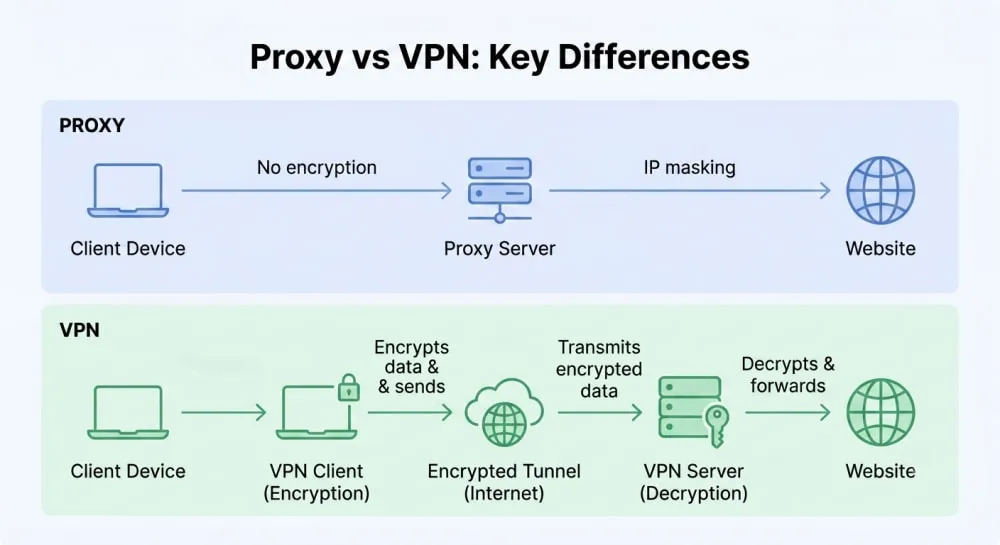
Proxies focus more on flexible IP management and traffic routing, while VPNs focus on encryption and protecting your overall internet connection. The comparison below breaks down the key differences across the factors that matter most when choosing between them.
Feature | Proxy | VPN |
Main Purpose | 🌐 IP routing and connection control | 🔒 Secure and private internet connection |
Speed | ⭐⭐⭐⭐⭐ Usually faster due to no encryption overhead | ⭐⭐⭐ May be slightly slower due to encryption |
Encryption | ❌ Usually does not encrypt traffic | ✅ Encrypts internet traffic |
Traffic Handling | Handles traffic for specific apps, browsers, or requests | Routes traffic from the entire device |
IP Address Change | ✅ Replaces your IP with a proxy IP | ✅ Replaces your IP with a VPN server IP |
Privacy Protection | ⭐⭐⭐ Helps hide your IP address | ⭐⭐⭐⭐⭐ Provides stronger privacy protection with encryption |
Device Coverage | Limited to configured applications or tools | Covers most device traffic after connection |
Personal Use | Useful for flexible IP changes and specific connection needs | Ideal for private browsing and secure connections |
Business Use | Suitable for IP management, data collection, and location-based access | Suitable for remote access and protecting business communications |
Setup & Control | ⚙️ Offers more customization and IP control | ✅ Easier setup with simple connection options |
Price | 💰 Varies based on proxy type, IP quality, and usage | 💰 Usually based on monthly subscription plans |
Key Takeaways: VPN vs Proxy
Choose a proxy if you need: More flexibility in how you connect to online services, especially when you need customized connection options.
Choose a VPN if you need: A simpler way to secure your online connection with broader protection for everyday internet use.
The main difference: A proxy gives you more control over how your connection is configured, while a VPN focuses on providing a secure browsing experience.
While VPNs are a common choice for general online security, proxies can offer advantages in situations where flexibility and connection control matter more. Next, we'll explore why some users choose a proxy instead of a VPN.
Why Choose a Proxy Instead of a VPN?
A VPN is mainly designed to secure individual connections by encrypting internet traffic and protecting online activity. However, it may not fully meet business needs when organizations need to manage multiple IP addresses, control different connection environments, or handle more flexible traffic requirements.
When the need changes from protecting one connection to managing multiple access points, proxies become a better fit. They provide more IP flexibility and are easier to integrate into technical workflows, allowing businesses to configure connections based on specific requirements.
Managing multiple IP addresses independently can be complex and costly for businesses. For many businesses, working with an IP proxy provider is a more efficient way to access scalable and reliable proxy solutions. IPcook stands out as a flexible IP proxy provider that combines diverse proxy resources, advanced control features, and easy integration options.
How Can IPcook Help Meet Your Proxy Needs?
IPcook ISP Proxies provide stable, high-speed connections with unlimited traffic, and HTTP/SOCKS5 support. It maintains 99.9% uptime to help businesses keep reliable proxy connections. Compared with traditional VPNs, IPcook ISP Proxies offer greater flexibility and control over IP usage. They are a better fit for businesses that need consistent IP addresses for workflows such as fingerprint browsers, multi-account management, and other operations requiring stable connections.
Depending on different business requirements, IPcook also provides residential proxies with access to a 55M+ IP pool across 185+ countries. They are suitable for tasks such as data collection, market research, and other activities that require access to real residential IPs from different locations.
Why Businesses Choose IPcook:
Affordable pricing with residential proxies starting from $0.3/GB and ISP/datacenter proxies from around $0.04/IP/day
Fast and stable proxy performance with average global response times under 0.5s and latency as low as 50ms in major regions
Unlimited traffic options for continuous proxy usage without usage restrictions
Real-time usage monitoring and detailed reports to track traffic consumption and connection performance
Free support for up to 10 sub-accounts to simplify team collaboration and access management
Technical support and customized proxy solutions to help businesses optimize proxy setups and improve workflow efficiency
FAQs
Can websites detect VPNs and proxies?
Websites may be able to identify VPN or proxy connections in some cases. They can use signals such as IP reputation, network information, or known data associated with VPN and proxy servers. However, detection is not always accurate and depends on factors such as the website's detection methods and the quality of the service being used.
Using a reliable proxy provider with high-quality IP resources can help provide more stable connections and reduce issues related to poor IP reputation. IPcook offers diverse proxy solutions with reliable IP resources to support different connection needs.
Is a proxy faster than a VPN?
A proxy can be faster than a VPN in some cases because it usually does not encrypt traffic. This reduces processing overhead and can improve connection speed. However, performance still depends on factors such as server location, network quality, proxy type, and provider infrastructure.
Can I use a proxy and VPN together?
Yes, a proxy and VPN can be used together, but the setup is usually unnecessary for most users. Since both tools route traffic through another server, combining them can add extra complexity and may affect connection speed. The right choice depends on whether you need stronger security, more connection control, or both.
Do I need a VPN if I have a proxy?
It depends on your needs. A proxy can help manage IP addresses and route specific connections, but it does not usually provide the same level of encryption as a VPN. If you need encrypted protection for your entire internet connection, a VPN may still be useful. For users who mainly need flexible IP management, a proxy alone may be sufficient.
Final Takeaways
Proxies and VPNs both help users connect through different servers, but they are designed for different needs. VPNs are better suited for users who want secure, encrypted protection across their internet connection, while proxies offer greater flexibility for managing IP addresses, connection settings, and specific workflows.
For businesses that need reliable IP resources, scalable proxy solutions, and more control over their connections, choosing the right proxy provider is essential. IPcook provides flexible proxy solutions with diverse IP resources, global coverage, and features designed to support different connection requirements.
