


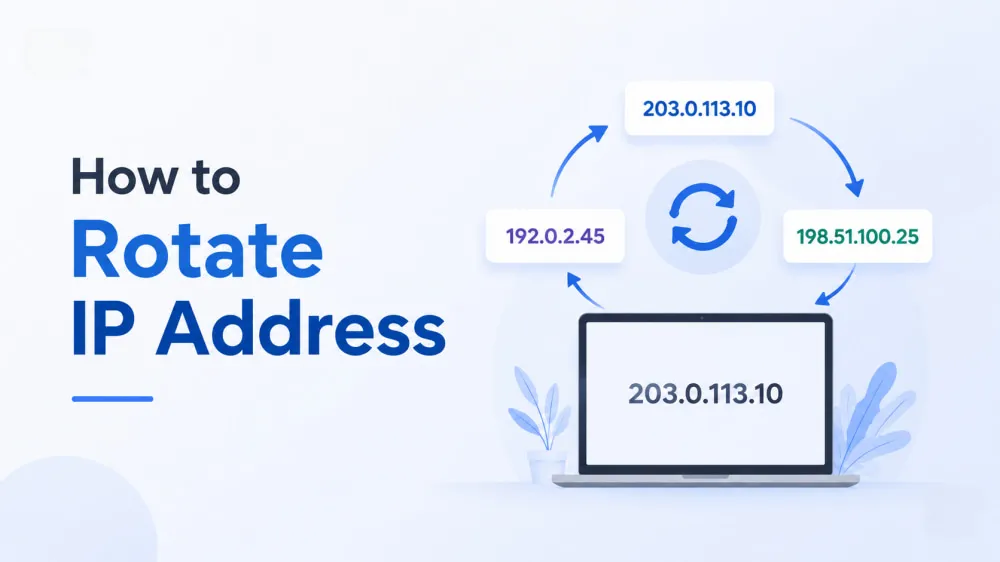
As your online activities become more demanding, you may need a way to switch between different IP addresses. IP rotation gives you the flexibility to replace your current IP address and reduce reliance on a single connection.
In this guide, you'll learn what IP rotation means, the different types of IP rotation, and 4 common methods to rotate an IP address. We'll also explain how each approach works and help you choose the right method based on your specific needs.
Think of IP rotation like changing masks before stepping into different online spaces. Instead of using the same IP address for every request, a rotating IP setup allows you to switch between multiple IP addresses automatically or manually. This is usually done through tools such as proxies or VPNs, which route your traffic through different exit IP addresses.
Simply put, a static IP is like using the same online identity every time you visit a website, while a rotating IP works more like taking turns with different identities. Each request can come from a different IP address, helping you avoid relying on a single connection and providing more flexibility for various online activities.
When you connect to the internet through a rotating IP setup, your device does not communicate with the target website directly. Instead, your requests are first sent to an intermediary server, such as a proxy server or VPN server. This server forwards your traffic to the website, which only sees the intermediary server’s IP address rather than your real IP address or physical location.
The process usually works like this:
User Request
      ↓
Proxy Server
      ↓
Target Website
      ↓
Different IP ReturnedIP rotation can work in different ways depending on when and how the IP address is changed. The most common types include:
Request-Based IP Rotation: Each request receives a different IP address, making it a common choice for tasks that require frequent changes.
Time-Based IP Rotation: The system switches IP addresses at set intervals, such as every few minutes or hours, to balance rotation frequency and connection stability.
Sticky Session Rotation: A single IP address remains assigned during a session or for a certain period before a new IP is used.
Rotating IP addresses can help you handle situations where using a single IP address may limit your online activities. By switching between different IPs, you can reduce dependence on one connection and access the internet in a more flexible way.
Common use cases include:
Web Scraping: Large-scale data collection often requires sending many requests to the same website. Rotating IPs helps distribute requests across multiple IP addresses, reducing the chance of being blocked due to high traffic from a single IP.
Avoiding IP-Based Restrictions: Frequent requests from one IP may trigger rate limits, HTTP 429 errors, 403 Forbidden responses, or CAPTCHA challenges. IP rotation helps spread traffic across different IPs to maintain smoother access.
SERP Tracking and Market Research: When monitoring search rankings or analyzing regional differences, rotating IPs let teams repeatedly access websites from multiple locations without triggering blocks or CAPTCHAs. For example, SEO teams can track local SERP results across different regions, while e‑commerce businesses can test how product pages and prices appear in various markets.
Reducing Online Tracking: Repeated online activity from the same IP address can make it easier for websites or networks to identify a connection over time. Rotating IPs changes the visible IP address, making it harder to build a consistent activity profile.
Many home internet connections use dynamic IP addresses assigned by the Internet Service Provider (ISP) through Dynamic Host Configuration Protocol (DHCP). Restarting your router disconnects and reconnects your network, which may trigger a new IP assignment from your ISP.
To try this method:
Turn off your router and wait for a short period.
Turn the router back on and reconnect your devices.
Open an IP lookup website to view your public IP address and compare it with your previous IP.
While this method is free, it is not a reliable way to rotate IPs. You cannot control whether a new IP will be assigned. The new address may still come from the same network range, and the process requires manual effort.
A VPN changes your visible IP address by routing your traffic through different VPN servers. Most commercial VPN apps allow you to select a server location manually or use features such as automatic server switching.
To change your IP with a VPN:
Install and open a VPN application.
Select a server location or enable automatic server selection.
Connect to the VPN and open an IP lookup website to confirm your new public IP address and location.
VPNs work well for personal privacy, general browsing, and accessing content from different regions. However, they are not built for automated IP rotation, high-volume requests, or scenarios that require a different IP address for each request.
Switching between different internet connections can also change your public IP address. Common options include using a mobile hotspot, switching between Wi-Fi networks, or reconnecting to a cellular network by enabling and disabling airplane mode.
For example:
Enable mobile data or connect to a different network.
Turn airplane mode on and off to reconnect to the cellular network.
Open an IP lookup website to check your current public IP address and compare it with the previous one.
This method can work for occasional IP changes, but results depend on the network provider. The manual process also makes it unsuitable for large-scale automation.
Rotating proxies provide a more automated way to change IP addresses. A proxy service manages a pool of IP addresses and routes your requests through different proxy servers based on your rotation settings.
To set up IP rotation with a proxy:
Choose a proxy provider that offers rotating IP services, such as rotating residential proxies.
Get your proxy credentials, including the proxy host, port, username, and password.
Configure the proxy in your browser, application, or automation tool.
Adjust the rotation settings if available, such as rotating IPs per request, setting a rotation interval, or enabling sticky sessions.
While proxy-based IP rotation offers more flexibility and automation, the quality of the proxy service can greatly affect the results. Free proxies may look convenient, but they often have limited IP availability, unstable connections, and a higher risk of being detected or blocked because many users share the same IPs.
Commercial proxy services provide access to larger IP pools, automated rotation features, and more reliable connections. This makes them a better choice for tasks that require consistent IP changes, such as large-scale data collection, SEO monitoring, or multi-location testing.
IPcook rotating Residential Proxies are built for businesses that need flexible IP rotation for tasks such as data collection, SEO monitoring, market research, and regional testing. By using residential IPs from different locations, businesses can manage large-scale requests and better understand how websites, products, or content appear across different markets.
IPcook offers 55M+ real residential IPs across 185+ locations, allowing businesses to choose IPs from specific countries or cities. The proxies support automatic rotation per request or at set intervals, with sticky sessions available for up to 24 hours when a consistent IP is needed.
For automated data workflows, IPcook can be integrated with Python scripts to schedule IP changes and collect data from multiple locations. Its residential proxies support both HTTP and SOCKS5 protocols, with SOCKS5 supporting TCP and UDP traffic for broader compatibility and real-time applications.
The network provides fast and stable connections, with average response times under 0.5 seconds and latency as low as 50ms in major regions. You can also monitor traffic usage and connection activity through real-time analytics and detailed reports.
More Proxy Options
Beyond rotating residential proxies, you can also choose IPcook Static ISP and Datacenter Proxies based on your specific requirements. Static ISP proxies are suitable for stable, long-term connections, while datacenter proxies focus on speed and scalability.
To see how proxy-based IP rotation works in practice, let's use IPcook as an example.
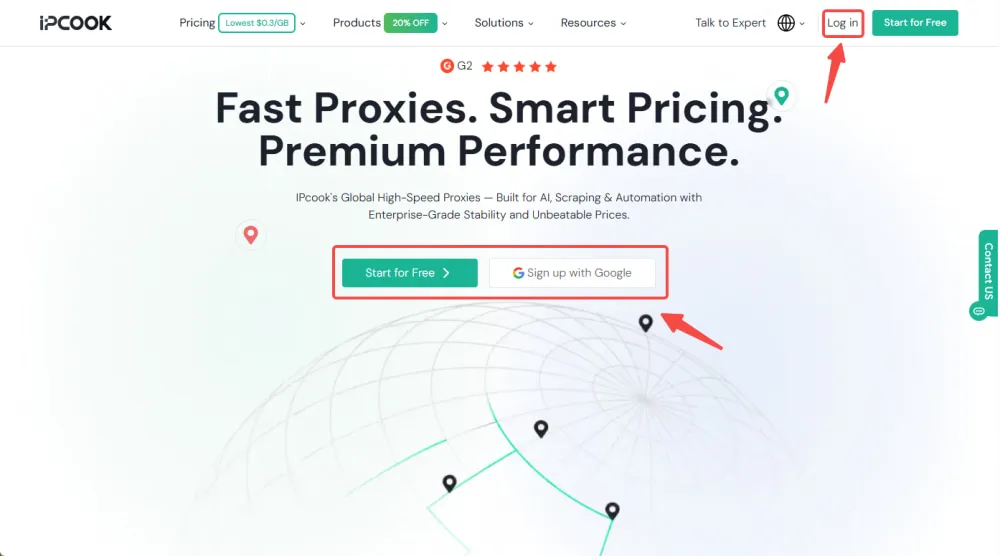
Step 1. Start by accessing the IPcook platform. Existing users can sign in through Login, while new users can register with Start for Free or Sign up with Google.
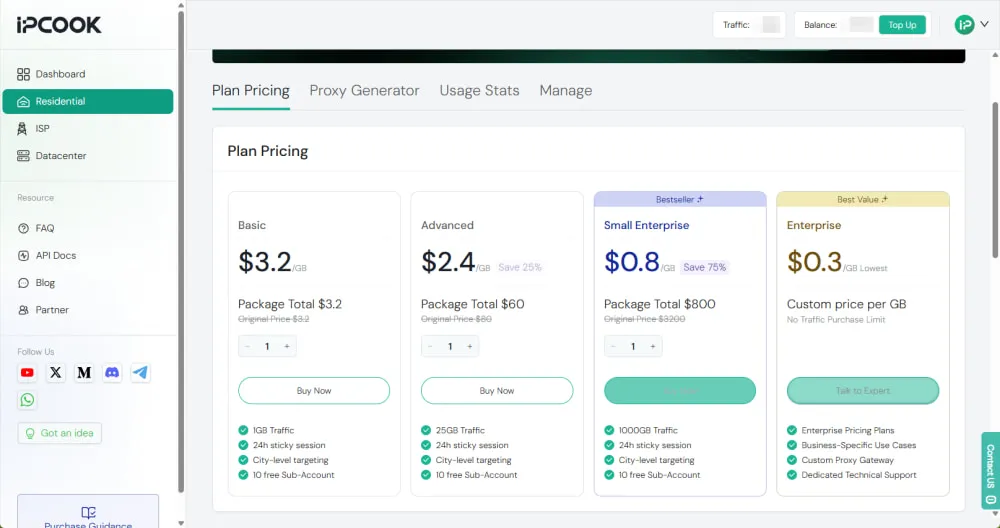
Step 2. Once you enter the dashboard, go to Residential and pick a plan that matches your usage requirements. Complete the purchase with one of the available payment options, such as a bank card or Google Pay.
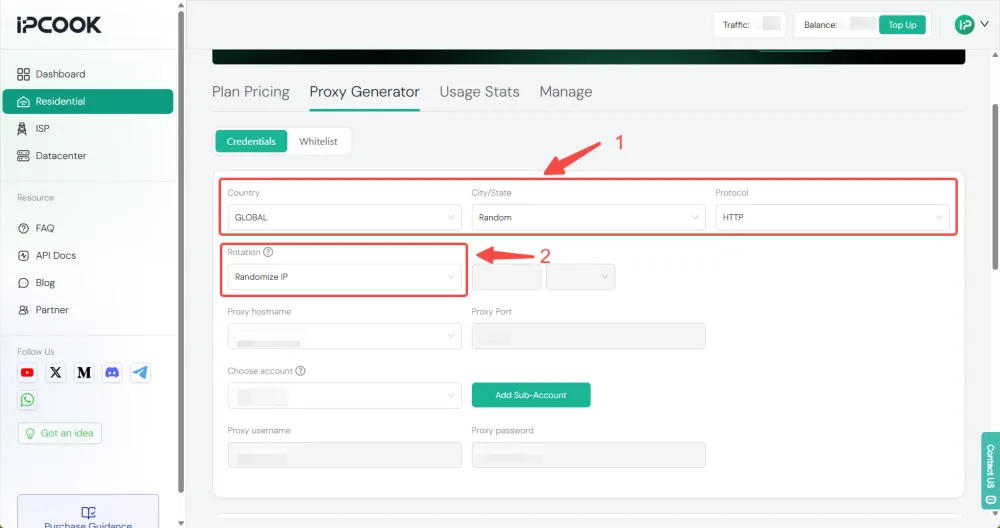
Step 3. In Proxy Generator, set your target location and protocol. Under Rotation Method, choose Randomize IP to get a new residential IP for each request, or choose Sticky to keep the same IP for a set duration.
Step 4. After setting your rotation preferences, scroll down to select the Quantity and Generate Format that match your tool, such as USER:PASS@HOST:PORT. Click Generate to create your proxy list, or use Generate API Link for automatic IP rotation.
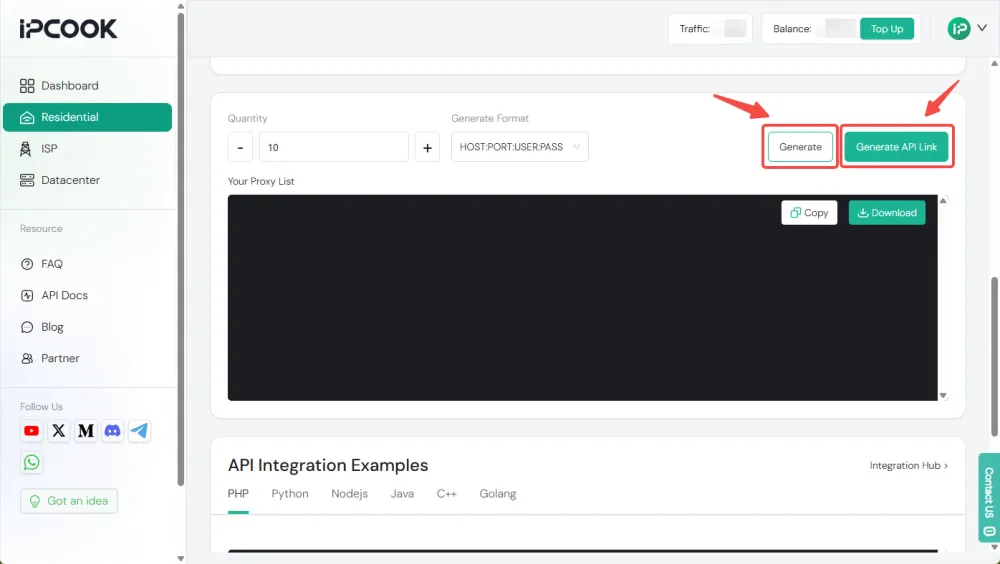
Step 5. Add the generated proxy credentials or API link to your browser, application, or automation tool. Send requests through the proxy and check your public IP address to confirm that it changes according to your rotation settings.
💡Learn More:
Need more help with proxy setup? Check out our IPcook User Guide: A Quick Start to Proxy Setup and Configuration for a detailed walkthrough.
It depends on your use case. High-volume data collection often requires per-request rotation, while tasks that need a stable session may work better with sticky IPs.
No. Changing an IP is usually a manual, one-time action, while IP rotation automatically switches between multiple IP addresses.
IP rotation is commonly used for market research, SEO monitoring, price tracking, regional testing, and large-scale data collection.
The best way to rotate an IP address depends on how much control and automation you need. Manual methods may work for occasional changes, while proxy-based rotation is better suited for ongoing operations. IPcook provides rotating Residential Proxies for businesses that need a reliable way to manage changing IP addresses.

