


What Is Data Scraping? A Complete Guide for Beginners

From tracking competitor prices to analyzing customer feedback and building research datasets, many tasks depend on collecting information from multiple digital sources. Doing this manually takes time and becomes impractical as the amount of data grows. Data scraping helps businesses and researchers collect and organize this information more efficiently.
This guide explains what data scraping is, how it works, its main types, common tools, and practical uses. You will also learn how IPcook proxies can improve access stability and efficiency in responsible web scraping.
What Is Data Scraping?
Data scraping is a technique in which a computer program extracts data from the human-readable output of another program and converts it into a structured format. The collected data can then be searched, compared, analyzed, or stored in a database. Common uses include price monitoring, market research, lead generation, sentiment analysis, and training machine learning models.
Data scraping is not inherently harmful, but the way it is performed can create concerns:
Scrapers may bypass an API, paywall, or other access channel provided by the website.
Bots do not view advertisements like real users, which can reduce the value of ad impressions.
Automated visits can distort traffic and audience statistics.
Frequent requests can increase server load and affect service stability.
These concerns explain why many websites restrict automated collection even when information is publicly visible. Whether scraping is acceptable depends on the data, collection method, website terms, and applicable laws.
What Are the Different Types of Data Scraping?
Data scraping is not limited to collecting information from websites. It can also capture data displayed in software interfaces or stored in generated reports. These approaches differ in the source they work with and how the data is extracted. The three main forms are web scraping, screen scraping, and report mining.
Web Scraping
Web scraping automatically extracts data from websites, such as product prices, news articles, search results, and product details. It is commonly used for price monitoring, competitor analysis, market research, SEO tracking, and product data collection.
Screen Scraping
Screen scraping collects data displayed through a computer screen or application interface. It is often used when legacy systems do not provide an API or another practical way to access their data. For example, a company may extract information from an old banking terminal or business application and transfer it to a newer system.
Report Mining
Report mining extracts data from human-readable reports and files, including PDF, HTML, and text reports. The extracted information can then be organized, analyzed, or used to create custom reports. Common applications include business data consolidation, market analysis, and report processing.
How Does Data Scraping Work?
Data scraping works by using software to simulate the way people browse and collect information online. For web scraping, a program sends requests to a target webpage, identifies the required content, processes the extracted data, and saves it in a usable format. The typical workflow includes five steps:
Identify the Target URL: Choose the webpage you want to collect data from.
Send an HTTP Request: Send a request to the target URL to retrieve its HTML content. Request headers can be configured to simulate a real browser.
Parse the HTML Content: Analyze the page structure and locate the required data elements using tags, class names, IDs, or other selectors.
Extract and Clean the Data: Extract the required fields and format the data into a consistent structure.
Store the Data: Save the processed data in CSV, Excel, JSON, or a database for further use.
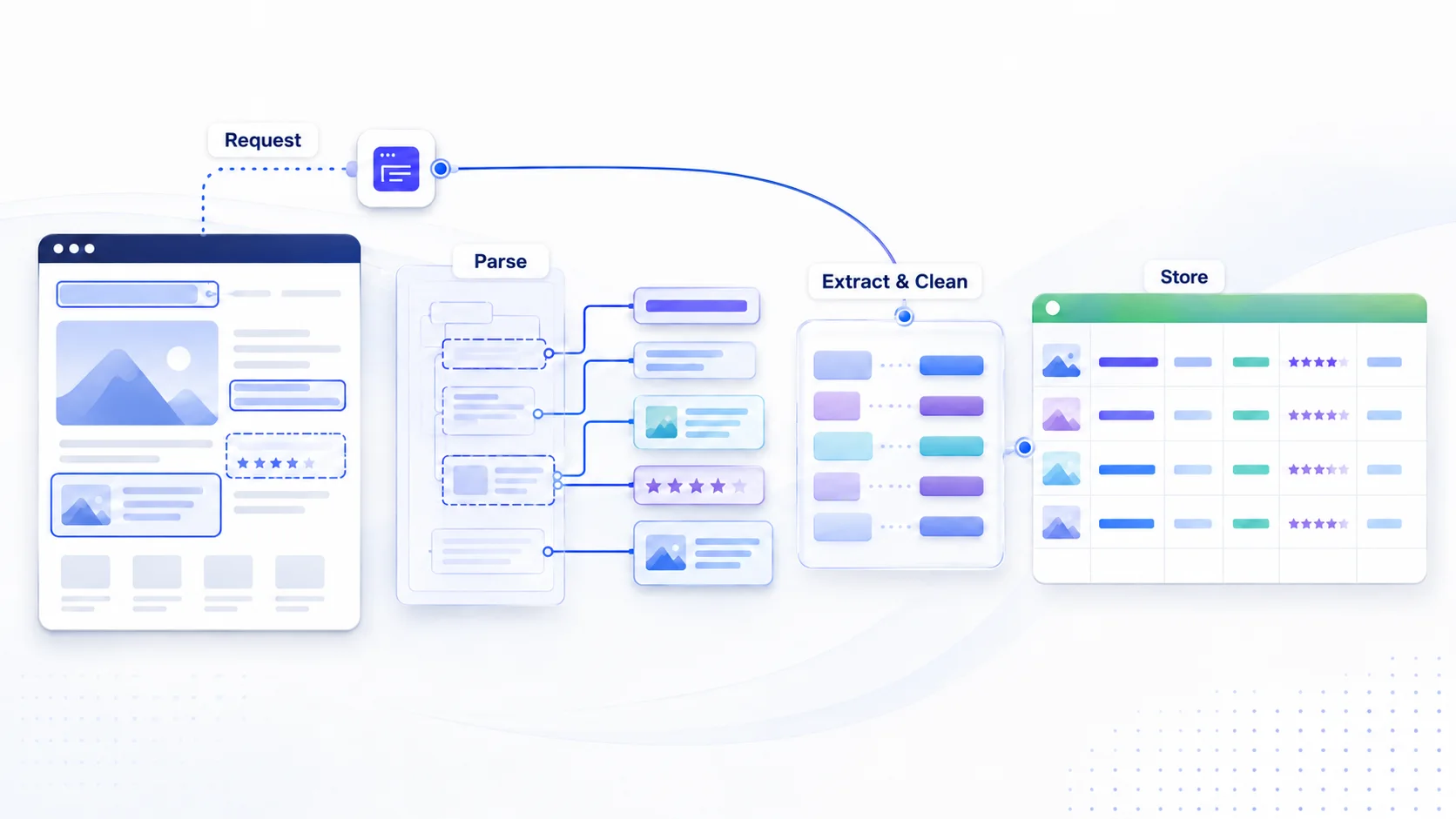
This process turns information from a webpage into structured, usable data. The specific tools and techniques can vary depending on the target website and the type of data being collected.
What Tools Are Used for Data Scraping?
Data scraping tools range from no-code software to programming libraries and proxy services. The right combination depends on your technical skills, project size, and budget. Common options include web scraping tools, APIs, custom scrapers, and proxies.
Proxies for Web Scraping
For large-scale web scraping, proxies can help reduce IP-based blocking and distribute requests across different IP addresses. Websites may monitor request frequency from a single IP, and a high volume of requests can trigger rate limits or blocks. Proxies allow requests to be sent through different IP addresses instead of relying on a single network endpoint.
Different proxy types suit different scraping requirements:
Datacenter Proxies: Use IP addresses from data center servers. They are typically fast and cost-effective, making them suitable for large-volume tasks where IP quality is less important.
Residential Proxies: Use IP addresses assigned by ISPs to residential networks. They more closely resemble typical home-user connections and are generally better suited to websites with stricter anti-bot measures, location-specific requirements, or higher IP trust requirements.
Mobile Proxies: Use IP addresses from 4G or 5G mobile networks. These IPs are often shared among many mobile users and can better match mobile network environments. They are typically more expensive and are suitable for tasks that require mobile IPs or a higher IP reputation.
For large-scale scraping, rotating proxies can be useful when you need to distribute a high volume of requests across multiple IPs. They automatically change IP addresses between requests or at set intervals, reducing reliance on a single IP. Among the available proxy providers, IPcook provides rotating residential proxies across 185+ countries, with pay-as-you-go pricing for different scraping needs.
Web Scraping Tools
Web scraping tools are ready-to-use software that let users configure scraping tasks through a visual interface, often without writing code. They are useful for beginners, non-technical users, quick testing, and small-scale data collection.
Common options include:
Visual Scraping Tools: Octoparse, WebHarvy, and ParseHub let users select page elements and configure scraping rules through a visual interface.
Google Sheets Functions:
IMPORTXMLandIMPORTHTMLcan import data from webpages directly into Google Sheets, making them useful when you want to scrape website data into Excel or spreadsheets for simple analysis and reporting.Browser Extensions: Web Scraper is a Chrome extension that lets users configure scraping tasks through a visual interface, making it useful for testing and simple scraping projects.
These tools are convenient for straightforward scraping tasks, but complex or highly customized projects may require more flexible solutions. Large-scale workflows may also need greater control over performance, data processing, and task management.
APIs
An API (Application Programming Interface) provides a structured way to access data from a website or online service through predefined endpoints, typically returning formats such as JSON or XML. Unlike web scraping, which extracts data directly from web pages, APIs offer more predictable access but may have authentication or usage limits. Web scraping provides more flexibility when no suitable API is available or the API does not provide all the required data.
There are also Web Scraping APIs, which are third-party services designed to simplify web data extraction. Services such as Zyte API and ScrapingBee can handle tasks such as request management, proxy rotation, and JavaScript rendering, reducing the need to build and maintain scraping infrastructure.
APIs are useful when an official and reliable data source is available, while Web Scraping APIs can help teams collect web data with less development and maintenance work.
Custom Web Scrapers
Custom web scrapers are programs built with programming languages and libraries to collect data from websites. They offer greater control over scraping logic, data processing, and storage, making them suitable for complex or highly customized projects.
Python is a common choice, with tools such as Requests, BeautifulSoup, Selenium, Playwright, and Scrapy. Node.js with Puppeteer and R with rvest are other options.
The main advantage is flexibility, but you need to handle dynamic content, access restrictions, proxy configuration, and website changes yourself. Custom scrapers are best suited to developers and teams working on complex or large-scale scraping projects.
Common Use Cases for Data Scraping
Data scraping is employed in a variety of industries for different purposes, such as:
Market Research: Businesses scrape data from websites and social platforms to gather insights about consumer preferences, analyze industry trends, and understand competitors' activities. For example, marketers may scrape Instagram data to analyze public posts, hashtags, or engagement trends.
Price Monitoring: Scraping is frequently used to track product prices across multiple retailers. Businesses can scrape eBay product data to monitor prices and compare products across marketplaces.
SEO Competitor Analysis: SEO professionals use scraping to analyze competitor websites, monitor keyword rankings, and track backlink profiles. This helps refine SEO strategies and improve site visibility.
Lead Generation: Companies scrape contact information like emails or phone numbers from business directories and social media platforms. This data is used for outreach and sales lead generation.
Business Intelligence: Companies scrape data to monitor news, track stock market trends, or gather other forms of business intelligence. This information is crucial for strategic decision-making.
As the scale of scraping increases, a key challenge arises: IP bans. Websites often block IPs that make too many requests in a short period. To bypass this, using dynamic residential IPs, like those offered by IPcook, can help maintain anonymity and avoid IP blacklisting, making large-scale scraping more efficient.
How to Scrape Data Efficiently and Safely with Proxies
Before scraping, you should review the target website's robots.txt and Terms of Service, follow applicable privacy regulations, keep your request rate reasonable, and use collected data for legitimate purposes. The following steps use IPcook as an example to show you how to configure and use proxies for data scraping.
Step 1: Choose a Proxy Type and Get Your Proxy
Firstly, register an IPcook account and choose a proxy plan. New users can try 100 MB of residential proxy traffic for free.
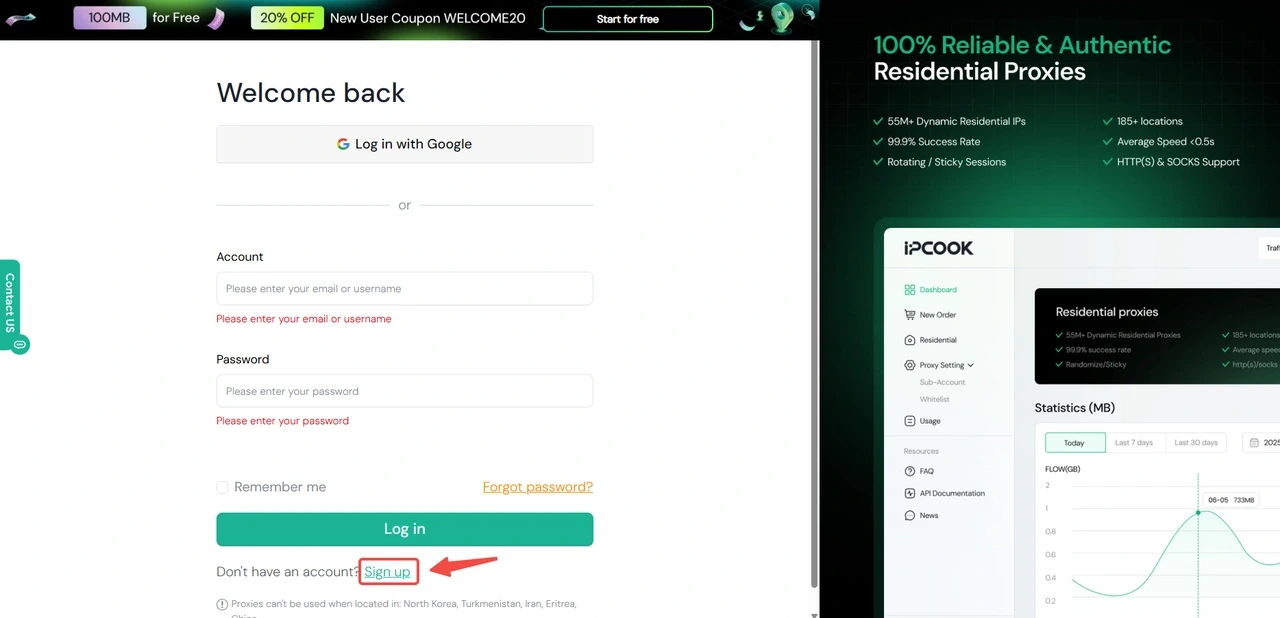
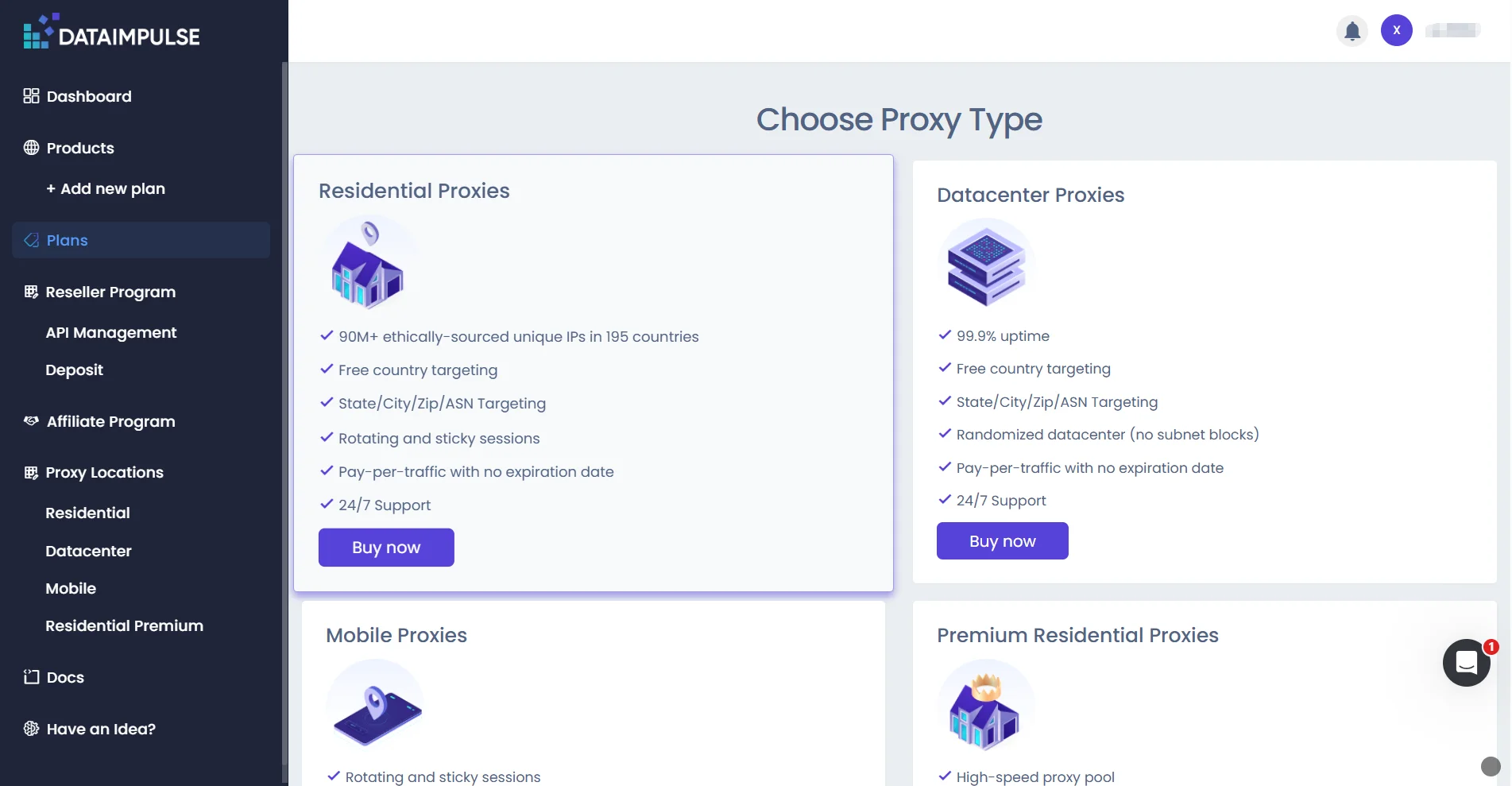
Choose a proxy type based on the target website's restrictions and your scraping requirements:
Datacenter Proxies: Suitable for websites with fewer access restrictions and tasks where speed and cost efficiency are priorities, such as scraping news sites and public directories.
Residential Proxies: Better suited to websites with stricter access controls or tasks requiring greater IP diversity, such as e-commerce and social media data collection. They can also support large-scale scraping by distributing requests across a broader IP pool.
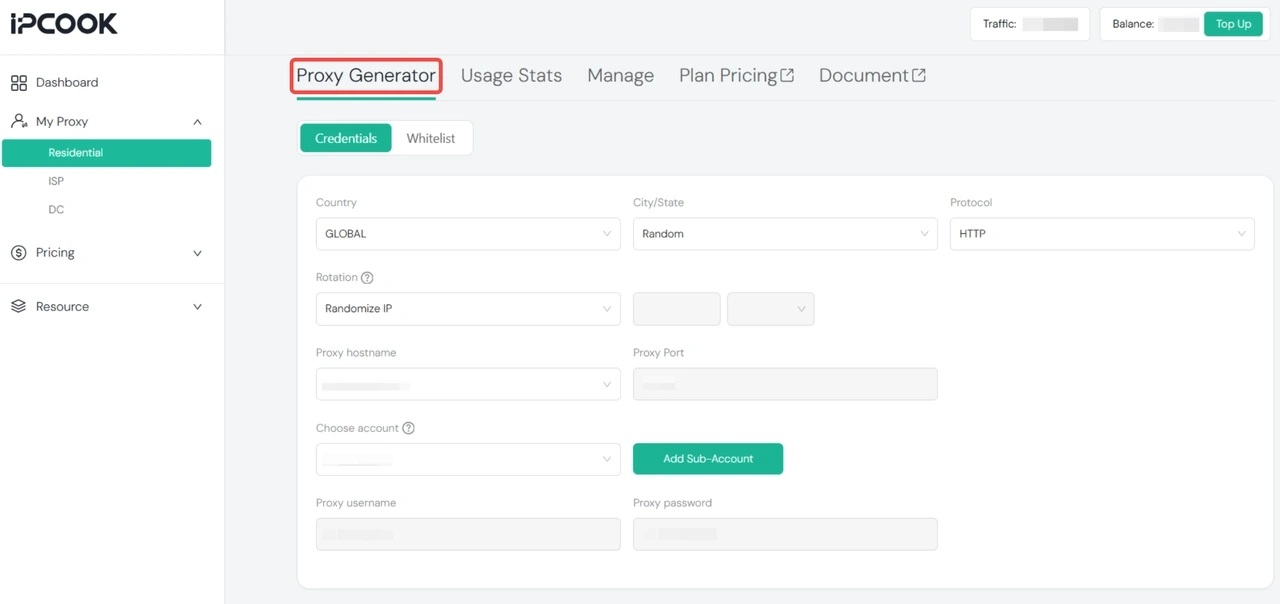
Then, open "Proxy Generator", select the country, protocol (HTTP/SOCKS5), and rotation mode (Randomize IP or Sticky IP) to generate your proxy credentials.
Step 2: Configure the Proxy
Add the proxy credentials to your scraping program. For example, with Python's requests library:
proxies = {    "http": "http://<username>:<password>@<gateway_host>:<port>",    "https": "http://<username>:<password>@<gateway_host>:<port>"}

response = requests.get(url, proxies=proxies)
Replace the placeholders with the values generated in Proxy Generator. Use rotating proxies when you need different IPs across requests, or Sticky IP when a session requires a consistent IP. IPcook supports sticky sessions for up to 24 hours.
Step 3: Control Your Requests
Set a reasonable request rate based on the target website's limits and avoid sending large bursts of traffic. Use appropriate request headers and handle errors gracefully. If a website requires a CAPTCHA or blocks automated access, check whether an official API or another permitted data source is available.
Step 4: Test and Monitor
Start with a small-scale test to check proxy connectivity and data accuracy. Monitor response times and error rates, then adjust the request rate or proxy configuration if necessary. Gradually increase the workload once the scraper runs reliably.
Conclusion
Data scraping provides an efficient way to collect and organize data from websites, applications, and reports. Whether you use web scraping, APIs, scraping tools, or custom scrapers depends on your data source and project requirements. Regardless of the method, responsible scraping means respecting website policies, privacy regulations, and reasonable request limits.
If you need to scale your scraping tasks or collect data more reliably, IPcook offers Residential Proxies and Datacenter Proxies for different scraping needs. Choose the proxy type that fits your task and get started with IPcook.
