


What Is Data Parsing? How It Works, Tools, and Use Cases

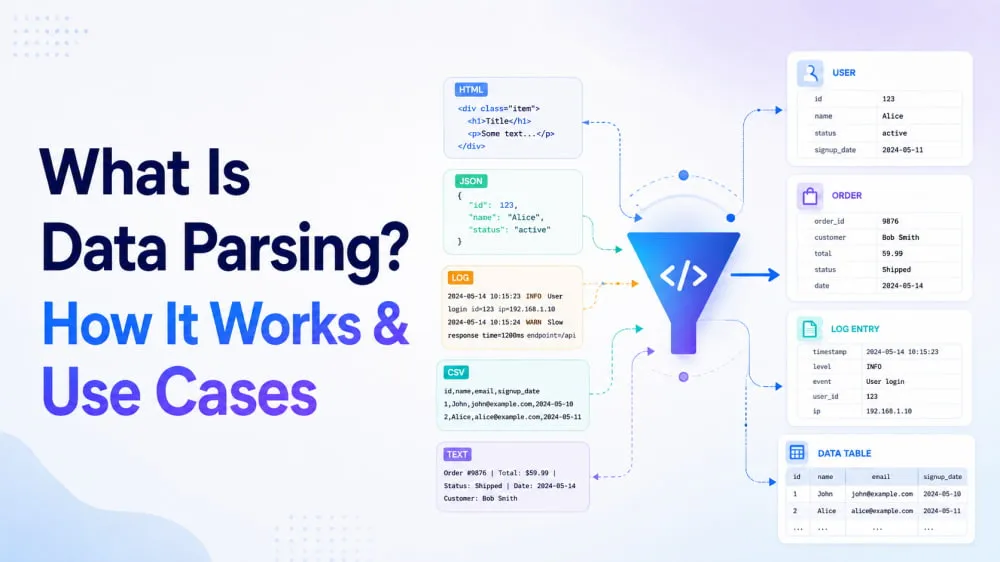
A person can look at a web page or file and recognize names, prices, dates, and other details. A program, however, needs rules to identify how that information is organized. Data parsing applies those rules to recognize structures and fields, turning raw input into data that software can use.
This guide explains what data parsing is and follows the process from raw input to structured output. Practical examples will also show how parsing tools work, when they are useful, and what can cause parsing to fail.
What Is Data Parsing?
Data parsing is the process of interpreting data and organizing the information it contains into a usable structure. It allows software to distinguish individual values and access them as separate fields instead of treating the entire input as one block of content.
Sources can range from HTML documents and JSON responses to CSV files and text with consistent patterns. After parsing, the information may appear as an object, record, row, or set of named fields that another program can use. A parser is simply the software or code that performs this task.
📌Data Parsing vs. Programming Language Parsing:
Both interpret input according to predefined rules.
Data parsing organizes information from sources such as HTML, JSON, or CSV into usable fields
Programming language parsing interprets source code so a compiler or interpreter can understand its structure.
Why Is Data Parsing Important?
Raw data is not always arranged for the task you want to perform. A web page may mix useful values with navigation and markup, while an API response can contain nested objects that an application cannot use without first locating the required fields. Even structured data may need to be interpreted before individual values can be accessed. Data parsing makes those values available in a defined structure. Software can then store, search, compare, or transfer the information without interpreting the original input each time.
How Does Data Parsing Work?
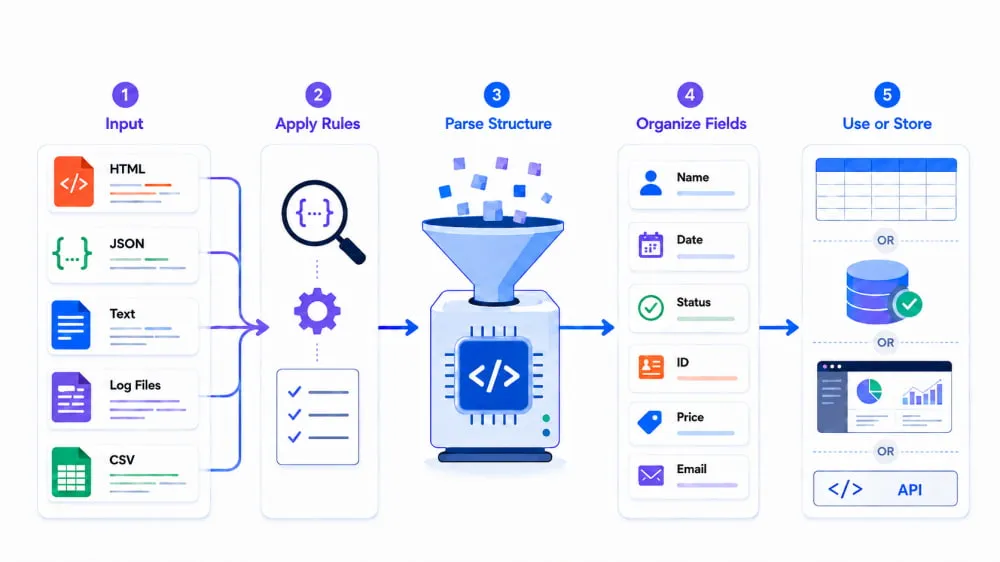
The exact process varies by data format, but most parsers follow the same general sequence. They interpret the input according to its format and organize the information into fields that other systems can use.
Receive the input: A parser begins with a source such as an HTML document, JSON response, CSV file, text string, or log file.
Apply the rules: Every format uses specific markers to arrange its contents. CSV relies on separators and rows, HTML uses tags, and JSON uses keys, brackets, and braces.
Parse the structure: With those markers as a guide, the parser identifies individual elements and determines how they are connected through rows, objects, arrays, or nested sections.
Organize the fields: Once the relationships are clear, values are assigned to fields such as name, date, status, ID, price, or email.
Use or store the result: From there, the structured data can be saved in a table or database, displayed in a dashboard, or delivered to another application through an API.
A Simple Data Parsing Example
Suppose an inventory system receives the following CSV row:
P-1042, "Wireless Mouse",24.99,in_stock,2026-08-28The expected fields are product_id, name, price, status, and last_updated. Here is how the full parsing workflow handles the record:
Input: The CSV row enters the parser as a single line of text.
Recognition: Using commas as delimiters, the parser separates the line into five values and matches each one to its expected field.
Validation: Before accepting the result, the system checks that all required values are present. It can also confirm that
24.99is a valid number,in_stockis an allowed status, and the date follows the expected format.Output: The parsed values can be represented as a structured JSON object:
{
  "product_id": "P-1042",
  "name": "Wireless Mouse",
  "price": 24.99,
  "status": "in_stock",
  "last_updated": "2026-08-28"
}
Next step: This record can now be stored in a database, displayed in an inventory dashboard, or compared with later records to track price and availability changes.
Common Data Parsing Techniques
Data parsing techniques differ mainly in the rules they use to recognize structure. Some search for recurring text patterns or separators. Others follow syntax built into a specific file format. The right choice therefore depends on how the source data is organized:
Regular expressions (regex): Regex finds values that match a pattern, such as email addresses or product codes. It works well with predictable text but is unreliable for nested or inconsistent data.
Delimiter-based parsing: This method splits text at commas, tabs, pipes, or other separators. It is best suited to simple records with a consistent format.
JSON parsing: A JSON parser converts keys, values, objects, and arrays into structures that code can access. Nested data may require moving through several objects or arrays.
CSV parsing: CSV parsing organizes rows and separates values into table fields. A dedicated parser also handles quoted values, embedded commas, and multiline content.
XML parsing: XML parsers read tags, attributes, and nested elements. They can load the document as a tree or process it as a stream to save memory.
HTML parsing: An HTML parser turns webpage markup into a document tree. Elements can then be found with tags, attributes, CSS selectors, or XPath, even when the markup has minor errors.
Tools for Parsing Data
No single parsing tool fits every task. The best choice depends on the data, its volume, and the level of automation or customization required. Below is a comparison of where Python, Excel, and dedicated tools work best.
Tool | What it can do | Best for | Main limitation |
Python | Parses multiple formats with custom rules and automation | Large, recurring, or custom workflows | Requires coding and maintenance |
Excel | Splits and organizes text, CSV, and table data | Small, simple, or one-time tasks | Struggles with complex or large datasets |
Dedicated tools | Uses prebuilt parsers for web, documents, or integrations | Faster setup and managed workflows | May cost more and limit customization |
For a one-time task such as separating names and email addresses into columns, Excel may be enough. Python becomes more practical when the same rules must process many files or run on a schedule. Dedicated parsing tools are most useful when a team needs prebuilt extraction features, workflow integrations, or support for a specialized source.
Common Data Parsing Use Cases
Data parsing supports practical tasks by turning source content into the specific fields a workflow needs. The table below follows 4 common examples from input to parsed result and business value.
Use case | Input | Parsed result | Value |
Track product prices | Product page HTML | Name, price, and stock status | Detects price and availability changes |
Sync online orders | Order API JSON | Order ID, customer, and status | Moves orders between systems |
Process invoices | Digital invoices | Invoice number, date, and total | Reduces manual data entry |
Investigate server errors | Application log lines | Timestamp, endpoint, and error code | Helps locate recurring failures |
Common Data Parsing Errors and Fixes
Parsing errors may stop the process or produce missing, misplaced, or unreadable values. The symptoms can help identify whether the issue lies in the input, format settings, or parsing rules.
Error | Likely cause | Fix |
JSON or XML will not parse | Invalid JSON syntax or unclosed XML tags | Validate the input and correct the reported error |
CSV columns are misaligned | Wrong delimiter or incorrectly handled commas | Confirm the delimiter and use a CSV parser |
Webpage fields are missing | HTML changed, content is loaded dynamically, or selectors are outdated | Check the returned HTML and update the selector or data source |
Text appears garbled | The character encoding does not match the source | Decode the input with the correct encoding |
Dates or numbers are rejected | Values do not match the expected format | Normalize the values before conversion |
After fixing the error, check required fields, record counts, and several sample results. A parser can finish without reporting an error and still place values in the wrong fields.
Combine Data Scraping With Data Parsing
Data Parsing and Data Scraping handle different stages of a web data workflow. Together, they turn raw data into usable data. Scraping collects the data, while parsing cleans and structures it for further use. A typical workflow follows this path:
Online source → Data scraping → HTML or JSON response → Data parsing → Structured dataData scraping can collect online content through APIs or direct HTTP requests. When a scraping workflow needs more control over request IPs and locations, it can route those requests through proxies. A reliable provider helps maintain consistent access, so the parser receives fewer incomplete responses. IPcook is a trusted proxy provider offering ISP, Datacenter, and Residential Proxies.
For data scraping, residential proxies are often a better choice because their IPs come from real residential networks. They offer broad IP and location coverage, making them useful for collecting public data. IPcook Residential Proxies provide 55M+ real residential IPs across 185+ countries, with country- and city-level targeting for regional pages. They support both rotating and sticky sessions for up to 24 hours, helping avoid IP-related interruptions or maintain consistent data collection.
Other Key Features of IPcook Residential Proxies for Data Scraping:
HTTP and SOCKS5 support: Compatible with a broad range of scraping tools, libraries, and scripts for flexible proxy integration.
One-line API: A simple API call provides proxy details, making automated proxy setup easier in scraping workflows.
Fast response times: Global response times average below 0.5 seconds, with speeds as low as 50 ms in major regions. This can reduce delays between data collection requests.
Python integration: Combine IPcook with Python to schedule IP changes and automate data collection across multiple regions.
Real-time traffic and connection monitoring: Track bandwidth usage and connection status as a scraping task runs, then export detailed reports for usage analysis.
Summary
Data parsing turns raw or unstructured data into a structured format that applications can read and use. It is often used alongside data scraping, with scraping collecting the data and parsing cleaning and organizing it for further use. The right parsing tools and a reliable proxy can make the overall data collection workflow more efficient and consistent. If you need proxy support for data scraping, IPcook offers Residential Proxies to help keep data collection reliable, with flexible IP rotation and location targeting for the scraping stage.
