


How to Clean Your Python Pandas Code with Method Chaining


When you start working with real datasets, cleaning data in Python is rarely the hardest part. The real problem shows up in the code. As small fixes accumulate, Pandas scripts quickly fill with intermediate DataFrames and variables that are difficult to name and track.
This article focuses on a small but high impact improvement: cleaning up Pandas code. Instead of spreading transformations across many temporary DataFrames, we show how to use method chaining to express the same logic in one readable flow, so the full path from raw data to final output is easy to follow.
Why the Code Gets Messy Faster Than the Data
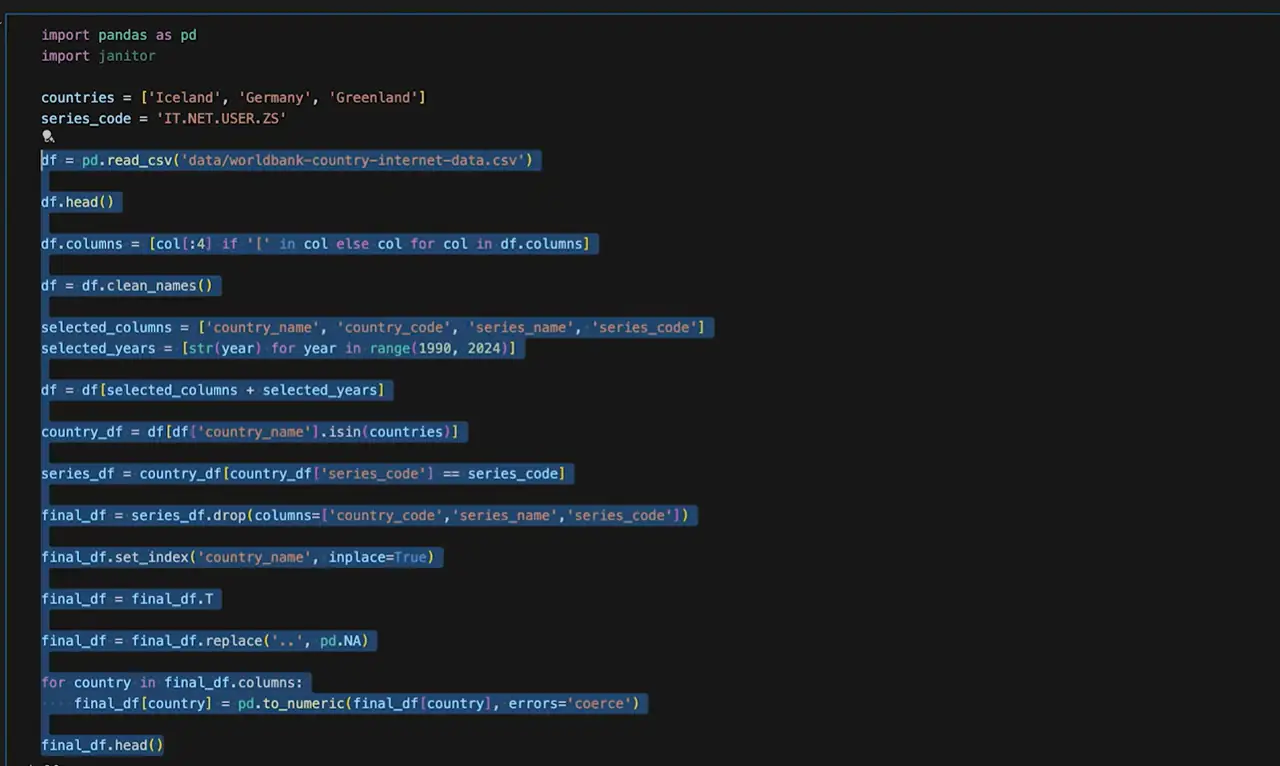
You usually start with a large dataset that looks fine at first glance. Many countries, many metrics, many years. The data itself works, and nothing appears obviously wrong. The real issue only becomes clear once you look at the code. As data cleaning progresses, small fixes stack up quickly: a filter here, a column selection there, then a reshape or a type conversion. Each change introduces another intermediate DataFrame, and variables like df1, country_df, and series_df begin to pile up. A table called final_df appears, only to be modified several more times as new issues surface.
Nothing is technically broken. The code still runs, and the output looks correct. The problem is how scattered the logic becomes. Understanding the full transformation now requires scrolling back and forth and mentally tracking which variable holds the latest version of the data. Naming intermediate results turns into guesswork, and making changes later feels risky because dependencies are no longer obvious.
The hardest part is often naming these intermediate DataFrames. Short names hide meaning, long names hurt readability, and neither scales well as the logic grows. If your notebook looks like a graveyard of temporary DataFrames, you are not alone. This is the situation we want to fix before moving on.
Step 1 Clean Column Names First
Before refactoring how the code is structured, it helps to make one small change that reduces friction in every step that follows. Clean the column names.
Column names with spaces, mixed casing, or extra symbols force awkward syntax and slow everything down. This is not about preference. It removes friction from every line that comes after, especially once you start chaining operations together.
To handle this, we use a small helper library called pyjanitor. You could achieve the same result with pandas alone. The reason for using pyjanitor here is clarity.
Install it once:
pip install pyjanitorImport it alongside pandas:
import janitorThen standardize column names in a single line:
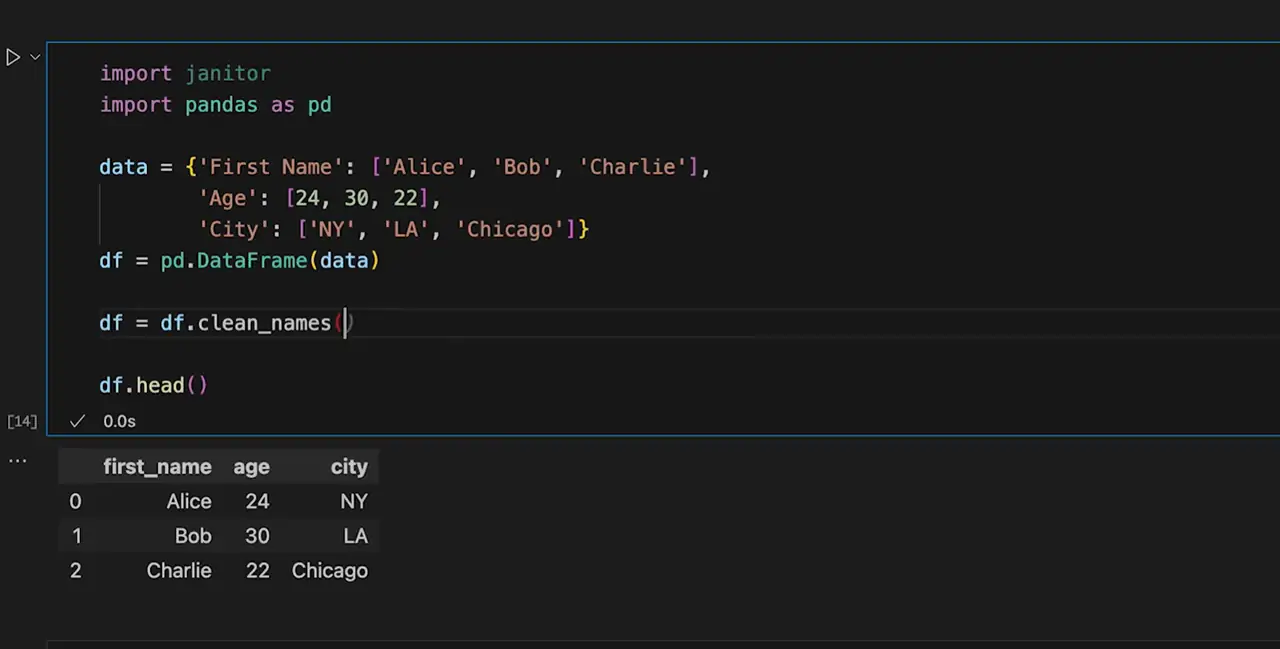
df = df.clean_names()This converts column names to lowercase, replaces spaces with underscores, and removes characters that tend to cause issues in chained expressions. The change is intentionally simple, but it has an outsized impact on everything that follows. Sometimes the biggest benefit is not fewer lines of code, but fewer details you need to keep in your head while writing it.
Step 2 Turn Many Steps Into One Chain
This is where the cleanup actually happens. Not to the data, but to the structure of the code.
In the earlier steps, the data itself was gradually improved. Here, the focus shifts to how those improvements are expressed. The issue is not that the transformations are wrong. The issue is that they are spread across too many places.
Originally, the transformations were written as a sequence of separate steps. Each operation created a new DataFrame. Filtering, selecting columns, reshaping, replacing values, and converting types were handled one by one. Over time, the logic became fragmented and harder to follow.
A simplified version of that pattern looked like this:
df = worldbank_raw_data
df.columns = [col[:4] if "[" in col else col for col in df.columns]
df = df.clean_names()
df = df[selected_columns + selected_years]
country_df = df[df["country_name"].isin(countries)]
series_df = country_df[country_df["series_code"] == series_code]
final_df = series_df.drop(columns=["country_code", "series_name", "series_code"])
final_df.set_index("country_name", inplace=True)
final_df = final_df.T
final_df = final_df.replace("..", pd.NA)

for country in final_df.columns:
    final_df[country] = pd.to_numeric(final_df[country], errors="coerce")
Nothing here is incorrect. Each step does exactly what it is supposed to do. The problem is that the full transformation is hard to see at once. Understanding the flow requires jumping between variables and mentally stitching the steps together.
The same logic can be written as a single chained expression:
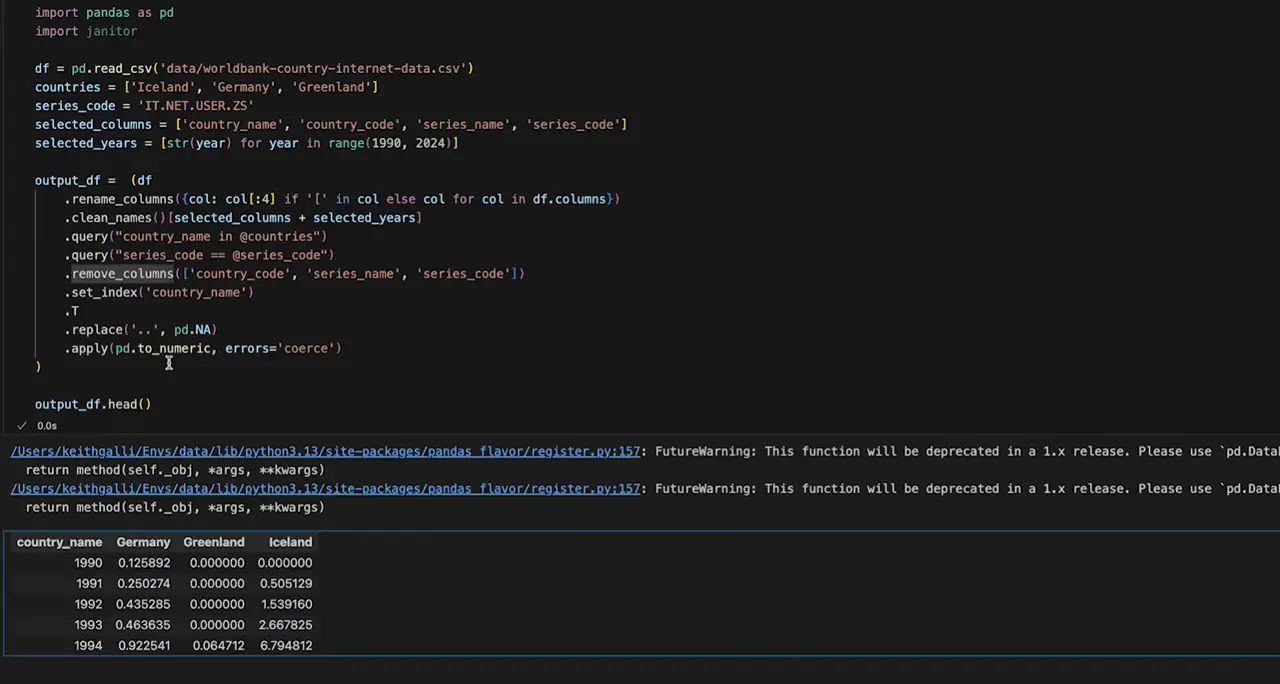
output_df = (
    worldbank_raw_data
    .rename(columns=lambda col: col[:4] if "[" in col else col)
    .clean_names()[selected_columns + selected_years]
    .query("country_name in @countries")
    .query("series_code == @series_code")
    .remove_columns(["country_code", "series_name", "series_code"])
    .set_index("country_name")
    .T
    .replace("..", pd.NA)
    .apply(pd.to_numeric, errors="coerce")
)
Every transformation is still there. The difference is that the full path from input to output is visible in one place. Parentheses make it possible to break long chains across multiple lines while keeping everything readable, without introducing temporary variables. This small detail makes it much easier to work with longer pipelines.
A simple way to read this is to start at the top and follow each line downward, one transformation at a time. The data does not change. What changes is how easy it becomes to follow and modify the logic.
Step 3 Let an LLM Refactor Existing Code
Refactoring code like this by hand takes time. This approach works best when you already understand what the final transformation should look like, but you want to avoid rewriting the structure yourself.
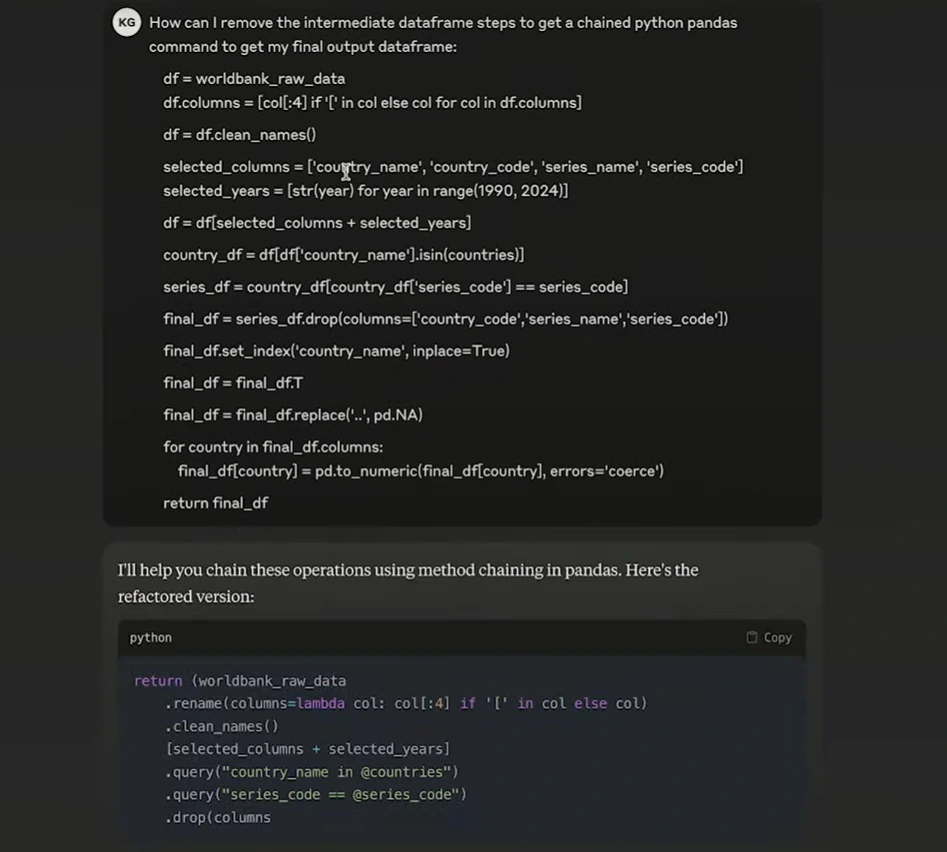
One simple approach is to copy the existing pandas code and ask an LLM to rewrite it as a chained expression. The logic stays the same. Only the structure changes.
This can be especially helpful when the code already runs but feels difficult to read or maintain. Instead of focusing on syntax details, you can review the structure of the result and adjust it where needed.
This approach tends to work best in a few common situations:
You already have pandas code that produces the correct result
The logic feels scattered across many intermediate DataFrames
You want to reduce variables without changing behavior
A Simple Prompt You Can Reuse
How can I remove intermediate DataFrame steps and rewrite this pandas code using method chaining to get the final output DataFrame?
A typical flow looks like this:
Open Claude or ChatGPT
Paste the existing pandas code
Review the chained version and compare the output
You should always verify that the output matches the original result.
Reliable Data Collection with IPcook
When Python and Pandas pipelines start to scale, data access often becomes the weakest part of the system. Scraping slows down, requests get blocked, and some sources quietly stop returning complete data. These issues usually appear before any problems show up in data cleaning or modeling.
To keep collection stable, IPcook offers high-quality residential proxies for web scraping. Data collection requests are routed through real residential IPs worldwide, helping avoid throttling and reducing the risk of being flagged. This creates a steadier flow of raw data into downstream cleaning and LLM-assisted pipelines. IPcook supports a wide range of scraping needs, integrates smoothly with common tools, and includes an easy-to-use dashboard for monitoring traffic and usage. Pricing starts at $0.5/GB.
How IPcook supports stable data scraping:
Real residential IPs across 185+ global locations for accurate regional access
Flexible IP rotation and sticky sessions to reduce bans and failed requests
High-anonymity (elite) proxies with no proxy-identifying headers
Fast, stable connections suitable for continuous scraping workloads
Pay-as-you-go pricing with no monthly plans and non-expiring traffic
Conclusion
Method chaining does not change the data or the final result. It changes how clearly the transformation is expressed. By keeping each step in a single, readable flow, you remove the need for temporary DataFrames and make Pandas code easier to follow, modify, and reuse over time.
Data workflows also depend on stable data collection. Scraping tasks can fail due to blocking or throttling long before data reaches the cleaning stage. IPcook supports large-scale scraping by using real residential IPs, keeping data access consistent across repeated requests. You can start with a 100MB free trial.
