


How to Scrape Airbnb Data with Python Without Limits

Have you ever opened Airbnb just to check a few listings and ended up clicking for far too long? You want clear answers. How much do similar homes charge? Which areas stay booked most of the year? Are prices rising or falling right now? If you work in market research, real estate, or short term rentals, these questions matter. But checking listings one by one does not work. You cannot compare hundreds of homes, cities, or dates by hand, and screenshots do not give you real data.
That is why we scrape Airbnb data. Instead of guessing, you collect prices, availability, ratings, and locations in one place. You can sort the data, compare trends, and use it for reports or investment decisions. In this guide, we will show you how Airbnb web scraping works, what problems to expect, and how you can get reliable data without wasting time.
What Airbnb data can be collected (and what cannot)
When you scrape Airbnb data, what you can get depends on one simple rule: what Airbnb shows publicly. If you can see it in your browser without logging in, you can usually collect it. This is the data you can use to compare markets.
Data you can usually collect from Airbnb listings
The table below shows common data points that are visible on public pages and widely used for analysis:
Data type | Example | Why it matters |
Listing title | “Modern apartment near downtown” | Understand how properties are positioned |
Price per night | $120 per night | Track pricing trends |
Cleaning fee | $45 | Calculate total stay cost |
Availability | Open dates on the calendar | Measure demand |
Location | City or neighborhood | Compare areas |
Rating score | 4.7 stars | Judge listing quality |
Number of reviews | 320 reviews | Estimate popularity |
Property type | Apartment, house, studio | Segment the market |
Host type | Individual or company | Understand supply structure |
Data you cannot collect from Airbnb listings
Some information is simply not visible on public pages, so it cannot be scraped:
Private host contact details: These are hidden until a booking is made
Internal booking history: Airbnb does not show full past bookings publicly
Airbnb ranking or recommendation logic: This is calculated inside Airbnb’s system
Real time user behavior: You cannot see who is browsing or about to book
You do not need every piece of data to get value. For most research and investment use cases, the public information available on Airbnb listings is already enough to support solid decisions and clear comparisons.
Setting Up Your Python Environment Before Airbnb Web Scraping
To scrape Airbnb reliably, start with a clean setup.
Use Python 3.11 or newer for best results. Avoid older versions.
Create a virtual environment
Open your terminal, pick a folder, and run:
# macOS / Linux
python3 -m venv .venv && source .venv/bin/activate

# Windows (PowerShell)
py -m venv .venv && .\.venv\Scripts\Activate.ps1
You will see (.venv) in your terminal. This means you are working inside an isolated project environment.
Install the core libraries
With the environment active, install these libraries:
pip install requests beautifulsoup4 lxmlrequests fetches pages
beautifulsoup4 locates the data you need
lxml makes parsing faster and more reliable
Do a quick check
Create a file named check.py, paste the code below, and run it:
from bs4 import BeautifulSoup

html = "<h1>Setup is ready</h1>"
soup = BeautifulSoup(html, "lxml")
print(soup.get_text(strip=True))
If you see Setup is ready, your environment is ready.
Step-by-step: Scraping Airbnb search results
This section walks through how to scrape Airbnb data from search results using a clean and controllable Airbnb web scraping workflow.
Airbnb search URLs and parameters
Airbnb search pages are built from URLs with a small set of core parameters. The most important ones are location, check-in date, check-out date, and number of guests. Together, these values determine which listings appear and how they are ordered.
A simplified search URL looks like this:
https://www.airbnb.com/s/New-York--NY/homes
?checkin=2024-06-10
&checkout=2024-06-15
&adults=2
Dates are not optional. Without them, Airbnb often returns unstable results or redirects the page. Guest count also matters because prices and availability change based on how many people stay.
Some parameters are stable and safe to control, such as location, dates, and guests. Others are tracking or session related and change constantly. When you copy a full browser URL, these unstable values are often included. That is why the same link may work once and fail later. Building clean search URLs with only core parameters leads to more consistent results.
Send the initial HTTP request
The next step in Airbnb web scraping is sending a basic HTTP request. At this stage, complex headers are not required. A clear User-Agent and language setting are usually enough.
Example using requests:
import requests

url = "https://www.airbnb.com/s/New-York--NY/homes"
params = {
    "checkin": "2024-06-10",
    "checkout": "2024-06-15",
    "adults": 2
}

headers = {
    "User-Agent": "Mozilla/5.0",
    "Accept-Language": "en-US,en;q=0.9"
}

response = requests.get(url, params=params, headers=headers, timeout=15)
print(response.status_code)
A status code of 200 only means the request succeeded at the network level. Airbnb pages often return HTML that contains embedded JSON inside script tags. Inspecting the response content matters more than checking the status code alone.
Extract listing data from the response
When you scrape Airbnb data, listing information usually appears in two places: visible HTML elements or JSON embedded inside script tags. In most cases, the JSON contains cleaner and more complete data.
A simple example using BeautifulSoup:
from bs4 import BeautifulSoup

soup = BeautifulSoup(response.text, "lxml")
scripts = soup.find_all("script")

print(len(scripts))
From there, you look for JSON blocks that include listing IDs, titles, prices, and ratings. The exact structure changes over time, so focusing on the data shape is more reliable than relying on a single selector.
Common fields people extract include:
listing ID
title
price per night
rating score
Getting your first real data out of the response is the moment scraping stops feeling abstract and starts feeling useful.
Normalize and store scraped results
Raw scraped data is rarely ready to use. Normalizing fields early makes later steps easier. Convert prices to numbers, keep keys consistent, and store results in a simple structure.
A common pattern is a list of dictionaries:
results = [
    {
        "id": "123456",
        "title": "Cozy studio in Manhattan",
        "price": 120,
        "rating": 4.8
    }
]
You can export the data to JSON or CSV. This small step turns scraping into a repeatable data pipeline instead of a one-time script.
Why Does Scraping Airbnb Get Harder at Scale?
When you move past a single page, scraping Airbnb becomes harder to manage. Pagination, multiple locations, and unstable responses start to affect how reliably pages load.
Handle pagination and infinite scroll
Airbnb does not load all listings at once. Some results are split across pages, while others load more listings as you scroll. These two patterns behave differently and often return inconsistent results.
Page-based loading is easier to control, but it may repeat listings or skip some results. Scroll-based loading can look complete in a browser but return partial data when loaded by a script. Getting more listings usually takes more work than expected.
Scrape multiple cities or date ranges
Scraping one city for one date range is simple. Adding more cities or dates quickly increases the number of requests. A loop over cities and dates can grow from dozens of requests to thousands in minutes.
This is why a script may work fine today and fail tomorrow. The logic did not change, but the request volume and timing did. Scale becomes a different problem, not just more of the same work.
Common issues you will hit (and why they happen)
When you scrape Airbnb data at scale, you may see 403 or 429 responses, empty pages, skeleton layouts, or missing fields. These issues often appear suddenly and without a clear pattern.
In most cases, the problem comes from how your IP is seen and how your requests behave, not from the code itself. Failures are no longer caused by code, but by where the requests come from and how they are sent.
💡Recommended Reading
Keeping Airbnb Scraping Stable with Residential Proxies
To scale an Airbnb scraper successfully, the challenge shifts from writing code to managing your request environment. Professional residential proxy services address this directly by making automated traffic appear organic. They route your requests through a large pool of real household IPs, so each query looks like a normal search. If one IP is blocked, the system rotates automatically, keeping your data pipeline running smoothly.
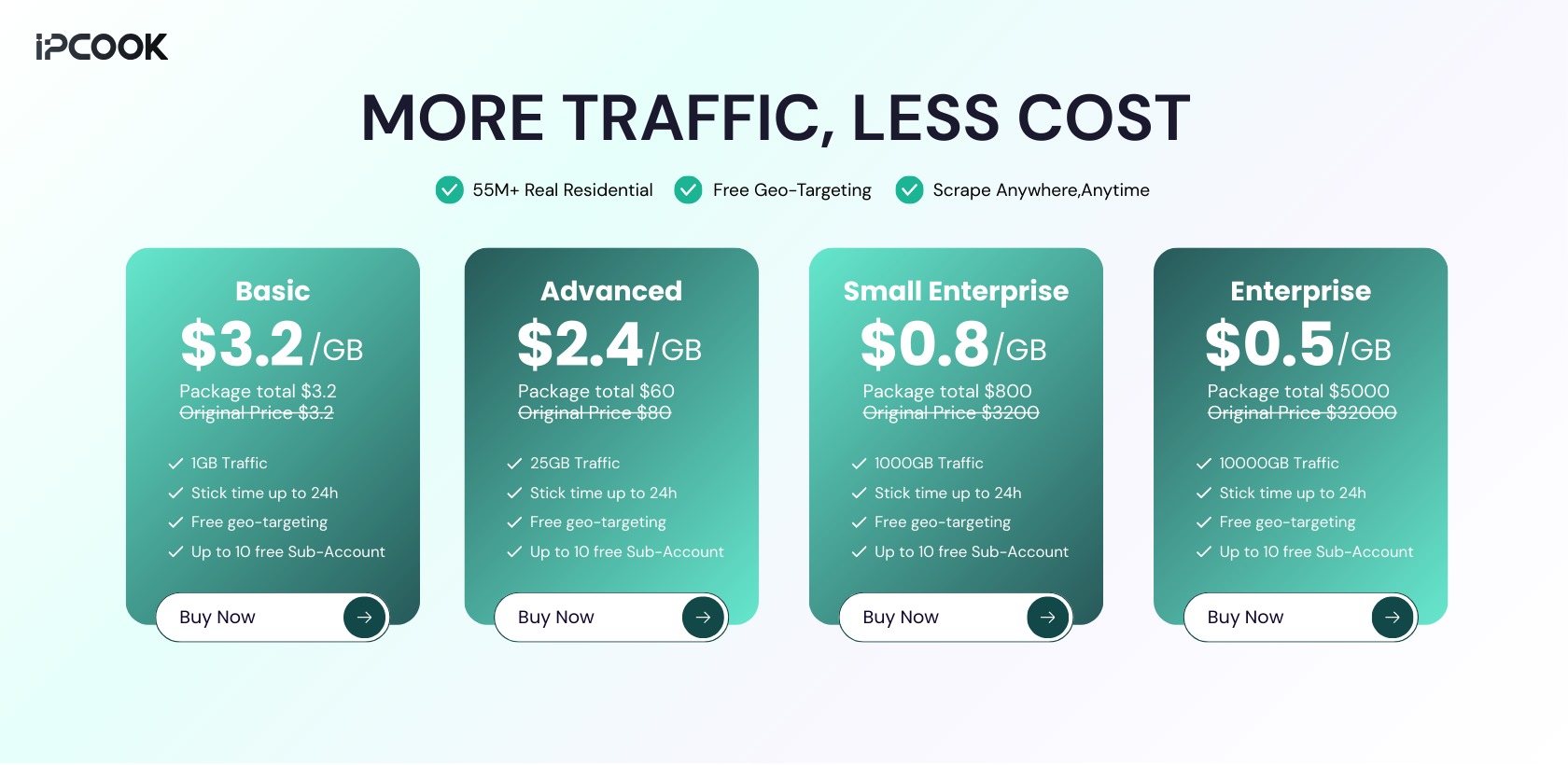
For this, IPcook provides high-quality rotating residential proxies, with pricing starting from $0.5/GB.
What you get with IPcook residential proxies
55M+ residential IPs across 185+ locations, reducing repeated origin traffic during large Airbnb search runs
Per request to 24 hour IP rotation, supporting both fast identity changes and stable pagination sessions
Elite anonymity with no proxy identifying headers, limiting detectable traffic patterns
Hundreds of concurrent connections per account, enabling parallel page collection instead of slow serial access
No monthly commitment with non expiring traffic, so scraping volume can scale without time pressure
Conclusion
Scraping Airbnb data usually works at first. Problems appear as volume grows. At scale, failures are rarely caused by parsing logic, but by how requests are sent and how they are received.
Managing request origin is what keeps data collection stable across cities and dates. Residential proxies make this possible by aligning traffic with real user behavior. IPcook’s residential proxies support consistent Airbnb data collection over time, not just one-off results. Try a free 100MB with IPcook.
