


How to Scrape Real Estate Data Reliably in 2026

Want to scrape real estate listings without getting blocked? Follow this step-by-step guide to build a production-ready real estate scraper with Python. You'll learn how to scale your scraper, handle IP rotation, bypass CAPTCHAs, and ensure your data stays accurate. You'll also discover the proxy strategy that keeps it running reliably. No more broken scripts or missing listings.
What Real Estate Data You Can Scrape
You do not need every data point to understand a real estate market. Most scraping projects succeed or fail based on a small set of fields that stay consistent across listings and over time.
Property listing data
This is the baseline. If your scraper collects nothing else, it should collect these fields:
Price
Address
Property type
Bedrooms and bathrooms
Price only makes sense when paired with location. Property type defines the market segment. Bed and bath counts explain why two listings at the same price can perform very differently. Two homes can list at the same price. One sells in days. The other sits for months.
Location and market signals
Listings show what is available. Market signals show how conditions change.
City or ZIP code
Days on market
Price changes over time
This data starts to matter when you collect it repeatedly. A price drop often signals urgency. A listing that stays active for months tells a very different story than one that disappears quickly. Patterns only become clear when the same fields are tracked across weeks or months.
Agent and brokerage information
Some projects focus on properties. Others focus on the people behind them.
Agent name
Brokerage
Public contact details
Here, consistency matters more than volume. Clean agent names tied to dozens of listings are more useful than scattered data pulled from hundreds of pages. Once this information stops lining up across listings, it quickly becomes unusable.
Tools You Need to Scrape Real Estate Data
Scraping real estate data does not require a complex setup. Simple, well understood tools are enough to fetch pages, extract key fields, and store results reliably.
Core libraries
Most real estate scraping tasks come down to requesting pages, extracting fields, and saving structured results.
requests Sends HTTP requests and handles responses with minimal setup
BeautifulSoup Extracts prices, addresses, and listing details from HTML
pandas Organizes scraped data into tables that are easy to filter and compare
If your setup can load pages consistently, read page structure, and save clean tables, it is sufficient for most real estate scraping projects. Complex tools rarely fix data quality problems. Consistent fields and repeatable runs matter more than advanced frameworks.
Step 1. Set Up Your Python Environment
Before you scrape real estate data, your environment needs to be predictable. Small differences in versions or libraries cause confusing errors later. This step keeps everything aligned from the start.
Install Python and Verify Version
Make sure Python is installed and accessible from your terminal. Most systems already have it, but the version matters.
Open a terminal and check:
python --versionIf that command fails, try:
python3 --versionAny recent Python 3 release works fine. The key is knowing exactly which version you are running so your results match what you see here.
Create a Virtual Environment
A virtual environment keeps this project isolated. It prevents library conflicts and makes cleanup easy when you move on.
Create one in your project folder:
python -m venv venvActivate it:
source venv/bin/activateOnce active, everything you install stays inside this folder. That means no side effects on other projects and fewer surprises when you run the script again later.
Install Required Libraries
With the environment active, install the libraries you will use:
pip install requests beautifulsoup4 pandas lxmlEach library has a clear role:
requests handles HTTP calls
BeautifulSoup parses HTML and lets you pull specific fields
pandas stores results in tables you can reuse or export
This setup is enough for web scraping real estate data python projects and keeps the workflow simple.
Step 2. Build Your First Real Estate Scraper (Basic Example)
Now you are ready to scrape real estate listings. This example keeps things minimal. The goal is to show how the pieces connect, not to cover every edge case.
Send an HTTP Request to a Listing Page
Start by requesting a page. This is not a browser request, so you should include a basic User Agent.
import requests

url = "https://example.com/listings"
headers = {
    "User-Agent": "Mozilla/5.0"
}

response = requests.get(url, headers=headers)
print(response.status_code)
If the request succeeds, you get raw HTML back. This is the key difference to remember. You are scraping pages, not clicking through a site.
Parse HTML with BeautifulSoup
Next, turn that HTML into something you can work with.
from bs4 import BeautifulSoup

soup = BeautifulSoup(response.text, "lxml")
The soup object represents the page structure. From here, you select elements using CSS selectors. If you can inspect an element in your browser, you can usually select it here as well.
Extract Key Property Fields
Pick a few fields to extract. Keep it focused.
results = []

for listing in soup.select(".listing"):
    price = listing.select_one(".price")
    address = listing.select_one(".address")
    link = listing.select_one("a")

    results.append({
        "price": price.text if price else None,
        "address": address.text if address else None,
        "url": link["href"] if link else None
    })
Storing results as a list of dictionaries keeps the data clean and ready for the next step. You are already shaping it for export.
Step 3. Save Scraped Real Estate Data to CSV
If you have collected the data you want, the next step is to save it to CSV or other formats.
import pandas as pd

df = pd.DataFrame(results)
df.to_csv("real_estate_data.csv", index=False)
Open the file and check the output. If you see prices, addresses, and links lined up correctly, the loop is complete. You now have a repeatable way to scrape real estate data and store it in a format you can reuse later.
Common Problems When Scraping Real Estate Websites at Scale
After a few test pages, real estate scraping starts to behave differently. What worked during quick checks does not hold up once requests repeat.
Why Requests Start Failing After a Few Pages
The first sign is usually a spike in failed requests.
403 responses
429 responses
Pages returning empty content
These errors show up after repeated requests from the same IP. The code stays the same. What changes is how often the site sees you. Real estate sites limit access per IP. Once requests cross a hidden threshold, responses slow down or stop. Tweaking parsing logic rarely helps here. The problem sits outside the script.
CAPTCHA and Bot Detection
When blocking escalates, CAPTCHAs usually follow. At first, pages load with missing sections. After that, full challenges start to appear. Adding headers can delay this, but only briefly.
Detection systems look for patterns. A scraper running on a tight loop leaves a clear footprint that gets flagged at scale, even when each request looks fine on its own.
Location Data Inconsistencies
Some of the hardest issues to spot come from location.
A listing shows up from one location
The same listing disappears from another
Prices or availability change without explanation
Real estate sites tailor results based on where requests come from. IP geography affects which listings appear and how they are ordered. If you are tracking market signals or comparing areas, these differences matter. Without control over request location, scraped data starts to drift.
💡Recommended Reading
Why Proxies Are Essential for Real Estate Web Scraping
When you scrape real estate websites without residential proxies, failures are guaranteed. At scale, they usually show up as:
Requests getting blocked after a short run
Free or shared IPs flagged almost immediately
Pages returning partial data or empty responses
Location introduces another source of variation in real estate scraping. The same URL can return different listings, prices, or availability depending on where the request comes from, which makes side-by-side comparisons unreliable and skews market analysis. Rotating residential proxies reduce this variation by blending requests into normal traffic and avoiding repeated access from a single origin.
Why IPcook’s Proxies Work for Real Estate Scraping
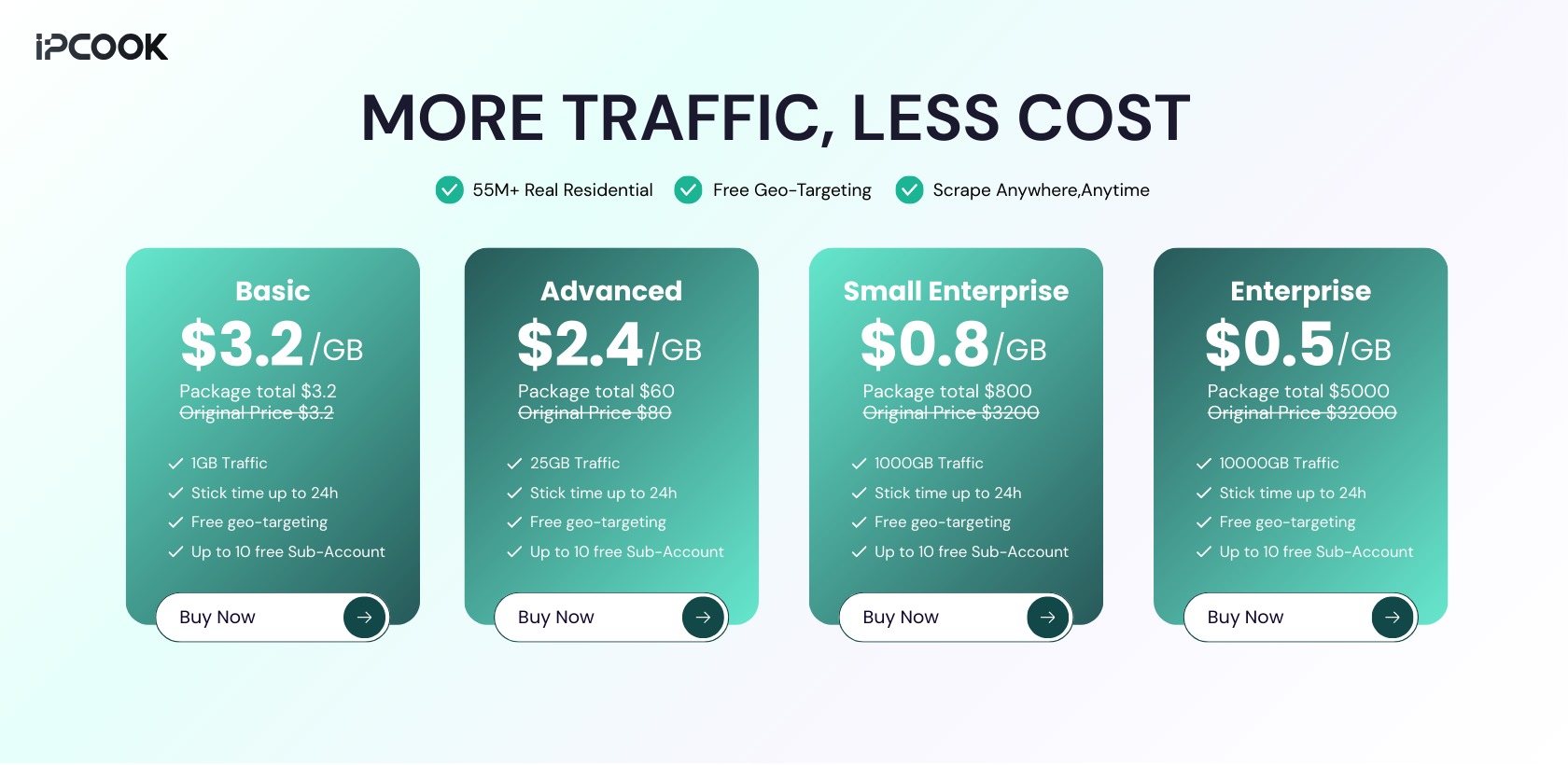
IPcook provides real residential IPs that keep real estate scraping stable. This reduces blocks during large scraping runs and helps scrapers stay reliable over time. Pricing starts at $0.5/GB.
What Keeps Real Estate Scraping Stable with IPcook
Large residential IP coverage Access to a broad pool of real residential IPs across 185+ regions reduces repeated origin traffic during high volume listing collection.
Flexible IP rotation with session control Requests can rotate per call or stay consistent when pagination or multi-request flows need stability.
Clean traffic without proxy fingerprints Requests do not carry proxy identifying headers, limiting detection based on behavior rather than request volume alone.
Usage without forced monthly limits Unused residential traffic does not expire, making it easier to scale scraping volume based on actual demand.
Conclusion
A script that collects listings is just the start. The real asset is a system that runs reliably across regions and returns consistent data over time. Scaling real estate scraping requires residential proxies that handle IP blocking, bot detection, and location based access. You can start with IPcook’s 100 MB free trial.
- What Real Estate Data You Can Scrape
- Tools You Need to Scrape Real Estate Data
- Step 1. Set Up Your Python Environment
- Step 2. Build Your First Real Estate Scraper (Basic Example)
- Step 3. Save Scraped Real Estate Data to CSV
- Common Problems When Scraping Real Estate Websites at Scale
- Why Proxies Are Essential for Real Estate Web Scraping
- Conclusion
