


How to Build a Free AI Web Scraper with Crawl4AI and DeepSeek

Crawl4AI handles automated page by page crawling and request control, which makes it suitable for AI driven data extraction. This guide shows how to build a complete AI powered web scraper using Crawl4AI, DeepSeek R1, and Groq. The scraper runs on free tools, can be reproduced locally, and crawls a real website page by page to extract structured company data, generate AI written descriptions, and export the results to a CSV file.
What You Will Build
In this project, you will build an AI web scraper that automatically collects and structures data from real websites. The scraper crawls listing pages, extracts company level information, generates short AI written descriptions, and saves the final dataset to a CSV file for further use.
The result is a clean spreadsheet containing company name, location, industry indicators, size or pricing signals when available, and a concise AI generated summary that helps teams personalize outreach.
A Practical Example Scenario
To keep the project grounded in real use, this tutorial follows a common B2B scenario.
Imagine a SaaS company expanding into a new city. The sales team needs a reliable list of local businesses to begin outbound outreach. A raw collection of URLs is not enough. What they need is structured information that can be reviewed, filtered, and acted on immediately.
The required fields are simple.
Company name
Location
Industry or service type
Any available size or pricing signal
A short description explaining what the company does
The aim is to build a scraper that visits a business directory site, moves through listing pages automatically, extracts this information, and produces a spreadsheet that can be shared directly with the sales team. For more guides on effectively collecting public company data, see our articles on Google Maps and LinkedIn scraping.
Three Core Tools Used in This Project
This workflow relies on three tools that cover browser control, data extraction, and model execution.
Crawl4AI forms the foundation of the scraping workflow and manages browser control and page collection. It is an open source, browser based crawling framework created to support LLM driven web scraping. Crawl4AI handles pagination, dynamic rendering, and content selection during the crawl, which removes the need for manual HTML parsing or fragile rule based extraction logic. It also supports configurable page load strategies, JavaScript wait conditions, screenshots, and output formatting, allowing the same workflow to scale to more complex sites without changes to the core logic.
DeepSeek R1 handles reasoning based structured extraction. It converts selected page content into clean, schema defined fields including company name, location, category, and description. The model performs well when organizing multiple fields from semi structured HTML, producing consistent records without relying on post processing rules.
Groq provides the inference infrastructure that runs DeepSeek R1 efficiently at no cost. It supports fast model execution and keeps extraction latency low, which becomes important when scraping many pages. Individual extraction calls usually complete within a few seconds, allowing the overall workflow to remain fast, predictable, and suitable for free tier usage.
How to Scrape the Web With Crawl4AI and DeepSeek
This section outlines the full scraping workflow, from project setup to structured extraction and data export. The steps follow the same execution order used by the final scraper and reflect a production oriented crawling pipeline.
Step #1: Project Setup
Set up an isolated Python environment and install the dependencies used throughout the scraping workflow.
conda create -n ai-scraper python=3.11 -y
conda activate ai-scraper
Define project dependencies in a requirements.txt file.
python-dotenv==1.0.1
requests==2.32.3
pydantic==2.7.4
pandas==2.2.2
crawl4ai
Install the dependencies.
pip install -r requirements.txtInstall browser dependencies required by Crawl4AI.
playwright installNow the local development environment is ready.
Step #2: Configure Model and Inference
Create a .env file in the project root to store the model credentials and endpoint configuration that will be used by Crawl4AI.
GROQ_API_KEY=your_groq_api_key_here
GRO_MODEL=deepseek-r1-distill-llama-70b
GRO_BASE_URL=https://api.groq.com/openai/v1
These environment variables are not applied automatically.
They are loaded in the next step when configuring Crawl4AI’s LLM extraction strategy, which sends model requests through Groq’s OpenAI-compatible API.
Groq handles inference for the DeepSeek R1 model, allowing reasoning-based extraction to run without managing a local model runtime or integrating a separate SDK.
Step #3: Define the Data Schema
Define a fixed schema to ensure all extracted records follow a consistent structure.
Create models.py.
from pydantic import BaseModel, Field
from typing import List, Optional

class Lead(BaseModel):
    company_name: str = Field(...)
    location: str = Field(...)
    category: Optional[str] = Field(None)
    pricing_or_size: Optional[str] = Field(None)
    description: str = Field(...)

class LeadList(BaseModel):
    leads: List[Lead]
This schema will be passed to Crawl4AI’s LLM extraction strategy in the next step.
By enforcing a schema at extraction time, every model response can be parsed into structured records without additional post-processing.
Step #4: Configure Crawl4AI
Set up browser behavior and configure LLM-based extraction using the schema defined earlier.
First, import the required components and load environment variables from the .env file.
import os
from dotenv import load_dotenv

from crawl4ai import BrowserConfig, CrawlerRunConfig
from crawl4ai.extraction_strategy import LLMExtractionStrategy
from crawl4ai.llm_config import LLMConfig
from models import LeadList

load_dotenv()
Configure browser behavior for page loading and rendering.
browser_config = BrowserConfig(
    headless=False,
    verbose=True
)
Create an LLM configuration that routes model calls through Groq using the DeepSeek R1 model.
llm_config = LLMConfig(
    provider="groq",
    model=os.getenv("GRO_MODEL"),
    api_token=os.getenv("GROQ_API_KEY"),
    base_url=os.getenv("GRO_BASE_URL")
)
Define an LLM extraction strategy that enforces the predefined schema during extraction.
extraction_strategy = LLMExtractionStrategy(
    llm_config=llm_config,
    extraction_type="schema",
    schema=LeadList.model_json_schema()
)
Attach the extraction strategy to the crawl run configuration.
run_config = CrawlerRunConfig(
    extraction_strategy=extraction_strategy
)
The browser configuration controls how pages are loaded and rendered.
The extraction strategy determines how page content is sent to the language model and returned as structured data that conforms to the defined schema.
Step #5: Handle Pagination and Stop Conditions
Before running full extraction, detect whether a page still contains valid results.
def has_no_results(html: str) -> bool:
    if not html:
        return True
    signals = ["no results found", "0 results", "no listings"]
    text = html.lower()
    return any(signal in text for signal in signals)
This check prevents unnecessary extraction calls once pagination reaches the final page and helps control token usage when scraping large directories.
Step #6: Run the Scraping Loop
Combine crawling, pagination, result detection, and structured extraction into a single asynchronous loop.
import asyncio
from typing import Optional
from copy import deepcopy
from crawl4ai import AsyncWebCrawler
First, define a lightweight fetch function used only for pagination stop detection.
This request does not trigger any LLM calls.
async def crawl_page_html(
    crawler: AsyncWebCrawler,
    url: str,
    browser_config,
    css_selector: Optional[str] = None
) -> str:
    result = await crawler.arun(
        url=url,
        browser_config=browser_config,
        run_config=None
    )
    return result.html or ""
Next, define the extraction function that applies the configured LLM strategy and schema.
async def crawl_with_extraction(
    crawler: AsyncWebCrawler,
    url: str,
    browser_config,
    run_config,
    css_selector: str
):
    # Create a local copy to avoid mutating shared config
    local_run_config = deepcopy(run_config)

    if hasattr(local_run_config, "extraction_strategy") and local_run_config.extraction_strategy:
        local_run_config.extraction_strategy.css_selector = css_selector

    result = await crawler.arun(
        url=url,
        browser_config=browser_config,
        run_config=local_run_config
    )

    # Safely retrieve structured extraction output across Crawl4AI versions
    data = (
        getattr(result, "extracted_content", None)
        or getattr(result, "extracted_data", None)
        or getattr(result, "json", None)
    )
    return data
Finally, combine pagination, stop detection, and structured extraction into a single scraping loop.
async def run_scraper(
    base_url_pattern: str,
    css_selector: str,
    browser_config,
    run_config
):
    all_rows = []
    page = 1

    async with AsyncWebCrawler() as crawler:
        while True:
            url = base_url_pattern.format(page=page)

            page_html = await crawl_page_html(
                crawler=crawler,
                url=url,
                browser_config=browser_config
            )

            if has_no_results(page_html):
                break

            extracted = await crawl_with_extraction(
                crawler=crawler,
                url=url,
                browser_config=browser_config,
                run_config=run_config,
                css_selector=css_selector
            )

            # Expected schema format: {"leads": [...]}
            leads = extracted.get("leads", []) if isinstance(extracted, dict) else []
            all_rows.extend(leads)

            page += 1

    return all_rows
In this loop:
crawl_page_htmlperforms a low-cost request used only to detect when pagination endscrawl_with_extractionapplies Crawl4AI’s LLM-based extraction using the configured model and schemaCSS selectors restrict extraction to relevant content blocks, reducing noise and token usage
Pages are processed sequentially until no additional results are detected
The final output is a list of structured records ready for export.
Step #7: Export Extracted Data
Run the scraper from a single entry point and save the results to a CSV file.
import asyncio
import pandas as pd
from pathlib import Path

def save_csv(rows, path: str):
    Path(path).parent.mkdir(parents=True, exist_ok=True)
    df = pd.DataFrame(rows)
    df.to_csv(path, index=False, encoding="utf-8")

if __name__ == "__main__":
    BASE_URL_PATTERN = "https://example.com/directory?page={page}"
    CSS_SELECTOR = ".listing-card"

    rows = asyncio.run(run_scraper(BASE_URL_PATTERN, CSS_SELECTOR, browser_config, run_config))
    save_csv(rows, "output/leads.csv")
The output file contains structured records ready for review, filtering, or further processing.
Handle IP Limits in web Scraping with IPcook
As scraping workloads grow, repeated requests from a single IP address can quickly lead to rate limits or temporary blocks. This is especially common when crawling directory-style websites with deep pagination or when running the same scraper on a regular schedule.
Using rotating residential IPs helps distribute requests across different network identities, allowing each page load to appear independent. This improves crawl stability without changing extraction logic or data schemas. IPcook provides high-quality rotating residential IPs that integrate smoothly with common scraping tools, helping large-scale scraping tasks run more reliably. Pricing starts at $0.5/GB, with better rates available as usage increases.
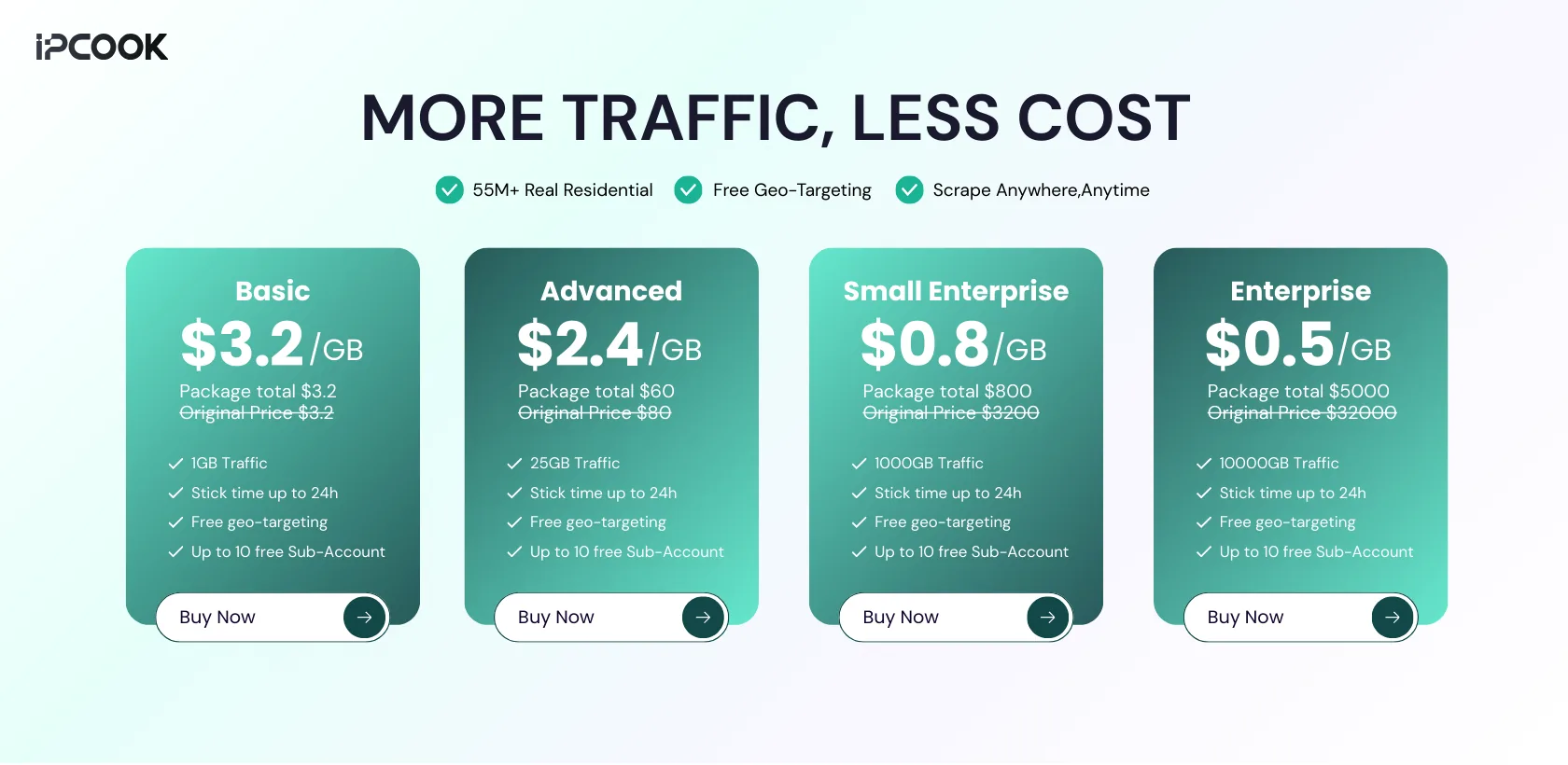
Why IPcook fits large-scale scraping tasks:
Real residential IPs across 185+ global locations for accurate regional access
Per-request rotation and sticky sessions to reduce blocks during deep pagination
High-anonymity (elite) proxies with no proxy-identifying headers
Fast, stable connections suitable for repeated crawling runs
Pay-as-you-go pricing with no monthly plans and non-expiring traffic
Final Notes
All tools used in this tutorial are free, and no paid compute is required to run the workflow. The setup is flexible and extensible, and the same approach applies beyond business directories to other structured data collection tasks. By combining browser crawling with modern reasoning models, raw web pages can be turned into immediately usable datasets with a clear and reproducible process.
As scraping tasks scale, stable data access becomes increasingly important. IPcook supports web scraping with rotating residential IPs, helping reduce blocking and throttling during repeated runs so the same workflow can continue to operate reliably. Start with a 100MB free trial.
