


What Is a SOCKS Proxy? Complete SOCKS5 Guide & Easy Setup

Choosing the right proxy protocol is like choosing the right route for your data. Different proxy protocols are designed for different connection needs. While HTTP proxies are commonly used for web requests, SOCKS5 (the latest version of the SOCKS protocol) provides broader traffic support for more complex applications such as automation, gaming, and data collection.
So, what is a SOCKS proxy, and why has SOCKS5 become a popular choice for advanced proxy needs? This guide explains how SOCKS works, where SOCKS5 fits, and what to consider when selecting a SOCKS5 proxy.
The Core Definition of the SOCKS Protocol
SOCKS is a network proxy protocol designed to forward data between a client device and a destination server through an intermediate proxy server. Unlike application-specific proxies that focus on certain types of traffic, SOCKS operates as a general-purpose connection method.
Rather than interpreting application-layer content the way an HTTP proxy does, a SOCKS proxy simply relays the connection between the client and the destination server. Think of a SOCKS proxy as a delivery person who follows instructions exactly. It delivers the package to its destination without opening or altering the contents.
The SOCKS protocol has evolved through several versions, with SOCKS4 and SOCKS5 being the most commonly discussed:
SOCKS4 is an older version that supports TCP connections but lacks UDP support and authentication methods.
SOCKS5 improves on SOCKS4 by adding UDP support and multiple authentication options.
Today, a SOCKS5 proxy is widely used as a flexible proxy solution for modern applications. With broader compatibility and support for different connection requirements, it provides a more versatile option for users who need a proxy protocol beyond basic network requests.
How Does a SOCKS Proxy Actually Work?
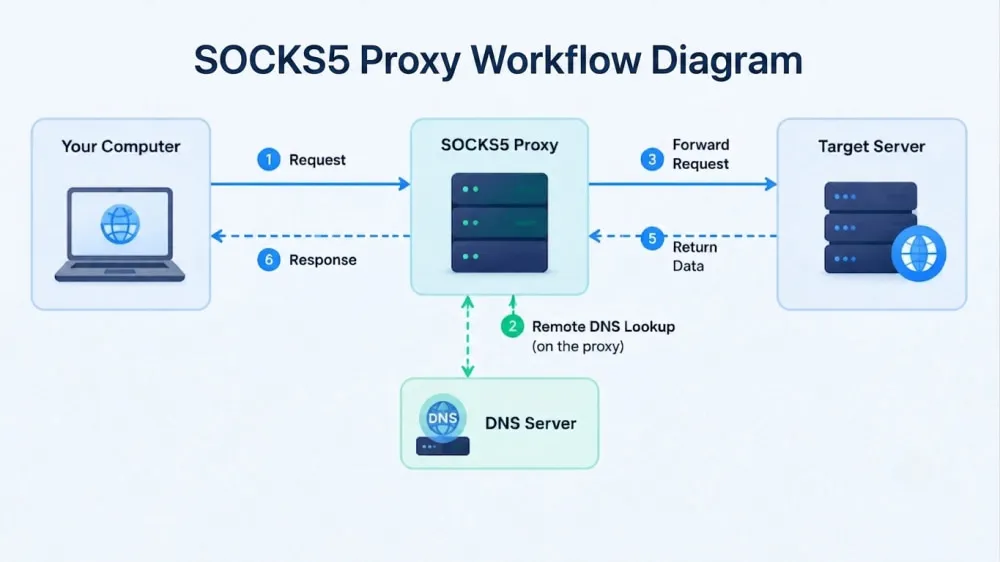
SOCKS is commonly mapped to OSI Layer 5, though some sources describe it as sitting between the session and transport layers. When an application connects through a SOCKS proxy, the proxy server establishes the connection to the destination server and transfers data between them. Because SOCKS5 supports both TCP and UDP, it can handle different types of network traffic.
TCP (Transmission Control Protocol): TCP focuses on reliable data transmission. It establishes a connection before sending data and helps ensure that packets are delivered correctly.
UDP (User Datagram Protocol): UDP sends data with lower overhead and does not require the same connection process as TCP. It is better suited for applications that prioritize speed and lower latency.
Another important feature of SOCKS5 is remote DNS lookup. When you access a website, DNS (Domain Name System) translates the website name into an IP address that your device can connect to. If the client supports it, this feature can help reduce DNS leakage by resolving hostnames through the proxy instead of the local device. This helps prevent DNS requests from bypassing the proxy connection when the application is configured correctly.
What Is a SOCKS Proxy Used For? Common Use Cases
SOCKS proxies are commonly used for applications that require proxy connections beyond standard web browsing. Most modern use cases rely on SOCKS5, the widely adopted version of the SOCKS protocol.
The right use case depends on the application, the traffic type, and the connection requirements. Common SOCKS proxy use cases include:
Web scraping: Scraping tasks often require collecting data from websites at scale without overloading a single IP address. SOCKS5 proxies do not rewrite or add data to your HTTP headers. This provides a higher level of anonymity, making it harder for anti-bot systems to detect your scrapers when extracting large-scale data.
SEO monitoring: SEO professionals require deep localized analysis beyond simple text results. SOCKS5 proxies provide region-specific IPs and handle complex traffic types, ensuring that localized elements like dynamic maps and videos load flawlessly for accurate SERP tracking.
Application connections: Some automation tools and applications generate traffic that is not limited to web requests. SOCKS5 proxies work at the connection level, allowing these applications to route their traffic through a proxy server without relying on browser-based configurations.
Gaming: Online games require fast responses and real-time data exchange. SOCKS5 proxies support UDP traffic, which helps handle game data more efficiently and provides smoother connections with lower latency.
Live video streaming: Streaming services rely on continuous real-time data transfer. SOCKS5 proxies support UDP-based communication, helping improve connection speed and reduce delays for applications that require stable live transmission.
Network testing: Developers need to verify how applications perform for users in different regions. Because SOCKS5 handles raw TCP and UDP traffic, teams can effortlessly test native desktop and mobile apps across diverse geographical locations.
SOCKS Proxy vs. HTTP Proxy vs. VPN
SOCKS proxies, HTTP proxies, and VPNs route internet traffic in different ways. Their main differences are how they handle traffic types, encryption, and configuration flexibility.
Feature | SOCKS5 Proxy | HTTP Proxy | VPN |
Working Layer | Session Layer (Layer 5) | Application Layer (Layer 7) | Network Layer (Layer 3) |
Supported Traffic | TCP & UDP | HTTP/HTTPS | Most device traffic |
Encryption | No | No | Yes |
Configuration Options | High | Limited | Medium |
Compatibility | High | Web browsers & HTTP-based apps | Entire device |
Speed & Latency | Low overhead | Fast for web requests | May vary due to encryption |
💡Related Reading:
Common Pitfalls and Security Risks to Avoid
Although SOCKS5 proxies provide flexibility, proxy services can vary in reliability, security, and feature support. Understanding common risks can help you avoid unsafe free proxies and limited SOCKS5 implementations.
Risks of Free SOCKS5 Proxies
Free public SOCKS5 proxies can create security concerns because their operators and infrastructure are often unknown. Some public proxy servers may monitor traffic, collect user information, or attempt to intercept sensitive data.
Potential risks include traffic sniffing, credential exposure, and unwanted monitoring of network activity. For important accounts or sensitive operations, using an unknown free proxy may introduce unnecessary security risks.
Check for Complete SOCKS5 Support
Not all services that advertise SOCKS5 support provide the same level of functionality. Some providers may offer basic SOCKS5 connections but lack features such as UDP forwarding. Before choosing a SOCKS5 proxy provider, verify whether it supports the TCP and UDP capabilities required for your applications.
How to Choose and Set Up SOCKS5 Proxies
Choosing a SOCKS5 proxy provider requires looking beyond price and availability. Factors such as IP type, connection stability, protocol support, and application compatibility determine whether a proxy service can meet your needs. Providers such as IPcook are examples of services that offer the resources and technical capabilities required for different use cases.
IPcook supports SOCKS5 proxy connections with TCP/UDP support, allowing users to work with a wider range of applications beyond standard browser traffic. With broader application compatibility and flexible authentication options, SOCKS5 proxies can be configured for different connection requirements and use cases. These SOCKS5 connections are available across IPcook Residential Proxies, ISP Proxies, and Datacenter Proxies.
IPcook Residential Proxies offer:
Access to 55M+ genuine residential IPs across 185+ countries.
Average global response times under 0.5 seconds, with latency as low as 50ms in major regions.
One-line API integration for proxy allocation.
Real-time traffic monitoring with exportable reports.
IP rotation by request or time interval with flexible switching control.
High uptime and low latency.
Pricing from $0.3–$3.2/GB.
IPcook ISP and Datacenter Proxies offer:
Unlimited traffic and no bandwidth limits.
99.9% uptime.
Username and password authentication support.
Low latency.
New users can also receive 100MB of rotating residential proxy traffic as a free trial.
Quick Setup Guide for Windows and macOS
Before setting up a SOCKS proxy, make sure you have the required proxy details, including the proxy server address, port, and authentication information if required. These details are usually provided by your proxy provider, such as IPcook.
Follow these steps to configure a SOCKS proxy on a Windows device:
Open "Settings", go to "Network & internet", and select "Proxy".
Under "Manual proxy setup", enable the option to use a proxy server.
Enter your SOCKS proxy details if the system or application supports SOCKS configuration.
Save the settings to apply the configuration.
To configure a SOCKS proxy on macOS:
Open "System Settings" and select "Network".
Choose your active network connection, such as Wi-Fi or Ethernet.
Open the proxy settings and enable the "SOCKS Proxy" option.
Enter the proxy server address and port, then apply the changes.
FAQs Frequently Asked Questions
What is the difference between a SOCKS proxy and a normal proxy?
A SOCKS proxy is designed to handle different types of network traffic, while many standard proxies are built for specific protocols such as HTTP. SOCKS5 provides broader application compatibility by supporting both TCP and UDP connections.
Is a VPN better than a SOCKS proxy?
A VPN and SOCKS proxy serve different purposes. A VPN provides encrypted traffic protection across a device, while a SOCKS5 proxy focuses on flexible traffic routing. The better option depends on your specific requirements.
Is SOCKS5 fully anonymous?
SOCKS5 can hide your original IP address and support remote DNS lookup, but it does not include built-in encryption. Privacy depends on the proxy provider, configuration, and how the service is used.
Final Thoughts
A SOCKS proxy is a flexible proxy solution that forwards network traffic between applications and destination servers without modifying the transferred data. Its ability to support different types of connections makes it a useful option for applications that require more flexible traffic routing.
For users looking for a reliable SOCKS proxy solution, IPcook provides flexible proxy options to support different connection requirements.
