Error Occurred While Proxying Request: Causes and Fixes

The error “error occurred while proxying request” is a common obstacle in development environments such as React, Angular, and Vue, or when using reverse proxies like Nginx. This guide walks you through why it happens, quick fixes you can apply in each framework, and a troubleshooting checklist for deeper cases. By the end, you will know how to resolve the error efficiently and keep your workflow running smoothly.
What “Error Occurred While Proxying Request” Means
The message “error occurred while proxying request” appears when the proxy server cannot forward a request from the frontend to the backend. In a typical setup, the proxy acts as a middle layer: it accepts the request from the browser and should deliver it to the backend service. If that delivery fails, the proxy stops and reports this error, similar to a courier returning a letter that could not reach its destination.
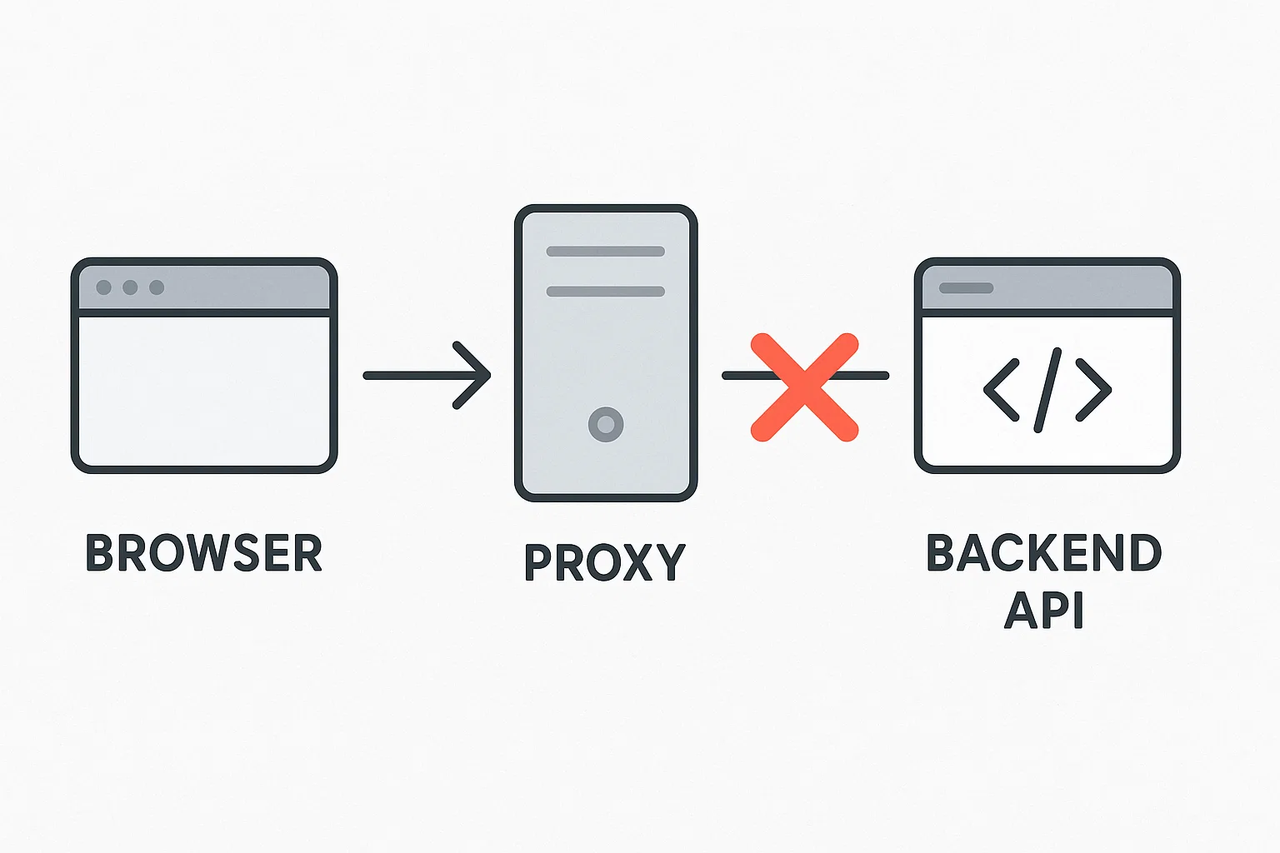
This error does not mean your frontend code is broken, nor does it always mean the backend has crashed. It simply indicates that the communication between proxy and backend was interrupted. In the next section, we will look at the most common reasons why this connection might fail.
Why the “Error Occurred While Proxying Request” Happens
Several issues can prevent a proxy from forwarding requests correctly. Most are configuration or environment mismatches rather than application bugs. Knowing the frequent causes helps you focus on the right part of the chain when this error appears.
Backend not running or port mismatch
A common reason is that the backend service is not running, or the proxy points to the wrong port. If the proxy forwards to a port with no process listening, the connection fails immediately. This often happens when the backend runs on port 5000 but the proxy expects 3000 or 8080.
HTTP and HTTPS conflicts or invalid certificate
Another frequent cause is a protocol mismatch. If the proxy uses HTTPS but the backend only serves HTTP, the connection cannot be established. The reverse is also true: if the backend requires HTTPS and the proxy sends plain HTTP, the request is rejected. In development, self-signed certificates often lead to this error. In production, it can appear when intermediate certificates are missing or when protocol settings differ.
CORS failures and missing headers
Cross-Origin Resource Sharing (CORS) can also block proxy requests. When the browser sends a preflight OPTIONS request, the backend must return headers such as Access-Control-Allow-Origin. If these headers are missing or modified by the proxy, the preflight fails and the browser blocks the call. To the developer, this may look like a proxy error even though the backend is reachable.
Network and DNS issues
Sometimes the configuration is correct but the network prevents communication. Firewalls, VPN restrictions, or corporate proxies can interfere with traffic. DNS errors are another common cause: if the hostname cannot be resolved or resolves to the wrong IP, the proxy cannot reach the backend.
How to Quickly Fix the “Error Occurred While Proxying Request” Error
Most of the time, this error can be resolved quickly by applying a minimal proxy configuration. The examples below show copy-paste setups for React, Angular, and Vue that forward API requests to your backend. Adjust the target to match your server, and restart the dev server after changes. If the problem persists, continue with the troubleshooting checklist in the next section.
Fix 1: Set up React proxy configuration
React supports two ways to configure a development proxy.
Option A:
package.json(simple, CRA dev server)
{
  "name": "my-app",
  "version": "0.1.0",
  "private": true,
  "dependencies": {
    "react": "^18.0.0"
  },
  "proxy": "http://localhost:5000"
}
Option B:
src/setupProxy.js(flexible, http-proxy-middleware)
const { createProxyMiddleware } = require('http-proxy-middleware');

module.exports = function (app) {
  app.use('/api',createProxyMiddleware({target: 'http://localhost:5000',changeOrigin: true
    })
  );
};
Requests sent to /api are forwarded to the backend on port 5000.
Note: Both the proxy field and setupProxy.js apply only to Create React App’s built-in dev server.
After applying the configuration, restart the React dev server and requests to /api will be proxied correctly.
Fix 2: Configure Angular proxy for API requests
Angular uses a proxy configuration file, and the official recommendation is to define a proxy.conf.json file and start the dev server with the --proxy-config option.
proxy.conf.json
{
  "/api": {
    "target": "http://localhost:5000",
    "secure": false,
    "changeOrigin": true
  }
}
Start the dev server
ng serve --proxy-config proxy.conf.jsonThis routes requests to /api through the proxy.
Note: Using secure: false is acceptable in local development when working with self-signed certificates.
Once started with --proxy-config, API requests to /api will be routed to your backend without CORS errors.
Fix 3: Apply Vue proxy settings for local development
Vue supports proxying through either Vue CLI or Vite, depending on which toolchain your project uses.
Vue CLI:
vue.config.js
module.exports = {
  devServer: {
    proxy: {
      '/api': {
        target: 'http://localhost:5000',
        changeOrigin: true
      }
    }
  }
};
Vite:
vite.config.js
import { defineConfig } from 'vite';

export default defineConfig({
  server: {
    proxy: {
      '/api': {
        target: 'http://localhost:5000',
        changeOrigin: true
      }
    }
  }
});
Both Vue CLI and Vite forward /api requests to the backend, handling port differences and preventing CORS errors during development.
Tip: If your backend expects a different path prefix, use rewrite or pathRewrite to align routes.
After saving the configuration and restarting the dev server, /api calls will be sent to the backend correctly.
Troubleshooting Checklist for “Error Occurred While Proxying Request”
If the quick fixes did not resolve the error, use this checklist to narrow down where the request is failing. Work through the steps in order to confirm whether the issue lies in the backend, the proxy, or the network.
Step 1: Test the backend directly with curl or Postman
First, confirm that the backend is available without the proxy:
curl http://localhost:5000/api/healthIf this fails, the backend is not running or listening, and no proxy configuration will work until the service is fixed.
Step 2: Verify ports and running processes
Check that the backend is bound to the port your proxy expects:
lsof -i :5000
netstat -tulpn | grep 5000
If nothing is bound to that port, the proxy cannot forward requests. Make sure the backend is running and bound to the correct address.
Step 3: Review proxy logs and backend logs
Compare proxy and backend logs from the same time window.
Frontend frameworks like React, Angular, and Vue usually display proxy errors in the terminal.
Reverse proxies such as Nginx log to files such as
/var/log/nginx/error.logand/var/log/nginx/access.log.
If the proxy logs a request but the backend shows nothing, the request never reached the backend. If the backend logs an error, the proxy worked but the service rejected the call.
Step 4: Adjust timeout and request size limits
Sometimes requests fail because they take too long or the payload is too large. Increase timeout and body size limits if needed.
Nginx example:
proxy_read_timeout 120s;
client_max_body_size 10M;
Express.js example:
app.use(express.json({ limit: '10mb' }));If increasing limits resolves the issue, you may need to optimize the backend or tune production settings.
Step 5: Verify authentication and headers
Ensure the proxy is passing headers through correctly. Missing Authorization, Cookie, or Content-Type headers can cause the backend to reject requests.
curl -H "Authorization: Bearer <token>" http://localhost:5000/api/dataCompare the headers sent by the client with those received by the backend. If they differ, adjust your proxy rules to forward headers unchanged.
You may also want to know:
How to fix ERR_PROXY_CONNECTION_FAILED
How to fix “received HTTP code xxx from proxy after connect”
Why Choose a More Reliable Proxy Solution
If proxy errors persist even after correct configuration, the issue might not be in your setup but in the reliability of the proxy network itself. In production or large-scale testing, unstable or shared IPs can cause recurring failures that disrupt workflows and reduce efficiency.
Many developers and enterprise teams choose IPcook as a trusted proxy provider for its stable connections, clean residential IP pool, and consistent global performance. Designed for both development and enterprise environments, IPcook helps minimize connection interruptions and ensures reliable access even under demanding conditions.
Key advantages of IPcook proxies:
Millions of residential and ISP IPs across 185+ global locations
99.9% uptime and sub-second average latency for steady performance
Automatic rotation or sticky sessions for up to 24 hours
Supports HTTP and SOCKS5, compatible with major frameworks and tools
Flexible traffic plans with a free trial for new users
Conclusion
With the right configuration and a clear troubleshooting process, you can restore your development workflow quickly. By keeping proxy settings simple, monitoring logs, and checking connectivity early, you save time and avoid chasing the wrong issues.
Choosing IPcook as your reliable proxy service provider keeps your applications stable from local development to production, ensuring smoother and more consistent connectivity.