


How to Scrape Bing with Python: A Complete Guide for 2026

You may need to scrape Bing to track keywords, compare rankings or collect data for SEO and research projects. But when you send requests directly, Bing often responds with blocks or incomplete results. Understanding how Bing structures its search results helps you collect data more reliably.
In this guide, you will learn how to scrape Bing search results with Python in a consistent and scalable way. You will see how each result is organized, how pagination works, and how to keep your scraper stable as the workload grows. By the end, you will have a clear workflow for retrieving Bing search data and preparing it for your own analysis.
What You Can Extract from Bing Search Results
When scraping Bing with Python, understanding what appears in each part of the results page is the first step toward building a reliable data pipeline. Bing presents its listings in a consistent format that makes key details such as titles, URLs and snippets easy to recognize. This structure gives you a clear sense of what your scraper will collect and how the information can support your Bing search results analysis.
Titles, URLs, Snippets, and Ranking Positions
When scraping data from Bing searches, you’ll find that each result is built from four key elements that remain consistent across queries and define what every scraper should capture.
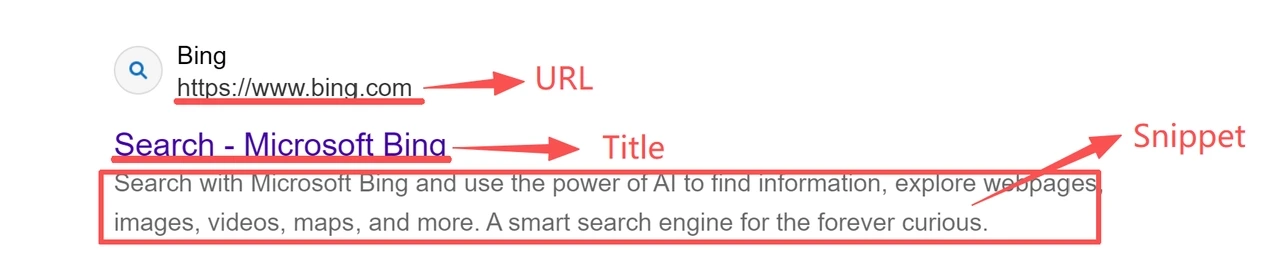
Title identifies the page.
Link points to its source.
Snippet provides a short description.
Position reflects where the item appears in the list.
Together, these fields give a compact yet meaningful snapshot of the search landscape. They reflect how Bing structures its results and supply the data most valuable for SEO analysis, competitor tracking, and market research. Because their layout rarely changes, a well-built scraper can extract them reliably across many queries without constant updates.
How Bing Pagination Works (The “first=” Parameter)
When scraping data from Bing search results, understanding how pagination works is essential for collecting more than the first page. Bing organizes its results into sequential sets of results, each beginning at an index defined by the ‘first’ parameter. A value of 0 returns the first set of results, while 10, 20, or 30 move through subsequent pages. Each number simply marks the starting position of that page.
This predictable structure provides a stable and repeatable model for accessing deeper result pages. Unlike platforms that often change their layout, Bing’s consistent use of the first parameter makes it a dependable foundation for building scalable, long-term scrapers that require minimal maintenance as your dataset grows.
Install and Set Up Your Python Environment for Scraping Bing
Before scraping data from Bing search results, you’ll need a clean and lightweight Python environment that can send browser-like requests and read HTML responses.
The setup is simple. A few well-known libraries are enough to fetch pages reliably and prepare them for analysis. Once configured, your Bing scraper will be ready to collect data consistently across multiple queries.
Required Libraries (Requests, BeautifulSoup, Optional Parsers)
Scraping Bing with Python doesn’t require a large framework.
You only need a few versatile libraries to handle requests and parse result pages.
Requests: Sends HTTP requests and retrieves Bing result pages.
BeautifulSoup: Parses HTML and locates elements such as titles, links, and snippets.
lxml (optional): Speeds up parsing for large datasets.
json (built-in): Useful for exporting scraped data in structured form.
Open your terminal and run the following command:
pip install requests beautifulsoup4 lxmlConfigure Browser Headers for Reliable Responses
Many Python scrapers fail because they load Bing pages without identifying themselves as browsers. Bing expects specific request headers, and missing them can lead to empty or incomplete responses. Adding proper browser headers helps your scraper appear legitimate and receive full pages.
Key fields include:
User-Agent: Identifies the client type.
Accept-Language: Ensures readable, localized results.
Accept-Encoding: Enables compressed responses for faster delivery.
Connection: Keeps the session active.
A reliable default set looks like this:
HEADERS = {
    "User-Agent": "Mozilla/5.0 (Windows NT 10.0; Win64; x64) AppleWebKit/537.36 (KHTML, like Gecko) Chrome/120.0.0.0 Safari/537.36",
    "Accept": "text/html,application/xhtml+xml,application/xml;q=0.9,*/*;q=0.8",
    "Accept-Language": "en-US,en;q=0.9",
    "Accept-Encoding": "gzip, deflate, br",
    "Connection": "keep-alive"
}
These headers ensure complete responses and reduce early blocking issues. Your Python environment is now ready for the next step, sending your first Bing request.
Extracting Bing SERP Data with Python Step-by-Step
The following steps demonstrate a simple and repeatable Bing SERP scraping workflow. You’ll learn how to collect titles, URLs, and snippets from multiple pages using Python.
Step 1: Send the First Request to Bing
Start by sending your first request to Bing using the headers you configured earlier.
This retrieves the HTML content that your scraper will later parse.
import requests

query = "python tutorial"
url = f"https://www.bing.com/search?q={query}&first=0"

response = requests.get(url, headers=HEADERS, timeout=15)
html = response.text
A status code of 200 means the page loaded successfully. Codes such as 403 or 429 indicate that Bing has temporarily blocked the request. This usually happens when headers are missing or when requests are sent too quickly.
To avoid rate limits, add short delays between requests or route traffic through rotating residential proxies.
Step 2: Parse Titles, Links, and Snippets
Once the HTML is returned, extract the key fields that appear in each Bing result block. Most listings contain a title, a link, and a snippet. These are the main data points used when scraping Bing SERPs.
from bs4 import BeautifulSoup

soup = BeautifulSoup(html, "lxml")
results = []

for item in soup.select("li.b_algo"):
    try:
        link_tag = item.select_one("a")
        title = link_tag.get_text(strip=True) if link_tag else ""
        link_url = link_tag["href"] if link_tag else ""
        snippet_tag = item.select_one(".b_caption")
        snippet = snippet_tag.get_text(strip=True) if snippet_tag else ""
        results.append({
            "title": title,
            "url": link_url,
            "snippet": snippet
        })
    except Exception as e:
        print(f"Skipping one item due to parse error: {e}")
This produces a structured list of visible SERP fields that you can easily save, filter, or analyze later. You can also export this data to a CSV or JSON file for further analysis.
Step 3: Add Pagination to Scrape More Results
To scrape more than the first set of results, loop through additional pages using the first parameter. Increasing it in steps of ten moves through the result sequence in a predictable way.
import time

all_results = []

for page in range(3):
    start = page * 10
    url = f"https://www.bing.com/search?q={query}&first={start}"
    response = requests.get(url, headers=HEADERS, timeout=15)
    soup = BeautifulSoup(response.text, "lxml")

    for item in soup.select("li.b_algo"):
        link_tag = item.select_one("a")
        title = link_tag.get_text(strip=True) if link_tag else ""
        link_url = link_tag["href"] if link_tag else ""
        snippet_tag = item.select_one(".b_caption")
        snippet = snippet_tag.get_text(strip=True) if snippet_tag else ""
        all_results.append({
            "title": title,
            "url": link_url,
            "snippet": snippet
        })

    # Pause between requests to reduce blocking risk
    time.sleep(2)
By adjusting the first value, your scraper can navigate through multiple Bing pages using the same parsing logic. This allows you to build a larger dataset with consistent structure.
If Bing updates its layout, simply revise the selectors (li.b_algo or .b_caption) to keep the scraper compatible.
Complete Example: A Full Python Script for Scraping Bing
The script below combines the request, parsing, and pagination steps into one complete workflow. You can copy this script into a file named bing_scraper.py and run it with python bing_scraper.py.
import requests
from bs4 import BeautifulSoup
from typing import List, Dict

HEADERS = {
    "User-Agent": (
        "Mozilla/5.0 (Windows NT 10.0; Win64; x64) "
        "AppleWebKit/537.36 (KHTML, like Gecko) "
        "Chrome/120.0.0.0 Safari/537.36"
    ),
    "Accept-Language": "en-US,en;q=0.9",
    "Accept-Encoding": "gzip, deflate, br",
    "Connection": "keep-alive",
}


def fetch_bing_html(query: str, start: int = 0) -> str:
    """Send a request to Bing and return the raw HTML."""
    params = {"q": query, "first": str(start)}
    response = requests.get(
        "https://www.bing.com/search",
        headers=HEADERS,
        params=params,
        timeout=15,
    )
    response.raise_for_status()
    return response.text


def parse_results(html: str) -> List[Dict[str, str]]:
    """Extract titles, URLs, and snippets from the Bing SERP."""
    soup = BeautifulSoup(html, "lxml")
    results = []

    for item in soup.select("li.b_algo"):
        link_tag = item.select_one("a")
        title = link_tag.get_text(strip=True) if link_tag else ""
        url = link_tag["href"] if link_tag else ""

        snippet_tag = item.select_one(".b_caption")
        snippet = snippet_tag.get_text(strip=True) if snippet_tag else ""

        results.append({
            "title": title,
            "url": url,
            "snippet": snippet
        })

    return results


def scrape_bing(query: str, pages: int = 3) -> List[Dict[str, str]]:
    """Scrape multiple Bing pages using the same parsing logic."""
    all_items = []

    for page in range(pages):
        start = page * 10
        html = fetch_bing_html(query, start=start)
        page_items = parse_results(html)
        all_items.extend(page_items)

    return all_items


if __name__ == "__main__":
    query = "python tutorial"
    results = scrape_bing(query, pages=3)

    print(f"Collected {len(results)} results for: {query}")
    for i, item in enumerate(results, start=1):
        print(f"{i}. {item['title']}")
        print(f"   {item['url']}")
        print(f"   {item['snippet']}\n")

# Example output:
# Collected 30 results for: python tutorial
# 1. Python.org
#    https://www.python.org/
#    The official home of the Python Programming Language.
This script applies the same request, parsing, and pagination workflow covered in this guide.
For larger projects, you can extend it with retry logic, CSV or JSON export, and rotating residential proxies to handle Bing scraping tasks more reliably.
👀 You may also want to know:
How to Avoid Blocking When Scraping Bing at Scale
As your Bing web scraping workload increases, you may encounter partial pages, empty result blocks or status codes that indicate Bing has restricted access. These issues typically appear when request patterns become repetitive or no longer resemble normal browsing behavior.
How Bing Detects Bots (IP, Headers, Fingerprints)
Bing evaluates several signals to determine whether a request is automated. The main ones include:
IP reputation: IP reputation is one of the strongest indicators. When many requests come from the same address or follow identical timing, Bing may respond with errors such as 403 or 429.
Browser signals: Missing browser signals can cause similar issues. Requests without a recognized User Agent or Accept Language often return incomplete results because the traffic does not match expected browser behavior.
Region mismatch: Region mismatch can also raise flags, since Bing tailors its SERPs by location and may limit access when the traffic pattern looks unusual.
These checks work together to separate scripted activity from real users. The more repetitive your IP, headers and request timing become, the more likely the scraper is to be restricted.
Why Rotating Residential Proxies Keep Bing Scraping Stable
Rotating residential proxies improve stability by routing requests through real household networks. This makes your traffic appear more natural and prevents rate limits from building up on a single IP. Automatic rotation distributes activity across many addresses, while city-level targeting helps retrieve accurate SERPs for specific markets. Residential IPs also avoid the fingerprint inconsistencies that often affect datacenter addresses.
IPcook provides a residential proxy service suited for long-running scraping workloads, with features that help reduce blocking and maintain reliable access:
55M+ global residential IPs
Automatic rotation for continuous collection
City-level targeting for localized SERPs
24-hour sticky sessions when a stable identity is required
99.99% uptime for dependable operation
Instant access with no subscription required
Competitive pricing suitable for ongoing Bing web scraping
Conclusion
You can scrape Bing with Python reliably by sending clean requests, understanding the SERP structure, and managing pagination predictably. This workflow helps you collect scraping bing search results in a stable and repeatable format that supports long-term analysis.
For large-scale bing web scraping, the main challenge is avoiding detection and preventing IP blocks. Rotating residential proxies address this by distributing traffic across real user networks, helping your scraper maintain stable access over time.
👉 Try IPcook with 100MB of free residential proxy traffic to keep your Python Bing scraper running without interruptions.
