


What Are Datacenter Proxies? Meaning, Uses, Pros and Cons

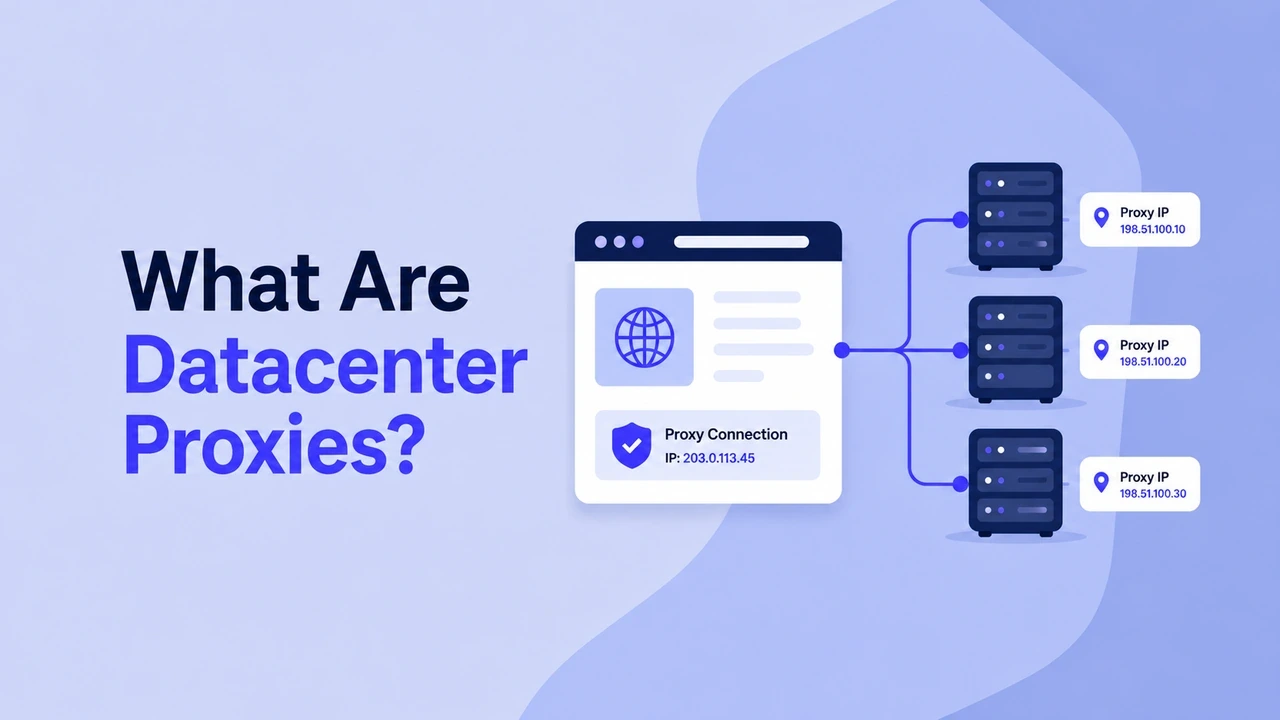
Datacenter proxies are proxy servers that route your traffic through IP addresses hosted in data centers, cloud platforms, or server farms — instead of through a residential Internet Service Provider (ISP) network. A data center is a facility that houses servers and networking equipment for websites, applications, and cloud services. Because these IPs come from high-bandwidth server infrastructure rather than home connections, datacenter proxies are typically faster, cheaper, and easier to scale than residential proxies.
Keep reading to learn everything about datacenter proxy servers, including what datacenter proxies are, how they work, the different types available, how they compare to residential and ISP proxies, and what to consider before using them.
What is a Datacenter Proxy?
A datacenter proxy acts as a middle layer between your device, browser, scraper, or automation tool and the website you want to reach. Instead of connecting directly from your own IP address, your request is routed through a server-hosted IP first.
When you send a request through a datacenter proxy, the target website sees the proxy IP instead of your original IP, giving you more anonymity while accessing the web. This can help you:
Hide your real IP address and location
Send requests from IPs in different countries or regions
Spread large volumes of requests across many IPs
Reduce IP-based throttling in public data tasks by avoiding reliance on a single IP
However, strict platforms may recognize known data center IP ranges more easily than residential or ISP traffic, which we'll return to in the pros and cons below.
How Do Datacenter Proxies Work?
A datacenter proxy sits between your device and the target website. When you send a request, the proxy forwards it using its own IP address, the website responds to the proxy, and the proxy passes the data back to you, often within milliseconds.
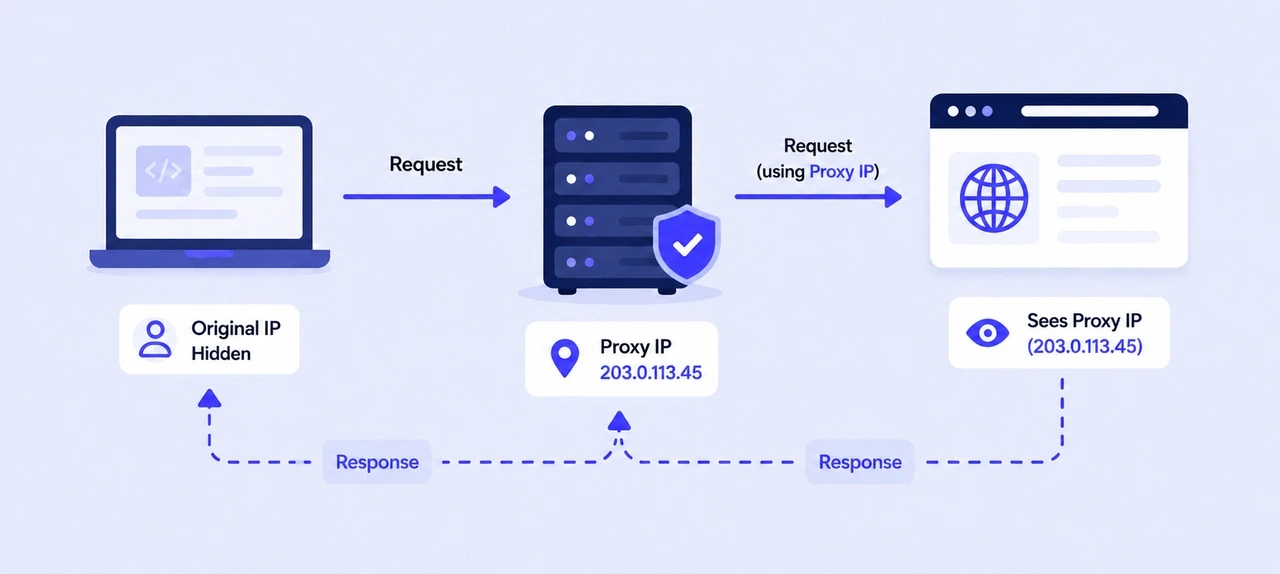
For example, say a scraper needs product price data from an e-commerce site:
Your tool sends a request to the datacenter proxy using the proxy host, port, and authentication details.
The proxy server forwards that request to the target website using one of its datacenter IP addresses.
The target website responds to the proxy IP, not your original IP.
The proxy sends the response back to your tool, so you can collect the page data or result.
What Are Datacenter Proxies Used For?
Here are the most common ways to use datacenter proxies:
Web scraping: Collecting large volumes of public data, such as prices, listings, reviews, and product details, from websites quickly and at scale. Their speed and lower cost at volume make them practical for large-scale data collection.
SEO monitoring: Checking keyword rankings, SERP features, and competitor visibility from different countries, regions, or markets without relying on a single IP address.
Price tracking and market research: Monitoring competitor pricing, stock availability, and market trends across regions in near real time.
Basic ad verification: Checking whether ads load correctly across different regions and devices. For high-stakes verification where a real consumer perspective matters, residential proxies are often a better fit, but datacenter proxies can handle large-scale, lower-risk checks efficiently.
Application and QA testing: Simulating traffic from different IPs and locations to test geo-restrictions, load handling, localization, or regional content delivery.
High-volume automation: Running automation scripts, schedulers, or data pipelines that make frequent requests while reducing reliance on a single IP address.
Accessing geo-specific public data: Viewing geo-specific public pages, local pricing, or search results from a specific country or region.
What Are Types of Datacenter Proxies?
Choosing a datacenter proxy plan comes down to three questions: Who can use the IP? Does the IP stay the same or rotate? Which protocol does the proxy support? The answers affect cost, stability, IP reputation, and tool compatibility.
Shared vs. Dedicated Datacenter Proxies
Shared and dedicated proxies are mainly about IP ownership.
Shared datacenter proxies are used by multiple customers at the same time. While this keeps costs lower, their reliability can depend partly on how other users handle the same IP. On stricter websites, a shared IP that has been overused or abused may become less reliable.
Dedicated datacenter proxies are assigned to one customer only. They cost more, but you get exclusive use of the IP and more control over how it is used and managed. If you need more control, like keeping cleaner IP usage or maintaining access over time, dedicated proxies are usually the better option.
Static vs. Rotating Datacenter Proxies
Static and rotating proxies are about IP behavior.
Static datacenter proxies keep the same IP for the duration of your session or plan. They work well for tasks that rely on continuity, such as accessing a dashboard repeatedly, testing the same workflow, or running a session where changing IPs mid-way could cause problems.
Instead of sending every request from the same address, rotating proxies cycle through a pool of datacenter IPs. Rotation can happen on every request, every session, or after a set time interval. This helps distribute requests across many addresses and reduces reliance on a single IP.
HTTP/HTTPS vs. SOCKS5 Proxies
HTTP/HTTPS and SOCKS5 describe what kind of traffic the proxy can handle.
HTTP/HTTPS proxies handle standard web traffic. They are the common choice for browsers, scrapers, SEO tools, and web automation frameworks because they work well with normal web requests.
SOCKS5 proxies operate at a lower network level, so they can handle more than HTTP traffic. They are often preferred for desktop apps, gaming clients, large file or data transfers, and advanced workflows that need to route traffic from multiple protocols.
📚 Related reading:
Datacenter Proxies vs. Residential Proxies vs. ISP Proxies
While datacenter proxies are commonly chosen for speed and lower per-IP pricing, residential and static ISP proxies solve different problems around network signals and session stability.
The key difference is where the IP comes from and how websites may detect that traffic. The table below compares datacenter, ISP, and residential proxies across the factors that usually matter most.
Factor | Datacenter Proxies | ISP Proxies | Residential Proxies |
IP source | IPs from data centers | IPs from ISP networks, hosted on servers | IPs from real home internet connections |
Speed | Fastest | Fast and stable | Fast |
Cost | Lowest, priced by IP | Medium, priced by static IP | Highest, priced by traffic |
IP stability | Static or rotating | Static and long-term | Rotating, with sticky sessions |
Detection risk | Depends on the provider | Low | Very low |
Pros and Cons of Datacenter Proxies
The strengths and limits of datacenter proxies come from the same source: their IPs are hosted on server infrastructure rather than real residential networks. That gives them strong performance for data-heavy tasks, but it also makes them easier to identify on platforms that check network origin closely.
Pros
Fast performance: Datacenter proxies run through high-bandwidth server networks, so requests usually move quickly and consistently, often faster than residential proxies whose speed can vary by the quality of real home connections.
Lower cost: They are usually the most affordable proxy type, especially when you need many IPs or high request volumes. Compared with residential or ISP proxies, datacenter proxy pricing is often easier to predict because it is commonly based on IP count and usage period.
Bandwidth-friendly pricing: Most datacenter proxy plans are priced by IP and time rather than by traffic volume. Some providers, including IPcook, also offer unlimited bandwidth, which helps make data-heavy projects more budget-friendly.
Cons
Easier to detect on strict platforms: Datacenter IPs come from known hosting ranges and do not carry residential or ISP network signals. Websites that check IP origin closely may flag or block datacenter traffic more aggressively than residential or ISP traffic.
Shared IP reputation risk: With shared datacenter proxies, other users' activity on the same IP can affect reliability. Dedicated proxies reduce this risk, but they usually cost more.
Less suitable for account-based workflows: Because datacenter IPs do not like real home connections, platforms that rely on long-term identity, login consistency, or strong trust signals may treat them with extra caution. For those tasks, ISP or residential proxies are more suitable.
Final Word: Choose IPcook Datacenter Proxies for Fast, Scalable Tasks
You should now have a clear understanding of what datacenter proxies are, how they work, where they perform best, and where their limits are. After you've confirmed that datacenter proxies are the proxy type you need, it’s time to choose a trustworthy provider that can reliably support the request volume and speed your tasks require.
If your priority is speed, scale, and cost-efficiency, IPcook Datacenter Proxies are exactly right for that.
Here's what you get:
HTTP & SOCKS5 support for scrapers, browsers, and automation scripts
Unlimited bandwidth for high-volume jobs without traffic-based caps
99.99% uptime with low-latency connections and optimized global routing
API, dashboard, and DNS customization for real-time proxy management
Unbeatable pricing from $0.037/IP/day, with plans from 10 to 500+ IPs
