


What Is a Static IP? How Does It Differ from a Dynamic IP?

An IP address is a network identifier assigned to a device or connection. It tells other devices where to send data, whether the communication stays within a local network or travels across the internet. Some IP addresses are configured to remain consistent instead of changing automatically. An address configured this way is called a static IP.
In this guide, we'll take a closer look at what a static IP is and how it works so you can fully understand the concept. We'll also explain how it differs from a dynamic IP and cover how to get or set one up if you decide you need a fixed address.
What Is a Static IP Address?
A static IP address is an IP address that is manually configured or consistently assigned to a specific network interface, connection, or online resource and does not automatically change. Reconnecting to the network does not automatically replace it with another address.
The address also remains consistent when a DHCP lease is renewed. A DHCP lease is the period during which a DHCP server assigns an IP address to a device. With a DHCP reservation, the server continues assigning the same IP address to that device when the lease is renewed.
A static IP can use either IPv4 or IPv6. The term static only describes whether the address remains consistent over time. It does not mean that the IP address can never be changed or that it is dedicated to one customer. A static IP may be dedicated, but static and dedicated describe different properties.
Static IP addresses can also be public or private:
Aspect | Public Static IP | Private Static IP |
Where it works | On the public internet | Within a local network |
Who assigns it | ISP, hosting, or cloud provider | Network administrator, router, or DHCP server |
Internet visibility | Publicly reachable, subject to network rules | Not directly reachable from the public internet |
Uniqueness | Globally unique | Unique within the local network |
Common examples | Business connection, cloud server | Printer, NAS, local server |
How Does a Static IP Work?
A static IP works like any other IP address when devices send and receive data. It identifies the source and destination of network traffic. The key difference is that the same IP address is consistently assigned instead of being automatically replaced with another address.
The way a static IP stays consistent depends on how it is assigned. There are 3 common approaches:
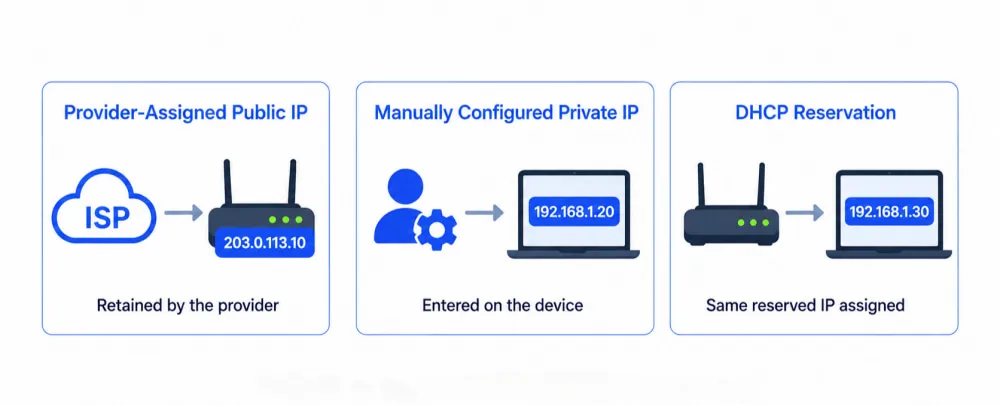
Provider-assigned public static IP: An ISP may reserve the same public IP for a home or business internet connection, while a cloud provider may assign one to a server or other hosted resource. The provider continues routing that address to the same connection or resource until it is released or reassigned.
Manually configured private static IP: A network administrator selects an unused address in the correct local subnet and configures it on the device. The settings typically include the IP address, subnet mask or prefix length, default gateway, and DNS servers.
DHCP reservation: The device still obtains its network settings through DHCP, but the router or DHCP server associates the device's MAC address or client identifier with a reserved IP. When the DHCP lease is renewed, the server assigns the same address again. Unlike manual configuration, the address is managed centrally by the router or DHCP server.
Pros and Cons of a Static IP
Whether a static IP is useful depends on what you need it for. Its main advantages are most noticeable in situations that require a consistent address, such as remote access or hosting websites and other services, while its drawbacks tend to involve cost, configuration, and security.
Pros of a Static IP
Predictable remote access: A public static IP gives authorized remote connections a consistent destination. Local services may also need a fixed private IP or DHCP reservation.
Simpler DNS management: Websites and online services can keep DNS records pointed to the same public IP without updating them whenever the address changes.
Reliable IP-based access rules: Allowlisted services, firewalls, remote databases, and business systems can continue using the same source IP without frequent rule updates.
Easier local network management: Fixed private IPs make devices such as printers, gateways, DNS servers, and NAS systems easier to find, monitor, and troubleshoot.
Cons of a Static IP
Possible additional cost: Private static IPs are generally free to configure, but ISPs may charge extra for public static IPs or offer them only with certain plans.
More configuration and maintenance: Manual setup requires the correct IP address, subnet mask, gateway, and DNS settings. Using an address already assigned to another device can cause an IP conflict.
Greater long-term traceability: A fixed public IP is easier to associate with the same network over time. It does not automatically reveal a person's identity, but it provides less address variation than a changing public IP.
Persistent exposure to public services: A publicly accessible service remains reachable at the same address if it has an unpatched vulnerability. A static IP does not create the vulnerability, but changing IPs is not a substitute for proper security measures.
Static IP vs Dynamic IP: What's the Difference?
A static IP isn't necessary for every network or use case, since many networks use dynamic IP addresses instead. The table below makes it easy to see the key differences between the two and decide whether you actually need a static IP.
Aspect | Static IP | Dynamic IP |
Address behavior | Stays the same until changed | May change over time |
Assignment | Manual, DHCP reservation, or provider-assigned | Automatic |
Administration | Requires more setup | Minimal setup |
Common Use cases | Remote access, hosting, business systems | Browsing, streaming, everyday use |
Cost | Public IPs may cost extra | Usually included |
💡For a more detailed comparison, see Dynamic vs Static IP: What's the Difference & Which to Choose?
How to Get and Set Up a Static IP
If you need a consistent address for hosting, IP allowlisting, or a fixed address for devices on your local network, you may need a static IP. Here's a brief guide to getting and setting up a static IP.
How to Get or Assign a Static IP
There are 2 main paths. A public static IP must be assigned by the provider that manages the internet connection or cloud resource. A private static IP is assigned within your local network and does not need to be purchased from an ISP.
Public Static IP
Determine whether you need the address for an internet connection or a cloud resource.
Contact your ISP for a home or business connection. For a cloud server, reserve the address through the relevant cloud provider.
Confirm whether the address will be configured automatically. If manual setup is required, save the IP address, subnet, gateway, and DNS information provided.
Private Static IP
Check your router's local subnet and DHCP address range.
Choose between a DHCP reservation and manual configuration on the device.
For manual configuration, select an unused address in the correct subnet that will not conflict with another device.
How to Configure a Static IP
Once a public address has been assigned or a private address has been selected, how you apply it depends on where the address is managed.
Public Static IP
An ISP may provision the address automatically, so no manual setup is needed. If the ISP supplies network details, enter them in your router's WAN settings. For a cloud server, associate the reserved static IP with the correct server or network resource. Never enter a public IP that has not been assigned by the provider.
Private Static IP
A private static IP is configured within your local network. You can create a DHCP reservation in your router so the same device continues receiving the same address. Alternatively, enter the address manually in the IP or TCP/IP settings on a Windows PC or Mac. These details should not be entered under proxy settings.
💡Menu names and setup requirements vary by device and provider. For step-by-step instructions, see our guide: How to Get and Set Up a Static IP Address.
FAQs
How Do I Change My IP Address?
You can change a private IP through your device or router settings. A dynamic public IP may change when your ISP reassigns it, although restarting the router does not guarantee a new address. To change a static public IP, contact the ISP or cloud provider that assigned it. A VPN or proxy changes the IP visible online, not the address assigned to your connection.
How Do I Know If My Public IP Is Static?
Check your public IP with an IP lookup tool and compare the result over time. If it changes, it is dynamic. If it stays the same, it may be static, but dynamic addresses can remain unchanged for long periods. The most reliable answer comes from checking your internet plan or asking your ISP directly.
Does a Static IP Improve Internet Speed?
No. A static IP only describes how consistently an address is assigned. It does not increase bandwidth, reduce latency, or make network hardware faster. It can make hosting, remote access, DNS records, and IP allowlists easier to manage. Actual speed depends on your internet plan, routing, network congestion, Wi-Fi connection, and hardware.
Final Word
A static IP is an address that remains assigned to the same connection, device, or resource until changed. It can be public or private and may be issued by a provider, configured manually, or reserved through DHCP. Its main advantage over a dynamic IP is predictability. However, it may cost extra or require more configuration. A static IP is worth using when keeping the same address makes a network connection or resource easier to manage.
