


How to Purchase a Static IP Address: Where to Buy & Costs

A dynamic IP usually isn't a problem until it changes at the wrong time. When that happens, it can interrupt business workflows, trigger account checks, and break remote access. It may be time to switch to a static IP.
Here's what this guide covers:
What to check before you buy a static IP address
Which IP type fits your use case
Where to buy a static IP address
How much a static IP address costs
Just what you need to make the right call before you pay.
Can I purchase a static IP address?
Yes, you can purchase a static IP address. A static IP stays the same over time, which makes it useful for remote access, hosting, and workflows that need a consistent IP identity. You can usually get a static IP from three places: your ISP, a cloud provider, or a proxy provider.
An ISP usually provides a static IP for your home or office connection, while a cloud provider can assign one or more static IPs to hosted resources. A proxy provider is often the most flexible option when you need more IP choices, location options, or easier scaling.
Where Can You Buy Static IP Addresses
First, a quick reality check. When you "buy" a static IP, you're not purchasing the address itself. Instead, you're paying for a service from a provider who assigns that IP exclusively to you for as long as you need it.
Here's a hassle-free choice worth considering: IPcook's Static ISP Proxies
If you're running ecommerce stores, managing multiple social accounts, or doing anything where anonymity and privacy matter, this is what you need. You can pick a global specific location, get a dedicated IP that's yours alone, and integrate it seamlessly into your browser or automation tools.
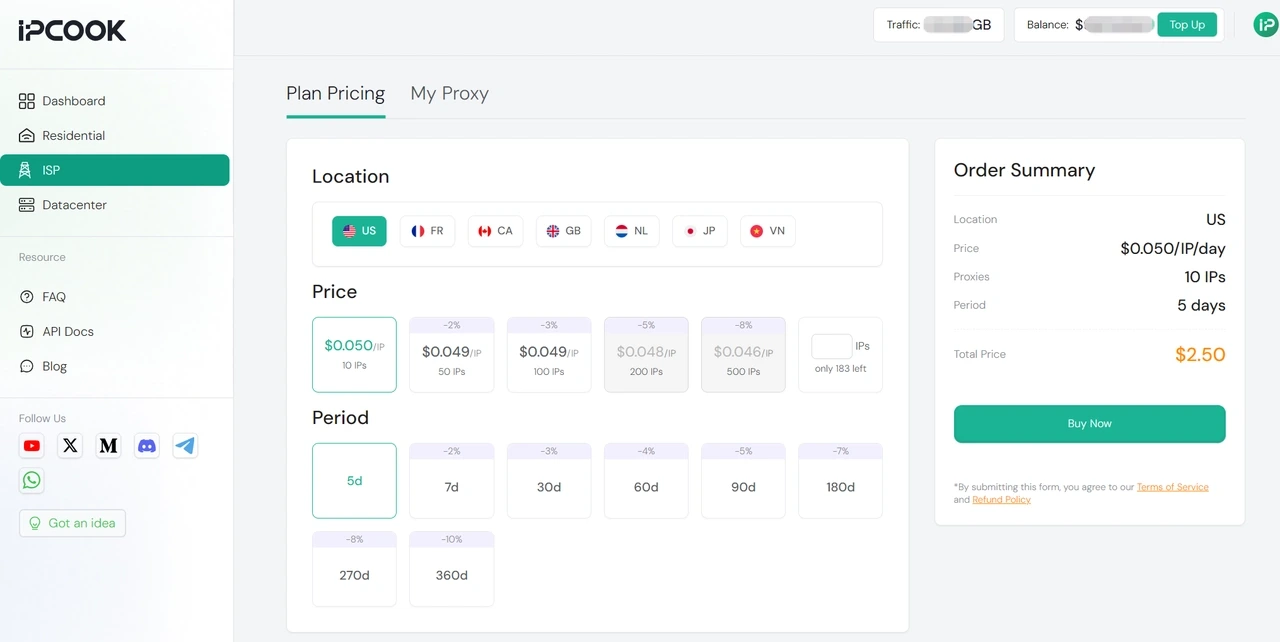
IPcook Unbeatable Static ISP Pricing:
Plan | Price | Total for 5 Days |
10 IPs | $0.05/IP/day | $2.50 |
50 IPs | $0.049/IP/day | $12.25 |
100 IPs | $0.049/IP/day | $24.50 |
How to Buy Static IP from IPcook:
Just a few clicks to get your dedicated static IP Address.
1. Log in to your IPcook dashboard and open the ISP page.
2. Choose your location, number of IPs, and Period.
3. Check the order summary on the right.
4. Click Buy Now to complete your purchase.
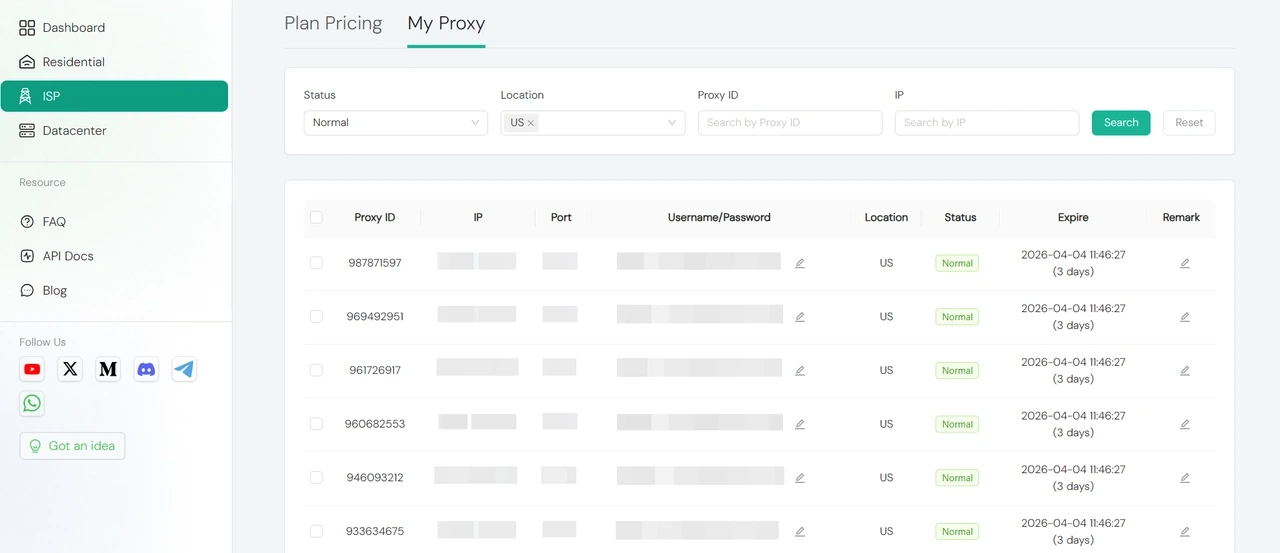
5. Open My Proxy to view and use your static IPs.
What you get from IPcook:
Clean, ethically sourced ISP IPs to reduce bans and restrictions
Ultra-fast servers with unlimited traffic for smooth browsing
Dedicated static IPs to prevent account association and keep your activities private
Affordable pay-as-you-go pricing from $0.05/IP, with no subscription required
What to Check Before You Buy a Static IP Address
If you plan to buy a static IP online, don't look at price alone. The right choice depends on reliability, security, and whether the total cost fits your needs.
Reliability When buying a static IP, reliability comes first. You want a stable, consistent connection that does not keep dropping in the middle of your work. Pick providers that clearly state high uptime and have very few service interruptions.
Cost The price of a static IP depends on the provider and the plan you choose. Compare a few options, look for hidden extras like bandwidth or location fees, and think about the long-term cost of keeping that static address, not just the first month.
Security
A fixed IP gives you more control over who can reach your network. You can set stricter firewall rules, use IP allowlisting, and build safer VPN access. With a trustworthy static IP provider, your network is easier to protect and trusted access is easier to manage.
👉 For reliable static ISP proxies, see our guide to the best ISP proxy providers.
Common Use Cases for a Static IP
Static IPs can be useful in both technical setups and online account workflows. Here are some of the most common use cases.
Hosting websites, servers, or apps A static IP keeps your site or service at a fixed address, which matters for payment gateways, SSL certificates, and anything that needs to reliably find its way back to you. No more updating DNS every time your IP shifts.
Managing social media or ecommerce accounts With a static IP, you're not constantly re‑verifying logins or getting flagged for looking like a different person every time you log in. That matters if you're juggling multiple accounts. Fewer login prompts, less sudden ban risk.
Remote access and internal tools A static IP gives you one fixed address to hit when you need to grab a file from home, check a security cam, or remote into your work machine without playing IP guess‑and‑check. VPNs, Remote Desktop, all just work.
Security and access control
When your IP doesn't move, you can lock things down properly. Set firewall rules that actually stick, whitelist only that address for sensitive systems, and stop chasing a moving target.
Dedicated IP vs Shared IP
When you buy a static IP from a proxy provider or VPN service, it usually comes in one of two forms: dedicated or shared. Here's the difference:
Factor | Dedicated Static IP | Shared Static IP |
Speed | More stable because the IP is used only by you | Performance can vary when others share the same IP |
Exclusivity and cleanliness | Used only by you, which usually means a cleaner IP history | Shared usage can affect IP reputation and consistency |
Consistency | Better for account stability and longer sessions | Shared history may lead to extra checks in some cases |
Pricing | Usually costs more | Usually cheaper to start |
Conclusion
Static IPs exist, you can buy them, and the right one depends on what you're doing with it. Skip ISP headaches and cloud complexity. If you need a clean, dedicated static IP for ecommerce or multi-account work, grab one from IPcook starting at $0.05/ip.
