


What Is an ISP? How Internet Service Providers Work

Every time you visit a website, stream a video, or use an online application, your device needs an internet connection to communicate with remote servers. An Internet Service Provider (ISP) makes this connection possible by linking your home, office, or mobile device to the wider internet.
Although people use the internet daily, they may not understand how ISPs work, what services they provide, or how connection types affect performance. Read on to learn more about how ISPs connect users to the internet and what their role means for your online activities.
What Is an ISP?
In networking, ISP stands for Internet Service Provider, a company that provides internet access to individuals, households, and businesses. In the United States, common examples include AT&T, Verizon, Comcast, and Spectrum.
An ISP connects your home or business network to the wider internet, allowing your devices to access websites, use online applications, and communicate with remote servers. To make this possible, ISPs operate network infrastructure and maintain connections with other networks that form part of the internet.
The services an ISP provides can vary depending on its customers and business focus. Some primarily offer internet access to households, while others provide connectivity solutions for businesses, such as dedicated internet connections and static IP addresses.
How Does an ISP Work?
An ISP works with other networks to route data between your device and the destination server. This process involves several steps, from resolving domain names to transmitting data packets and returning the requested information.
A typical connection follows these steps:
You enter a website address. Your browser uses the URL to identify the website you want to access.
Your device sends a request. The request passes through your local network and internet connection toward the destination.
DNS resolves the domain name, and the request is routed. DNS helps translate the domain name into an IP address, while IP routing directs data packets through the ISP's network and other interconnected networks toward the destination server.
The server sends back the response. The requested data travels through the network to your device, allowing your browser or application to display the content.
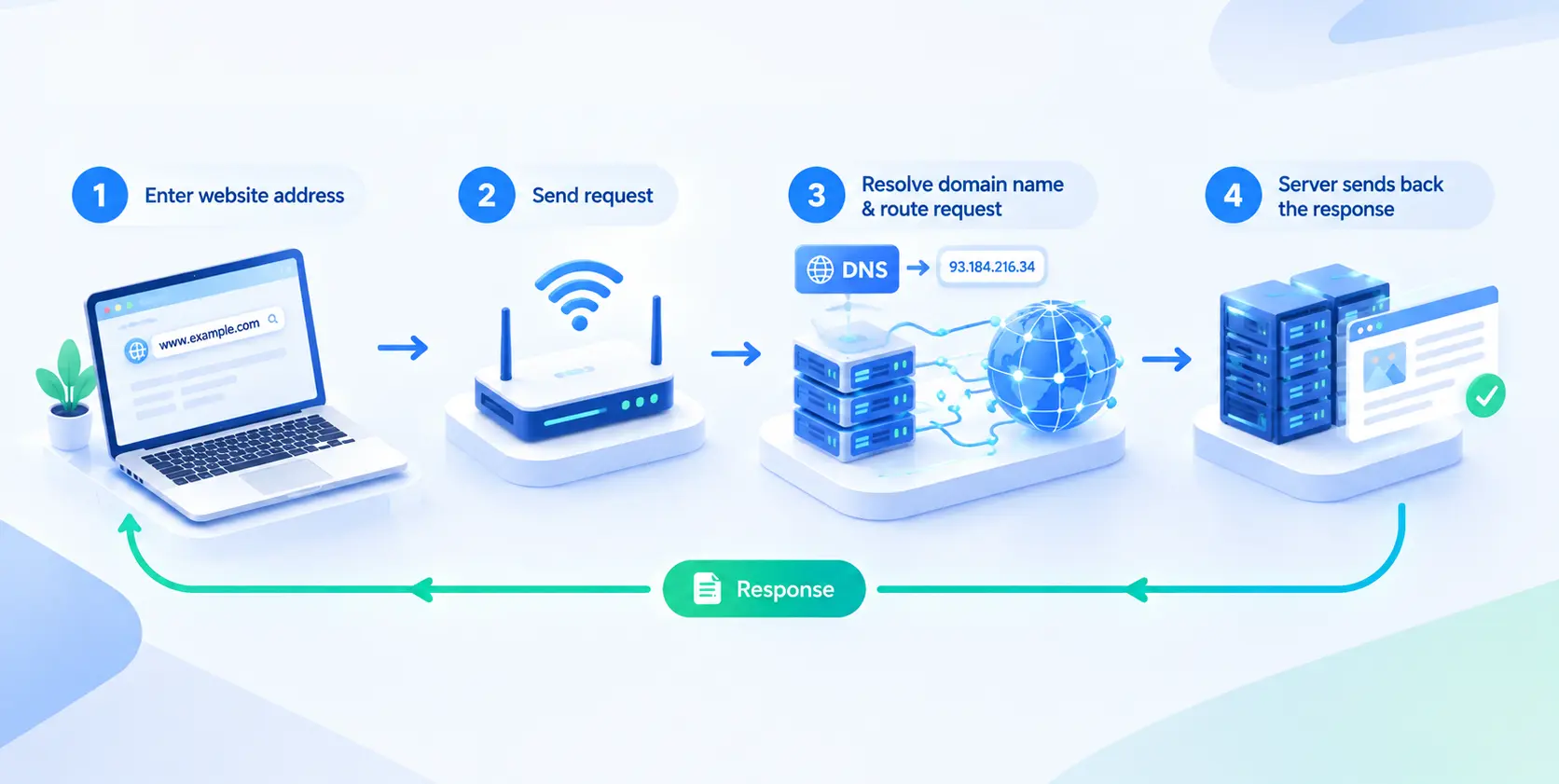
During this process, the ISP helps route traffic through its network and may assign a public IP address to your connection. Depending on the network configuration and the capabilities of your device and destination server, the connection may use IPv4 or IPv6.
Together, these steps enable data to travel between your device and remote servers, supporting communication across the internet.
What Services Do ISPs Provide?
ISP services vary by provider, location, and subscription plan. Internet access is the primary service, but some providers also offer additional connectivity and communication features.
Common services include:
Internet access: Broadband connections for households, individuals, and businesses, with different speeds and data allowances depending on the plan.
Email services: Some ISPs provide email accounts, mailboxes, or related support for their customers.
Domain registration and web hosting: Certain ISPs and broader internet service companies allow customers to register domain names and host websites.
Business connectivity: Business customers may have access to dedicated internet connections, static IP addresses, service-level agreements, or other network services.
Additional services: Depending on the provider, these may include network security features, technical support, Wi-Fi equipment rental, and managed network services.
Not every ISP provides all these options. Some focus primarily on residential broadband, while others offer more extensive services for businesses and organizations with specific connectivity requirements.
When comparing providers, consider which services you actually need rather than assuming that every ISP offers the same package.
What Types of Internet Connections Do ISPs Offer?
Internet access relies on different connection technologies, each with its own characteristics in terms of speed, latency, and availability. The options available in a particular area depend on local infrastructure and provider coverage.
The main types of internet connections include:
Fiber: Transmits data as light through optical fibers. It can deliver high bandwidth and low latency, making it suitable for activities that require fast, reliable connections.
Cable: Uses cable television infrastructure to provide internet access. It can offer high download speeds, although performance may fluctuate with network congestion.
DSL: Uses traditional copper telephone lines. Its speed generally depends on the distance from the provider's equipment and the condition of the line.
Satellite: Provides internet access through satellite infrastructure, making it an option for remote areas. Latency is typically higher with geostationary satellites, while low-Earth-orbit systems can offer lower latency.
Fixed wireless: Delivers internet access through a wireless link to equipment at a fixed location. Performance depends on signal strength, distance, network capacity, and the technology used.
Fiber is often a strong option for users who prioritize speed and low latency, while cable offers an alternative in areas with established cable networks. DSL, satellite, and fixed wireless can provide access in locations where other broadband options are limited.
When comparing available plans, consider the coverage in your area, your budget, and the connection requirements of your everyday online activities.
What Affects Your Internet Connection Speed and Reliability?
Whether you're streaming videos, joining a video call, playing online games, or downloading large files, your internet connection affects how smoothly these activities run. You may notice buffering during video playback, delays in online games, or interruptions during video calls.
These issues can have different causes, and a fast internet plan alone does not guarantee a smooth connection. Several factors can affect your internet speed and reliability:
Bandwidth: Determines how much data your connection can transfer over a given period. More bandwidth can support multiple devices and data-intensive activities, but it does not guarantee lower latency.
Network congestion: When many users share limited network capacity, your connection may slow down, particularly during peak hours.
Latency: Measures how long data takes to travel between endpoints. Low latency is especially important for video calls, online gaming, and other real-time applications.
Connection quality: Weak Wi-Fi signals, wireless interference, damaged cables, or faulty equipment can lead to slow speeds and unstable connections.
Network routing: The path data takes across interconnected networks can affect latency and reliability, particularly when traffic passes through multiple network operators.
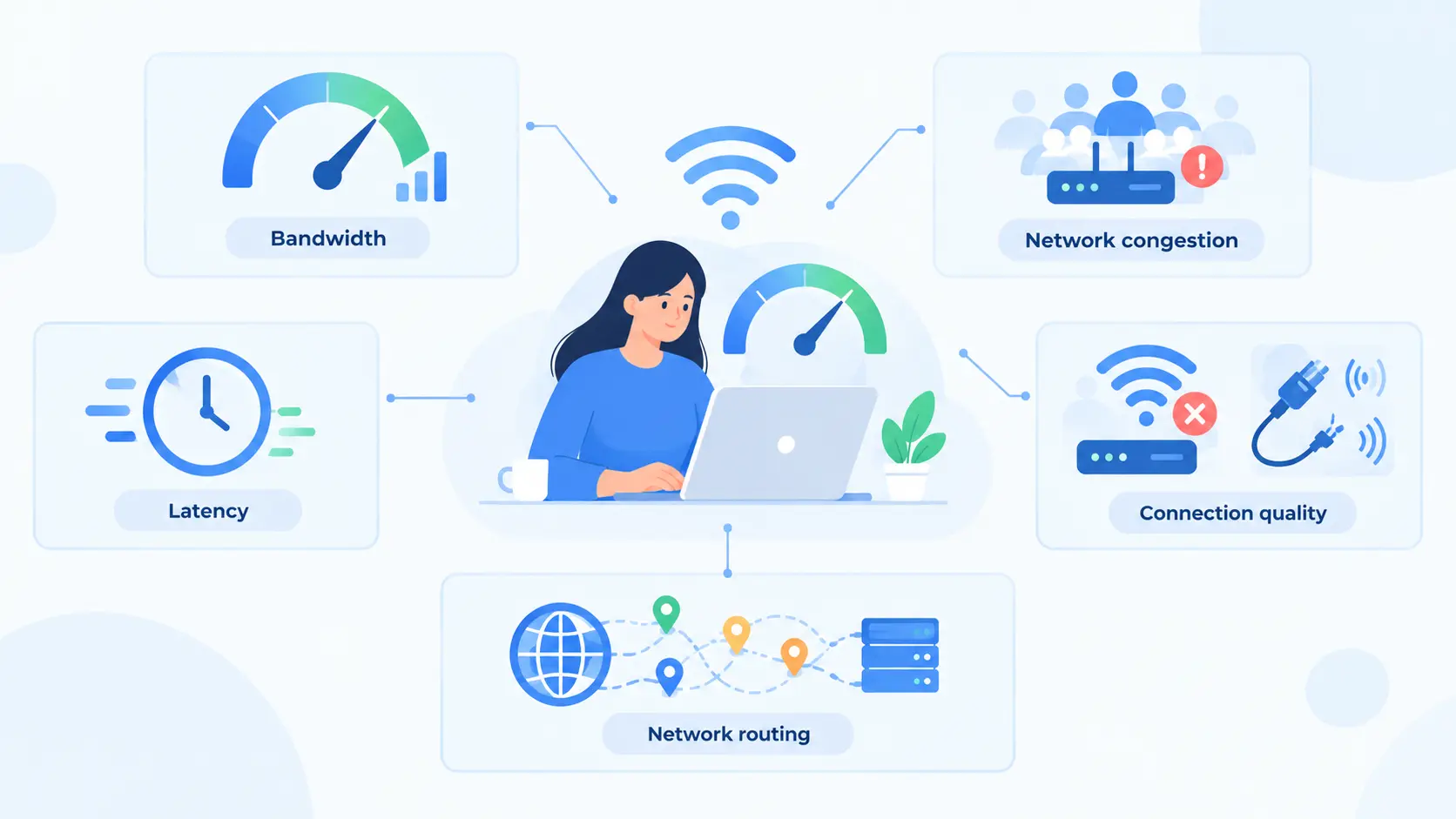
These factors help explain why your connection may perform differently depending on the device you use, your location, and the time of day. Your plan's advertised speed indicates its stated performance under certain conditions, not the performance you will always experience.
If you notice slowdowns or interruptions, run speed tests at different times and compare the results. This can help you determine whether the issue may stem from your local network, your ISP connection, or a specific online service.
What Information Can Your ISP See?
Since your internet service provider manages the network connection between your device and online services, it can observe certain details about your internet activity. Therefore, you may wonder whether your ISP can see what you search or which websites you visit. The answer depends on network configuration, encryption, DNS settings, and the services you use.
An ISP may be able to access or record the following information:
Connection metadata: Information such as connection times, data volumes, and traffic patterns, depending on the network and services involved.
IP addresses: Your ISP can generally identify the public IP address assigned to your connection and may keep records linking that address to your account.
Domain information: If you use your ISP's DNS resolver, it may be able to see the domain names in your DNS queries, which can reveal some of the websites you access. Using another DNS resolver can change what the ISP sees, although it does not necessarily hide all DNS-related information.
Encrypted traffic: HTTPS encrypts webpage content and the data exchanged between your browser and a website. However, some connection metadata may remain visible, including information that can help identify the destination.
The key distinction is between network activity and the content of that activity. HTTPS generally prevents your ISP from reading the protected content of a web session, but it does not make your entire connection invisible. Your ISP may be able to identify the websites you connect to, but it generally cannot see the specific search terms you enter on an HTTPS-protected search engine page from the encrypted traffic alone.
Privacy laws and data-retention rules also vary by jurisdiction and may determine what connection records an ISP must retain or disclose.
How Are ISP Proxies Connected to Internet Service Providers?
The connection lies in the IP addresses they use. ISP proxies route your requests through proxy servers using IP addresses associated with internet service providers, often hosted on data center infrastructure.
The two serve different purposes:
Internet service provider (ISP): Provides internet access to your home, office, or other network.
ISP proxy: Routes your requests through a proxy server using an IP address associated with an ISP.
ISP proxies are commonly offered as static IPs, allowing you to maintain the same IP address across multiple requests or sessions when supported by the service. This can be useful for social media account management on platforms such as Instagram and TikTok, competitor price monitoring, and ongoing website data collection.
For workflows that require ISP-associated IP addresses, IPcook ISP proxies offer static IPs at $0.05 per IP, unlimited traffic, coverage in major countries such as the US, France, and Canada, and 99.9% connection stability. These features help you control costs, access different markets, and maintain reliable connections.
For a comparison of available options, see our guide to the best ISP proxies.
Conclusion
ISPs play an essential role in connecting you to the internet. Understanding how they work and what affects connection speed, reliability, and privacy can help you evaluate your internet service and make more informed decisions about your online activities.
