


What Is a Proxy Protocol? HTTP, HTTPS, and SOCKS5 Explained

When setting up a proxy for web browsing, scraping, or an application, you may be asked to choose a protocol such as HTTP, HTTPS, or SOCKS5. The choice can affect whether the proxy works properly with your browser, scraping tool, game, or other application.
So, which protocol should you use? And why can the same proxy work differently depending on the protocol you choose? This guide explains how common proxy protocols work, what sets them apart, and how to choose one for your specific needs.
What Is a Proxy Protocol
A proxy protocol is a set of rules that defines how an application communicates with a proxy server.
When you use a proxy, your application does not connect directly to the destination. Instead, the proxy acts as an intermediary between the client and the target server. The selected protocol determines how the connection is established and how traffic is handled.
Different proxy protocols may support different types of traffic and applications. This is why the protocol you choose can affect compatibility, authentication methods, and how a proxy works in a specific setup.
📌Proxy Type vs. Proxy Protocol
A proxy type describes the source or infrastructure of the proxy IP, such as Residential, ISP, or Datacenter. A proxy protocol describes how an application connects to and communicates through the proxy, such as HTTP, HTTPS, or SOCKS5.
For example, a Residential Proxy can be used with either HTTP or SOCKS5, depending on the provider and configuration.
How Proxy Protocols Work
A proxy connection generally follows this flow:
Client → Proxy Server → Target Server
Think of a proxy server as an intermediary at the front desk. Your application is the visitor, the target server is the person you want to reach, and the proxy protocol is the set of rules for how the visitor communicates with the front desk.
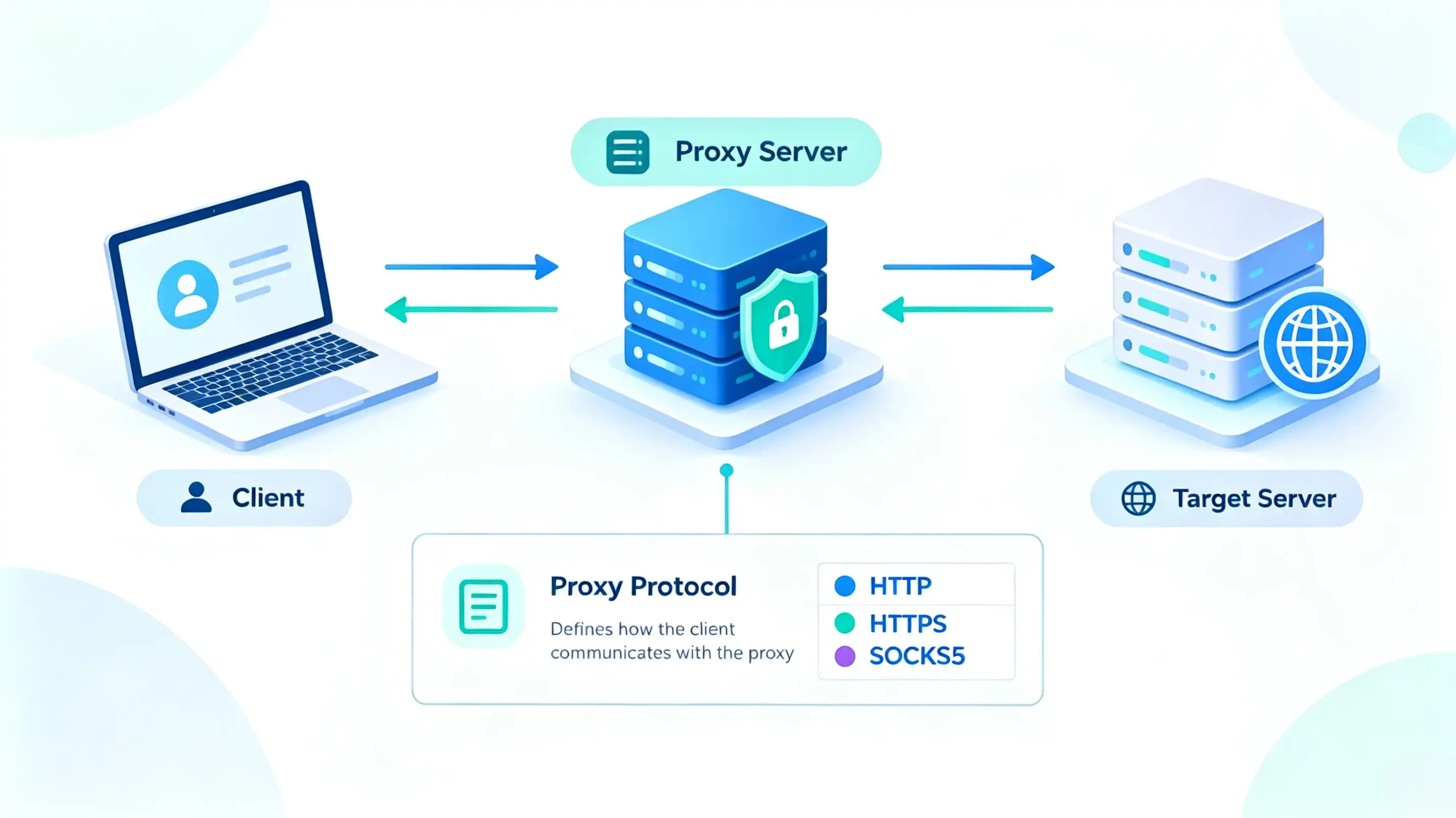
The protocol determines how the client starts the connection, sends information to the proxy, and communicates through it. The proxy then handles the connection to the target server and relays data between the two sides.
Different proxy protocols use different communication methods, which is why the same proxy server can behave differently depending on the protocol used. The following sections explain how HTTP, HTTPS, and SOCKS5 handle these connections.
Common Types of Proxy Protocols
Several proxy protocols are commonly used to connect applications to proxy servers. While they serve the same basic purpose, each uses a different approach to establish and handle the connection.
The three protocols covered below are HTTP, HTTPS, and SOCKS5. The following sections explain how each one works, its main characteristics, and where it is commonly used.
HTTP Proxy
An HTTP Proxy is a proxy protocol designed primarily for web traffic. It is widely supported by browsers, web scraping tools, and web automation software.
When you use an HTTP Proxy, your web request is first sent to the proxy server. The proxy forwards the request to the target website and returns the response to your application. For HTTPS websites, the proxy can use the CONNECT method to establish a tunnel to the destination server.
HTTP Proxies are commonly used for web browsing, web scraping, HTTP requests, browser automation, and public web data collection. They are generally easy to configure, but applications that use other types of network connections may not support them. Check your application's supported proxy protocols and authentication requirements before setup.
HTTPS Proxy
An HTTPS Proxy uses TLS to protect the connection between the client and the proxy server. This adds encryption to the proxy connection and helps protect data exchanged between the application and the proxy.
HTTPS Proxies are useful for applications that support HTTPS proxy connections and require an encrypted connection to the proxy. For example, they can be used with API clients that send sensitive requests, data collection tools that connect to external services, enterprise software with strict network requirements, and browsers that support HTTPS proxy settings.
The exact setup depends on the application, so check whether it supports HTTPS proxies and which authentication and connection formats it accepts.
SOCKS5 Proxy
A SOCKS5 Proxy provides a general-purpose method for relaying network connections. Unlike an HTTP Proxy, it does not handle traffic specifically as HTTP requests. Instead, it relays network traffic at the connection level and supports TCP connections.
SOCKS5 also supports UDP and includes authentication negotiation, such as username and password authentication. This makes it suitable for applications that use different types of network traffic, provided the application supports SOCKS5. Common examples include browsers, automation tools, online games, messaging applications, and web scraping software.
A SOCKS5 proxy can be useful when an application needs to handle traffic beyond standard HTTP or HTTPS requests, or when UDP communication is required. However, SOCKS5 support does not automatically mean that every feature is available. UDP traffic requires support from both the application and the proxy provider for the required UDP relay functionality.
😆Try IPcook SOCKS5 Proxies!
Get more control over your SOCKS5 setup with flexible session management, precise location targeting, and multiple proxy types. Switch between Residential, ISP, and Datacenter options to match different traffic and connection requirements.
HTTP vs HTTPS vs SOCKS5 Proxy Comparison
The differences between HTTP, HTTPS, and SOCKS5 proxies are easier to compare by looking at their traffic handling, connection methods, and application compatibility.
Comparison | HTTP Proxy | HTTPS Proxy | SOCKS5 Proxy |
Primary Use | Web traffic and HTTP/HTTPS requests | Proxy connections protected with TLS | General-purpose network connections |
Supported Traffic | Mainly HTTP/HTTPS traffic | Mainly web traffic supported by the application | TCP; UDP support depends on implementation |
TCP / UDP | TCP | TCP | TCP and UDP* |
Common Applications | Browsers, web scraping, web automation | Browsers and applications supporting HTTPS proxies | Browsers, automation tools, games, messaging apps, and other network applications |
Client Compatibility | Widely supported by browsers and web tools | Depends on application support | Depends on application support |
*SOCKS5 defines UDP support, but actual UDP functionality depends on the client, proxy provider, and implementation.
The proxy protocol determines how an application connects to the proxy, rather than which protocol the destination website uses. When choosing a proxy protocol, consider the application's supported protocols and the type of traffic it needs to handle.
How to Choose the Right Proxy Protocol
Choosing a proxy protocol also depends on the task you are performing. The following sections focus on the practical conditions that may make each protocol suitable for a specific task.
Choosing HTTP Proxy for Web Traffic
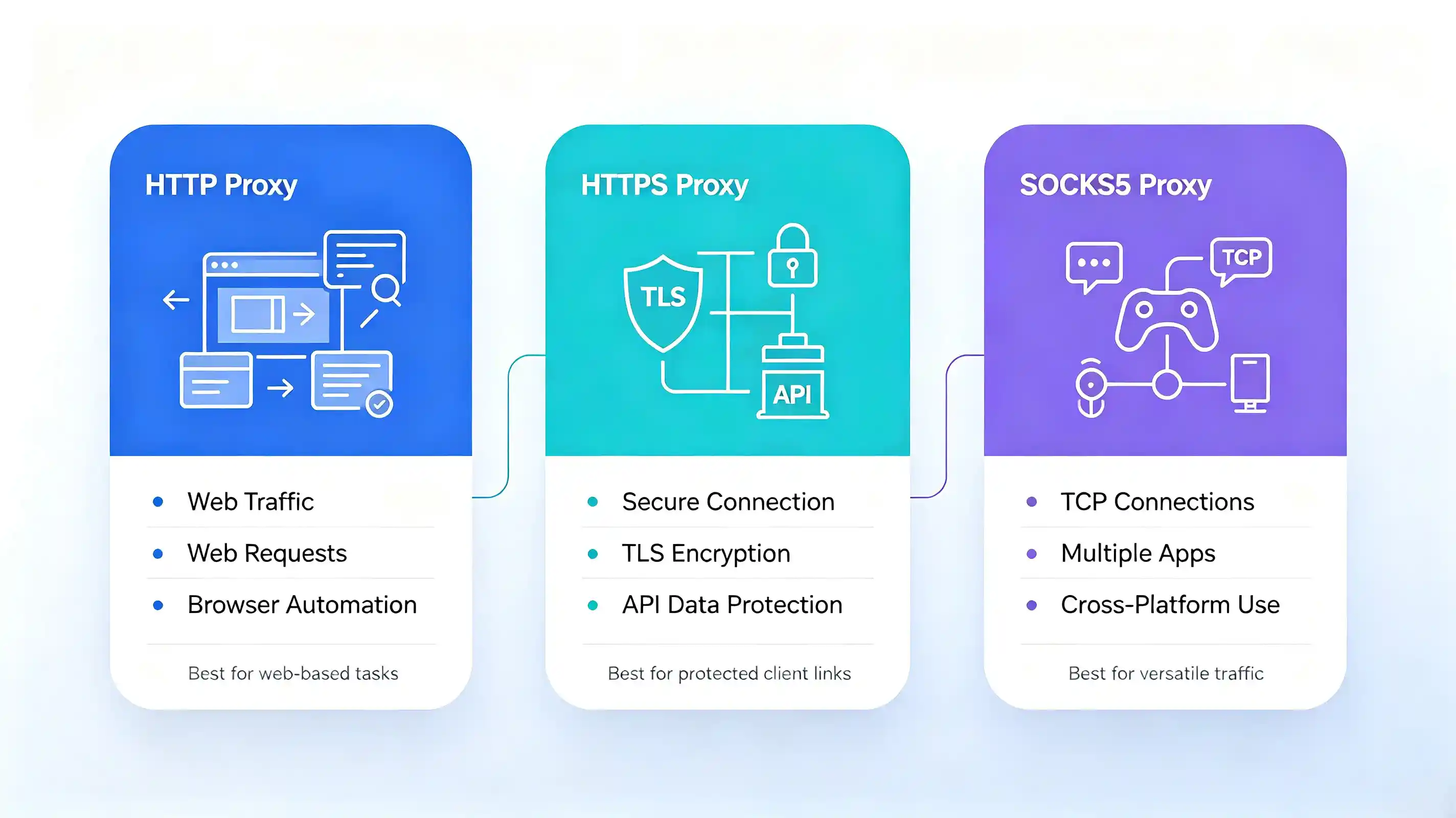
Choose an HTTP Proxy when your task mainly involves Web Traffic, such as opening websites, sending web requests, collecting search results, or running browser automation. If the application supports HTTP proxies, this can be a straightforward choice for these tasks.
HTTP Proxy is designed specifically for this type of traffic, so it fits tasks where web requests are the main type of connection. If you only need to route your browser or scraping tool's web requests through a proxy, HTTP Proxy provides the functionality required for the task.
Choosing HTTPS Proxy for Secure Connections
Consider an HTTPS Proxy when you want to encrypt the connection between your application and the proxy server. This can be useful when the information sent to the proxy should be protected while it travels from your device to the proxy.
For example, an API client may send request data through a proxy before reaching the target server. With an HTTPS Proxy, the connection from the client to the proxy uses TLS, which helps protect that part of the communication.
An HTTPS Proxy is therefore mainly a choice based on how you want the client-to-proxy connection to be protected. Whether it is suitable also depends on whether the application and proxy provider support this connection method.
Choosing SOCKS5 Proxy for Versatile Applications
Consider a SOCKS5 Proxy when your application needs to handle network connections beyond standard web requests. It can be a practical choice for software such as online games, messaging applications, and other applications that do not rely only on web traffic.
For browser-based tasks and web scraping, SOCKS5 can also handle TCP connections. In these cases, choose SOCKS5 when the application supports it and you want to use the same proxy protocol across different types of applications.
How to Configure an HTTP or SOCKS5 Proxy with IPcook
IPcook supports both HTTP and SOCKS5 proxy connections. The setup process depends on the proxy type and how you plan to use the proxy. The basic setup steps are outlined below.
Choose a proxy type. In the IPcook dashboard, select Residential, ISP, or Datacenter under My Proxy.
Configure the proxy. For Residential proxies, use the Proxy Generator to select the country, city or state, protocol, and rotation method. You can also choose the account and the number of proxies to generate.
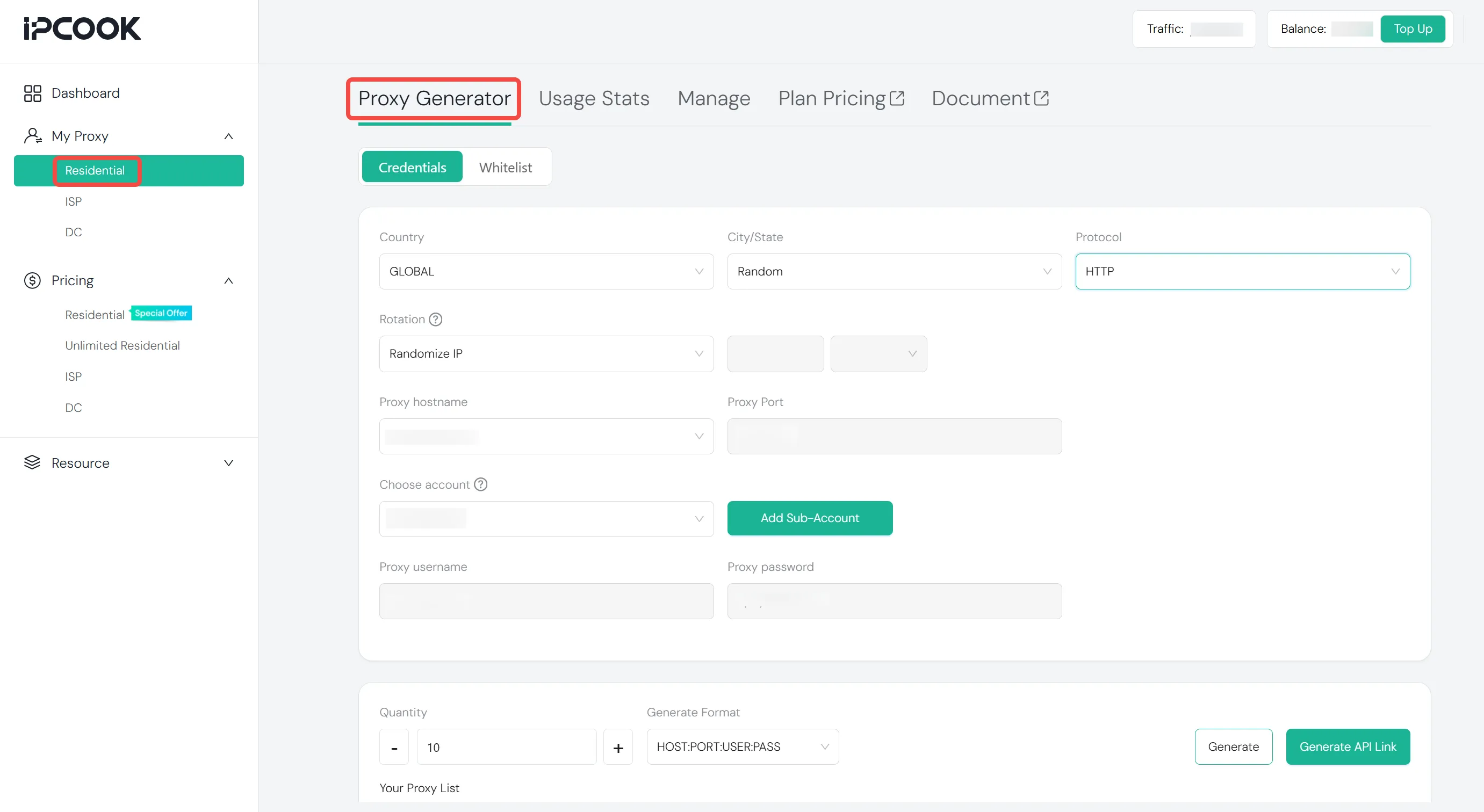
Generate the proxy and get the connection details. For Residential proxies, configure the available options and click Generate. For ISP and Datacenter proxies, open the corresponding My Proxy page to access your available proxies. The generated proxy details, such as the IP or hostname, port, username, and password, are then available for configuration.
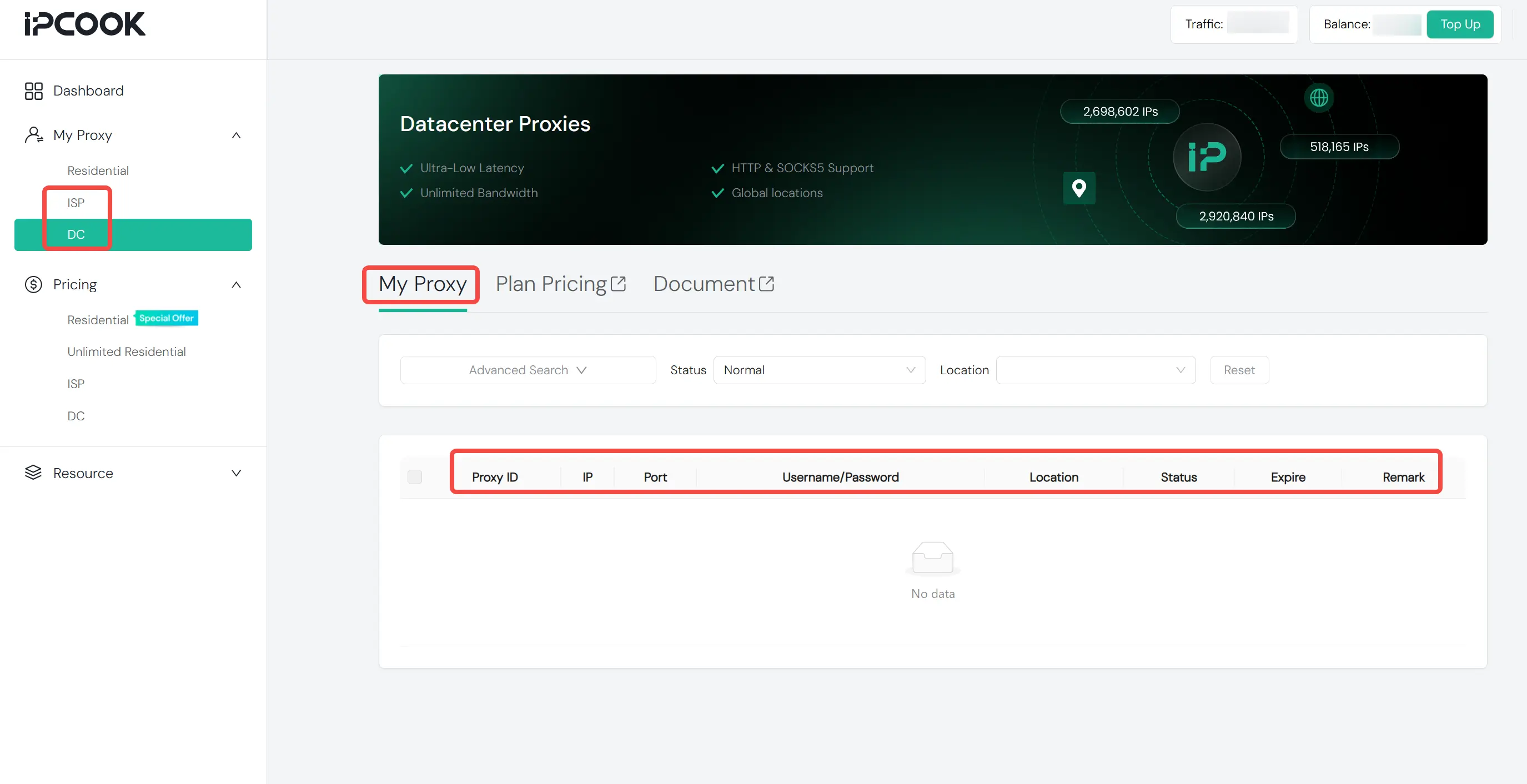
Enter the details into your application. Open the application's proxy settings and enter the connection details in the required fields or format.
Test the connection. Check whether the application can connect successfully through the proxy, then use an IP-checking tool to verify the resulting IP address and location.
If the connection fails, check the protocol, host, port, and authentication details first. A correct port alone cannot establish a connection if the application does not support the selected protocol or connection format.
Conclusion
Choosing a proxy protocol depends on your application's requirements, the type of traffic it handles, and the protocol it supports. Proxy type, IP coverage, location, stability, and session options are also important when building a complete proxy setup.
For users looking for these options in one proxy service, IPcook supports HTTP and SOCKS5 proxy connections across 185+ countries and regions, with a stated 99.99% uptime. Flexible location and session options are available. Start with 100 MB of free Residential Proxy traffic and test IPcook for your use case!
