Curl Proxy Guide: How to Set Proxy in Curl with Examples


Curl is a versatile command-line tool for sending HTTP requests, testing APIs, and automating workflows. Yet, when requests are made directly from your own IP, they can quickly trigger rate limits, geo-restrictions, or even expose personal data. A curl proxy addresses these challenges by routing traffic through an intermediary server, helping you stay secure, stable, and anonymous.
This guide shows you how to configure curl with different types of proxies. It covers essential commands, advanced configuration and debugging, and automation scenarios such as web scraping. You’ll also learn best practices to keep your proxy usage efficient and secure.
What is Curl Proxy
A curl proxy works by redirecting requests through an intermediate server. Instead of contacting the target directly, curl sends traffic to the proxy, which forwards it and returns the response. From the destination’s perspective, the request appears to come from the proxy’s IP, not yours. This approach helps you stay secure, maintain anonymity, and reduce the chance of being blocked.
Curl supports several proxy types that fit different use cases:
HTTP and HTTPS proxies are the most common choice for general web traffic and API testing.
SOCKS4 and SOCKS5 proxies provide stronger anonymity and advanced DNS handling.
Authenticated proxies require a username and password for access, which is useful in controlled environments.
With these options, curl becomes more than a basic request tool. It provides a flexible framework for secure, anonymous, and location-specific web access.
Benefits of curl proxy for security and anonymity
Without a proxy, every curl request reveals your real IP. This makes tracking and blocking easy. With a proxy, your identity is masked, which improves privacy and reliability.
The first advantage is security. Only the proxy’s IP is visible to the destination, so your network identity remains private. This matters when handling sensitive APIs or avoiding bans. Another benefit is anonymity. SOCKS5 proxies can resolve DNS queries remotely, reducing local traces and making requests harder to track.
Proxies also help bypass restrictions. They let you reach region-locked services and reduce the impact of rate limits by rotating IPs. For developers, this means smoother scraping, safer testing, and better simulation of traffic from multiple regions.
How to use curl with a proxy
The following sections show how to set up the most common proxy types, including HTTP, HTTPS, SOCKS5, and authenticated proxies.
What you need before using curl with a proxy
To use curl with a proxy, you first need a proxy list from your provider. This list contains all the details curl requires, such as the server address, port, protocol type, and authentication credentials.
With IPcook, you can generate and export this information directly from the dashboard. From there, you can:
Select from 185+ countries or regions
Choose the protocol (HTTP, HTTPS, or SOCKS5)
Configure IP rotation (automatic or sticky, up to 24h)
Copy the proxy address (e.g.
geo.ipcook.com), port (e.g.32345), username, and password for use in curl
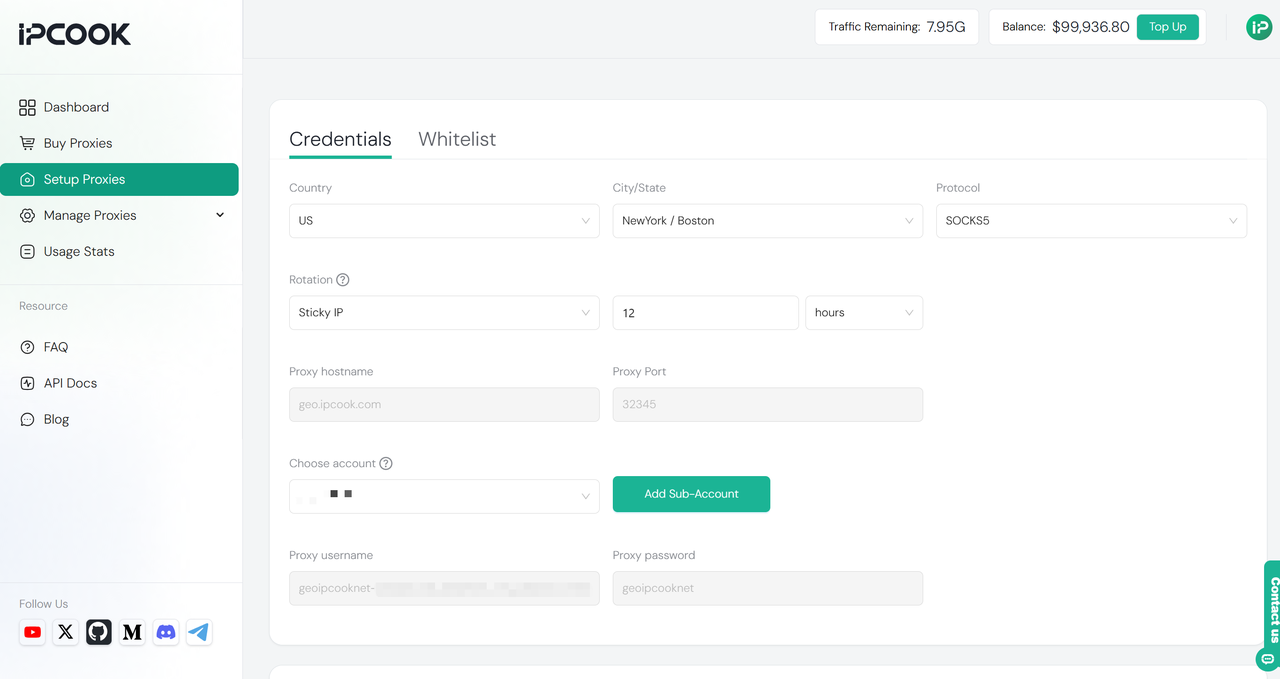
For instance, with IPcook you could run:
curl -x http://username:[email protected]:32345 https://www.google.com/Here https://www.google.com/ is just a placeholder. You can replace it with any website or API endpoint you want to reach through the proxy.
Setting HTTP and HTTPS proxy in curl
To send requests through an HTTP or HTTPS proxy, use the -x option followed by the proxy address and port.
curl -x http://username:[email protected]:32345 https://example.com/If your proxy supports secure HTTPS connections, you can specify https:// instead:
curl -x https://username:[email protected]:32345 https://example.com/Not all proxy providers support the https:// scheme. If your proxy only accepts plain HTTP connections, use http:// even when the target site is HTTPS.
HTTP proxies are widely used for everyday traffic, while HTTPS proxies add an encrypted tunnel between curl and the proxy. The setup is almost identical, but HTTPS may be required when handling secure connections.
💡 Tip: Always make sure the proxy address and port match your provider’s configuration, otherwise the request will fail.
Using SOCKS and SOCKS5 proxies
Curl can also work with SOCKS proxies which are often preferred for stronger privacy. To use a SOCKS5 proxy, add the scheme socks5:// to the address:
curl -x socks5://username:[email protected]:32345 https://example.com/If you want DNS lookups to go through the proxy as well, use socks5h://:
curl -x socks5h://username:[email protected]:32345 https://example.com/With socks5://, DNS is resolved locally. With socks5h://, DNS is resolved through the proxy, so the target never sees your local DNS requests. SOCKS proxies are useful for tasks that require higher anonymity or simulating requests from different regions.
Proxy authentication with username and password
Some proxies require authentication before you can use them. In this case, include the username and password directly in the proxy URL:
curl -x http://username:[email protected]:32345 https://example.com/Curl passes these credentials to the proxy, which then allows the request to go through. This method works for both HTTP and SOCKS proxies as long as the service supports authentication.
For better security, avoid putting plain text passwords in scripts or shared files. A safer way is to store credentials in environment variables instead of typing them directly in every command:
Linux / macOS
export http_proxy=http://username:[email protected]:32345
export https_proxy=http://username:[email protected]:32345
Windows PowerShell
$env:HTTP_PROXY = "http://username:[email protected]:32345"
$env:HTTPS_PROXY = "http://username:[email protected]:32345"
Windows CMD
set HTTP_PROXY=http://username:[email protected]:32345
set HTTPS_PROXY=http://username:[email protected]:32345
With these settings, curl automatically uses the proxy credentials without requiring you to type them into every command.
Advanced Curl Proxy Settings and Debugging
Basic proxy flags are often enough for quick tests, but real-world scenarios can be more complex. You might want to apply proxy settings globally, connect through secure HTTPS proxies, or troubleshoot errors when requests fail. This section explains how to configure environment variables for curl and how to debug proxy requests using verbose output and logs.
Configuring proxy environment variables
Instead of typing the -x flag for every request, you can configure curl to use a proxy automatically through environment variables. This is especially useful when running multiple commands or scripts where you want consistent proxy settings.
These variables tell curl which proxies to use for HTTP, HTTPS, or all traffic, and which domains should bypass the proxy (no_proxy).
Linux / macOS
export http_proxy=http://username:[email protected]:32345
export https_proxy=http://username:[email protected]:32345
export all_proxy=socks5h://username:[email protected]:32345
export no_proxy=localhost,127.0.0.1,.example.com
Windows PowerShell
$env:HTTP_PROXY = "http://username:[email protected]:32345"
$env:HTTPS_PROXY = "http://username:[email protected]:32345"
$env:ALL_PROXY = "socks5h://username:[email protected]:32345"
$env:NO_PROXY = "localhost,127.0.0.1,.example.com"
💡 Tip: To disable the proxy again, unset the variables (Linux/macOS) or close the PowerShell session (Windows). If you need to override the environment settings for a single request, the -x flag always takes priority.
Debugging proxy requests with verbose mode and log
When a request fails through a proxy, you need visibility into what happens behind the scenes. Curl provides verbose mode and trace mode, which make it easier to diagnose problems such as unreachable proxies, failed authentication, or certificate errors.
Verbose mode (
-v) Verbose mode shows the handshake, headers, and proxy tunnel details. For example:curl -v -x http://username:[email protected]:32345 https://httpbin.org/ip -o /dev/nullHere,
-o /dev/nulldiscards the response body so you can focus only on the connection details. You can omit this flag if you also want to see the actual response.https://httpbin.org/ipis a simple test API that returns your public IP address, making it useful to verify whether the proxy is applied.👉 To inspect the response headers in more detail, redirect them to a file:
curl -v -x http://username:[email protected]:32345 https://httpbin.org/headers -o headers.txt
Trace mode (
--trace) Trace mode logs every byte exchanged along with timestamps. This is useful when diagnosing complex issues such as API failures, proxy timeouts, or SSL handshake errors.curl --trace-ascii trace.log --trace-time -x http://username:[email protected]:32345 https://example.com/ -o /dev/null
Verbose and trace logs together help determine whether the problem is with the proxy itself, authentication, or the SSL handshake. If you are using an HTTPS proxy with a custom certificate, you may need to supply it with --proxy-cacert, or temporarily allow insecure connections with --proxy-insecure while testing.
Using Curl Proxy for Web Scraping and Automation
Curl combined with a proxy is not only useful for single requests but also for large-scale data scraping and automation. In these cases, proxies help you stay anonymous, avoid rate limits, and keep sessions stable. The following sections explain how rotating proxies and sticky sessions improve scraping reliability, followed by examples of common automation use cases.
Rotating proxies and sticky sessions for large-scale scraping
When scraping at scale, sending hundreds or thousands of requests from the same IP almost always leads to blocks or strict rate limits. A common solution is to use a pool of proxies and rotate between them so that requests appear to come from different sources. This distributes traffic and reduces the chance of detection. For example, with a simple shell script you can randomly select an address from a proxy list:
PROXIES=("http://p1.ipcook.com:32345" "http://p2.ipcook.com:32345" "http://p3.ipcook.com:32345")

for proxy in "${PROXIES[@]}"; do
  curl -x "$proxy" https://example.com/data
done
Some scraping tasks require more than just rotation. If you need to maintain a logged-in session or keep a shopping cart active, you must send multiple requests from the same IP. This is where sticky session proxies are used. By reusing the same proxy for a series of requests, curl can maintain continuity while still protecting your real IP.
Common curl proxy automation use cases
Curl with proxies is widely used in automation tasks where data must be collected or tested at scale. Proxies make these activities more reliable by hiding your IP and distributing requests across multiple addresses.
SEO Proxies are often used to fetch search engine results for keyword tracking or competitor analysis. For example:
curl -x http://username:[email protected]:32345 "https://www.google.com/search?q=best+headphones"💡 Note: Some sites (such as Google) may block automated requests. Proxies help reduce detection but do not guarantee unrestricted access.
E-commerce Proxies allow you to scrape product pages for pricing, stock levels, or promotions without being blocked. For example:
curl -x http://username:[email protected]:32345 https://store.example.com/product/12345Social media Proxies can support automation for public data collection, such as fetching posts or comments. For example:
curl -x http://username:[email protected]:32345 https://store.example.com/product/12345
Conclusion
Curl with a proxy offers far more than basic request handling. It secures your traffic, protects your identity, and enables automation at scale. In this guide, we explored how to configure curl with different proxy types, manage them with environment variables, debug advanced setups, and apply best practices across tasks like scraping, SEO, and e-commerce. To fully unlock these benefits, pairing curl with a trusted proxy provider is essential, and IPcook helps ensure your curl workflows remain secure, efficient, and scalable.