


How to Crawl a Site Without Getting Blocked: A Complete Guide


Whether you're tracking product prices, aggregating news content, analyzing SEO structures, or monitoring social media trends, the need to crawl a website efficiently is becoming more essential than ever. Web crawling allows you to systematically crawl data from websites and transform unstructured information into actionable insights, fueling everything from marketing intelligence to business automation.
If you're looking to build your crawler or explore beginner-friendly tools, and especially if you want to avoid getting blocked in the process, this guide will walk you through everything you need. Let's break down the methods, challenges, and effective proxy solutions like IPcook to help you start crawling sites with confidence and stability.
👀 Related Readings
Web Scraping vs Web Crawling: Differences & Real Use Cases
How to Scrape Prices from Any Website Without Getting Blocked
How Web Crawling Works: From Seed URL to Data Extraction
To learn how to crawl a site effectively, you first need to grasp how a typical crawler behaves behind the scenes. It all begins with a seed URL, a starting web address that your crawler uses to enter the site. From there, it systematically follows hyperlinks, jumping from one page to the next, just like a user would. Each new page it lands on is queued, analyzed, and stored, along with its links, allowing the process to repeat recursively.
Before crawling begins, most crawlers check for a "robots.txt" file, which outlines which parts of the site are off-limits. Likewise, an XML "sitemap" helps your crawler discover URLs that might not be directly linked from the homepage. Once a page is fetched, your crawler parses it, extracts relevant data like product names, metadata, or article text, and stores that content in a structured format such as JSON or CSV. You'll also need to handle tasks like de-duplicating URLs and managing crawl depth to avoid infinite loops.
Mastering this process is essential whether you're building your tool or relying on third-party platforms. The next question is: Should you code your crawler from scratch, or use a tool that does heavy lifting for you? Read on to make the decision wisely!
Option 1. Build Your Own Crawler with Python
If you're comfortable with code, crawling web data using Python gives you full control over the crawling logic and data extraction process. For small to medium-sized tasks, libraries like "requests" and "BeautifulSoup" are a good starting point. They let you send HTTP requests and parse HTML pages with minimal overhead.
Here's a simplified example:
import requests
from bs4 import BeautifulSoup

url = "https://example.com"
headers = {"User-Agent": "Mozilla/5.0"}
response = requests.get(url, headers=headers)
soup = BeautifulSoup(response.text, "html.parser")

for link in soup.select("a"):
    print(link.get("href"))
For more complex needs, like following pagination or processing large URL queues, you may want to explore Scrapy, a powerful asynchronous crawling framework. With Scrapy, you can set custom headers, handle retries, manage cookies, and structure scraped data into pipelines, all in a scalable architecture.
However, coding your crawler comes with serious challenges. You'll need to account for IP-based rate limiting, JavaScript-rendered content, and CAPTCHAs, all common roadblocks when crawling modern websites. Without the right countermeasures, your crawler might get blocked before it even starts delivering useful data.
Option 2. Use a Visual Site Crawler (No Code Needed)
Not a developer? No problem. Visual site crawlers are designed for beginners who want to crawl a website without writing a single line of code. Tools like Octoparse, Parsehub, and WebHarvy offer drag-and-drop interfaces that let you select elements on a page, define crawl patterns, and extract data with just a few clicks.
These platforms typically display the target website in a built-in browser. You can click on a product title, price, or image, and the tool will recognize the underlying HTML structure and replicate the selection across similar pages. Most tools also support pagination, multi-level crawling, and automated scheduling, making it easy to extract fresh data regularly. Export formats usually include CSV, Excel, or even API-based access for integration with other tools.
However, even with these user-friendly website crawler tools, you'll quickly hit a wall when dealing with anti-bot mechanisms. IP bans, bot detection systems, and CAPTCHA walls can stop your visual crawler cold, especially if you're targeting e-commerce or social media platforms. So, whether you're coding your crawler or using no-code software, the next question becomes critical: how do you get around these blocks?
✴️ Related Readings
How to Scrape Images from Any Website Easily & Quickly
Useful Tips to Crawl a Website Without Getting Blocked
Even with the best tools or custom code, you're likely to run into one big obstacle: getting blocked. So, how do you crawl a website without getting blocked, especially if you're collecting data at scale?
Here are some of the most effective strategies to reduce the risk of detection:
Use Realistic Headers and User-Agent Strings: Mimic a real browser by customizing headers like User-Agent, Accept-Language, and Referer. This helps your crawler look more like a regular human visitor.
Add Delays Between Requests: Avoid overwhelming the target server. Introduce sleep() intervals or set up rate limits to space out your crawl activity.
Respect robots.txt and Crawl Budget: Always check robots.txt directives. Crawling restricted pages can lead to IP bans and legal issues.
Avoid Scraping Sensitive Elements: CAPTCHA forms, login-only content, or heavily JS-rendered sections often trigger blocks. Skip them unless necessary.
Use a High-Quality Proxy Network: This is the most important tactic. Residential proxies, tied to real user devices, are much harder to detect and block compared to datacenter IPs.
Rotate IPs Automatically: Constantly using the same IP for hundreds of requests is a red flag. IP rotation helps you stay under the radar.
Still wondering how to get around website blocks at a deeper level? Here's the secret: most anti-crawling systems focus on identifying suspicious IP behavior, which means if you want consistent, high-scale crawling, the right IP infrastructure is your best weapon. Let's take a look at one of the most powerful tools for this job.
📘 Related Readings
Best Web Crawlers for Web Crawling, SEO, and Ads
How to Use Residential Proxies Safely and Effectively
Try IPcook: Your Anti-Block Engine for Web Crawling
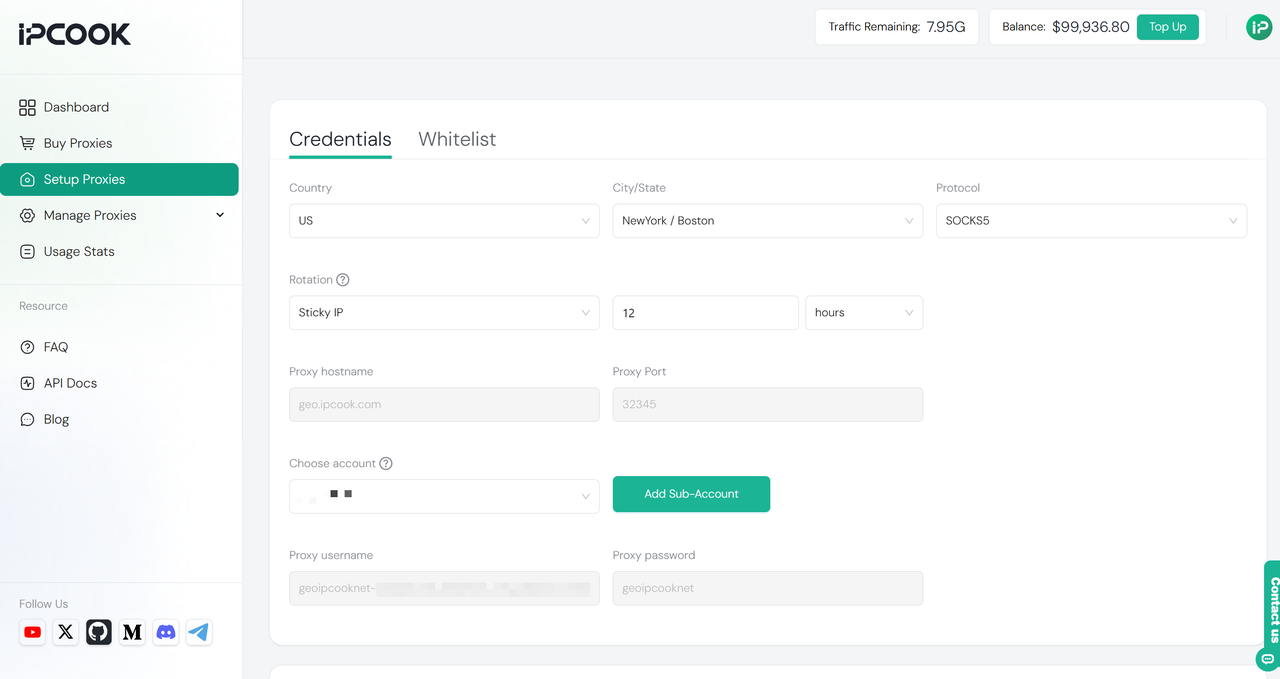
When you learn how to crawl a site effectively, having a reliable IP infrastructure underneath your crawler is just as important as the crawling logic itself. This is where IPcook shines as the best tool to crawl website data without interruptions. It provides a dynamic residential IP network covering 185+ countries, offering clean, high-quality IPs that closely mimic real user behavior.
With support for IPv4, IPv6, HTTPS, and SOCKS5, IPcook ensures millisecond-level latency and 99.9% uptime, making it extremely difficult for websites to detect or block your crawling activities. By integrating IPcook with your crawling tools, whether it's a custom Python Scrapy crawler or a no-code visual site crawler, you gain automatic IP rotation and smart switching strategies. This capability helps you bypass geo-restrictions and sophisticated anti-bot defenses, enhancing your crawling success rate and efficiency.
Key Features of IPcook:
Dynamic residential IP pool covering 185+ countries, ensuring truly global access and flexibility.
Full protocol support, including IPv4, IPv6, HTTPS, and SOCKS5, to match your tech stack and crawling setup.
Ultra-low latency (millisecond-level) and 99.9% uptime, ideal for time-sensitive and large-scale scraping tasks.
Smart IP rotation, with both automatic and manual options to avoid detection and maximize session longevity.
High-anonymity IPs that mimic real user behavior, helping you stay undetected by advanced anti-bot systems.
All these sparkling features make IPcook one of the best residential proxy providers on the market. If you want to avoid blocks and keep your crawlers running smoothly, it is the invisible engine you need behind the scenes. Next, let's explore practical tips on how to crawl a website without getting blocked.
Bonus: Legal, Ethical, and Performance Considerations
When learning how to crawl a site, it's crucial to keep legal and ethical boundaries in mind to avoid trouble and ensure sustainable crawling practices. Always respect the website's robots.txt file and terms of service (TOS) to understand which pages are allowed to be crawled. Avoid scraping private or login-protected data unless you have explicit permission.
Additionally, never overload a website with excessive requests, as this can resemble a DDoS attack and harm the site's performance. Implement rate limiting and delay mechanisms to maintain a respectful crawling pace. Thus, using proxies like IPcook to hide your identity doesn't exempt you from responsibility. Always use your crawling tools and IP networks in compliance with relevant laws and ethical standards. This approach ensures your web crawling activities remain both effective and legitimate.
Conclusion
To successfully crawl a site without getting blocked, you have two main paths: building your crawler using Python or leveraging no-code visual tools like Octoparse. Regardless of the method, mastering anti-blocking strategies, such as rotating IPs, simulating real user behavior, and respecting site rules, is essential to keep your crawling sustainable and effective.
At the core of every reliable crawling system lies a robust IP network. Choosing the right proxy provider, like IPcook with its vast dynamic residential IP pool and advanced rotation features, can make all the difference between frequent blocks and smooth data extraction. Ready to scale your crawling projects with confidence? Visit the IPcook website today and start building your unstoppable, anti-block web crawler stack!
- How Web Crawling Works: From Seed URL to Data Extraction
- Option 1. Build Your Own Crawler with Python
- Option 2. Use a Visual Site Crawler (No Code Needed)
- Useful Tips to Crawl a Website Without Getting Blocked
- Try IPcook: Your Anti-Block Engine for Web Crawling
- Bonus: Legal, Ethical, and Performance Considerations
- Conclusion
