


How to Test Proxies: 5 Easy and Effective Methods

Testing a proxy means checking if it works well in practice. A proper test shows whether the proxy is fast, stable, anonymous, and able to reach content from different regions. By trying a few simple methods, you can quickly confirm if your proxy is reliable and ready for everyday use. This guide introduces six clear and effective ways to test proxies step by step.
Method 1: Quick Methods to Test Proxy Online
Sometimes you only need a quick check to confirm that your proxy is active. Online tools are the simplest way to do this. They don’t require technical skills, and the results appear instantly in your browser.
Check Your IP Address Online
The most straightforward way to test a proxy is by visiting a site like whatismyip.com or ipinfo.io. These services display your current IP address and often the city or country it belongs to.
Here’s how to check step by step:
Go to one of these sites without your proxy enabled and note your real IP.
Turn on your proxy and refresh the page.
If the IP address changes, your proxy is active.
This quick test confirms whether your traffic is being routed through the proxy server. It’s also handy if you want to verify location—say you need your IP to appear in New York instead of London.
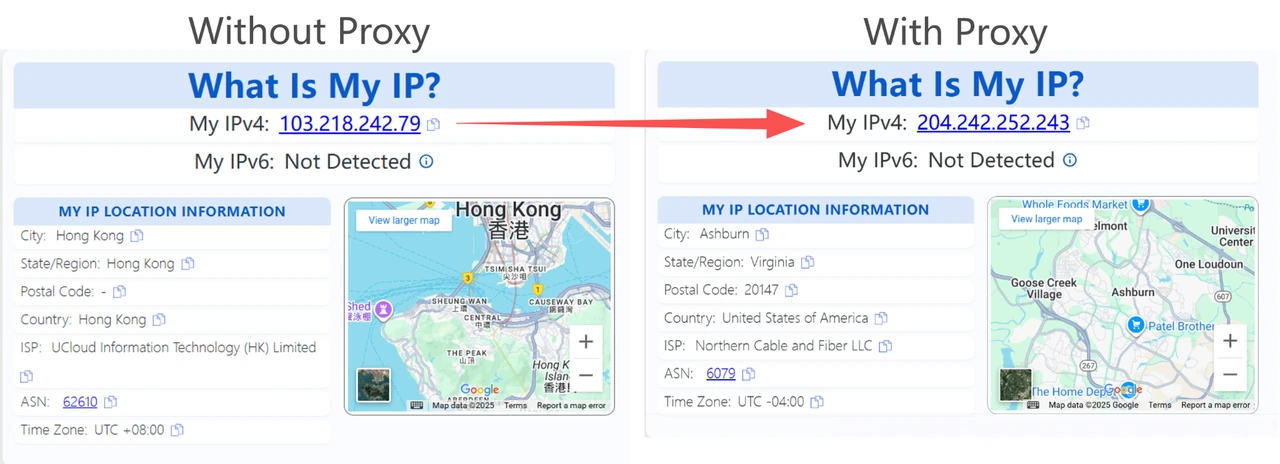
These tools give you a quick glimpse of anonymity, but we’ll cover advanced anonymity checks in detail later.
Method 2: How to Test Proxy IP Manually (Command-Line Tools)
You can also test proxies manually using the command line. Tools like cURL, Ping/Traceroute, or a short Python script give you direct feedback on whether the proxy is working. This approach is more technical than online checks but offers precise control and results.
Before you run the commands below, replace the placeholders with your own proxy details. The username and password are the login credentials from your provider. The proxy_ip is the hostname you’re given (for example, something like geo.ipcook.com), and the port is the numeric port assigned to your account. If you’re using IPcook, simply use the account credentials and server values shown in your dashboard. For a full walkthrough, see our IPcook User Guide.
If your proxy doesn’t require authentication, you can simply drop the username:password@ part and only use proxy_ip:port.
In the examples we use ifconfig.me to display the outgoing IP, but you can also substitute other services such as ipinfo.io/ip or icanhazip.com.
Test Proxy with cURL
The curl command is one of the simplest ways to check if a proxy is routing your traffic.
Example for HTTP proxy:
curl -x http://username:password@proxy_ip:port https://ifconfig.meThis command works for both HTTP and HTTPS requests in most cases. If your provider offers a dedicated HTTPS proxy, you can instead use:
curl --proxy https://username:password@proxy_ip:port https://ifconfig.meExample for SOCKS5 proxy:
curl --socks5 proxy_ip:port https://ifconfig.meIf the returned IP is different from your real one, it means the proxy is active. You can also test specific websites to confirm whether the proxy allows access.
👉 For a more detailed tutorial on setting up different proxy types with cURL, see our Curl Proxy Guide: How to Set Proxy in Curl with Examples.
Test Proxy Latency with Ping/Traceroute
To measure responsiveness, you can use ping or traceroute (or tracert on Windows).
ping proxy_ip
traceroute proxy_ip   # macOS/Linux
tracert proxy_ip      # Windows
With ping, you’ll see the round-trip time (RTT). Lower values mean faster response. By contrast, traceroute reveals the path your connection takes to reach the proxy, which is useful for spotting slow or overloaded hops along the way.
Batch Testing with Python Scripts
If you have multiple proxies, a short Python script helps test them automatically.
import requests

proxies = ["http://ip1:port", "http://ip2:port"]

for p in proxies:
    try:
        r = requests.get(
            "https://ifconfig.me",
            proxies={"http": p, "https": p},
            timeout=5,
        )
        print(p, "works:", r.text.strip())
    except:
        print(p, "failed")
This script loops through a list of proxies and prints whether each one works. Successful results also return the proxy’s IP address. You can expand the script to measure speed, detect failures, or even save results into a log file. This kind of automation is especially useful if you maintain a proxy pool for scraping, SEO monitoring, or ad verification.
Method 3: How to Test Proxy Anonymity
Once you’ve confirmed your proxy is working, the next step is to check whether it truly protects your identity. A proxy can change your IP but still leak other details like DNS requests or WebRTC information that reveal who you are. Testing anonymity is essential if you use proxies for privacy, account management, or bypassing geo-restrictions. Proxies differ in anonymity levels, ranging from transparent (real IP exposed) to elite (no trace of proxy use).
Use Online Leak Test Tools
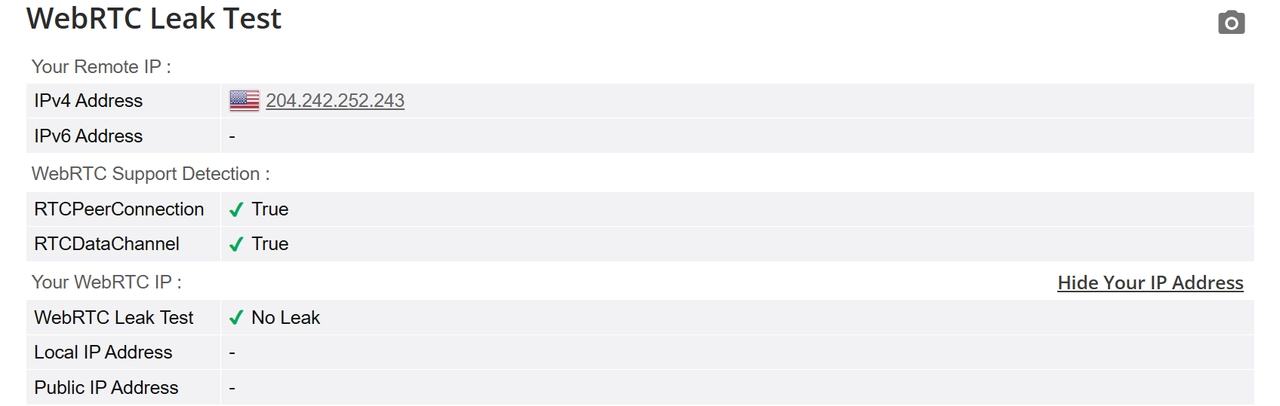
Services like browserleaks.com and ipleak.net are built to uncover leaks. They can show whether your DNS requests bypass the proxy, whether WebRTC connections reveal your local IP, and whether system or browser metadata exposes more than you expect.
Run a test with your proxy enabled. If you see your real IP, DNS server, or location in the results, your proxy isn’t fully anonymous. A secure setup should only display the proxy’s IP and region.
Check Proxy Headers
In Method 2, we showed how to use cURL to confirm that a proxy routes your traffic. Here, the same tool helps you check whether it leaks identifying headers.
curl -x http://username:password@proxy_ip:port -I https://httpbin.org/getFor SOCKS or HTTPS proxies, adjust the flag (e.g., --socks5 proxy_ip:port or --proxy https://username:password@proxy_ip:port).
Review the output carefully. If headers such as X-Forwarded-For, Via, or Proxy-Connection appear and expose your real IP or proxy usage, the proxy isn’t high anonymity. If only the proxy’s IP shows, it qualifies as elite and leaves no obvious trace of proxy usage.
Method 4: How to Test Proxy Speed and Stability
A proxy is only useful if it’s both fast and stable. Speed affects how smoothly you browse or stream, while stability ensures the connection holds up over time.
Run Short-Term Speed Tests
The quickest way to measure proxy performance is to run a speed test. Services like Speedtest.net or Fast.com will show latency, download, and upload speeds when the proxy is enabled. A healthy connection should add minimal delay and maintain consistent bandwidth.
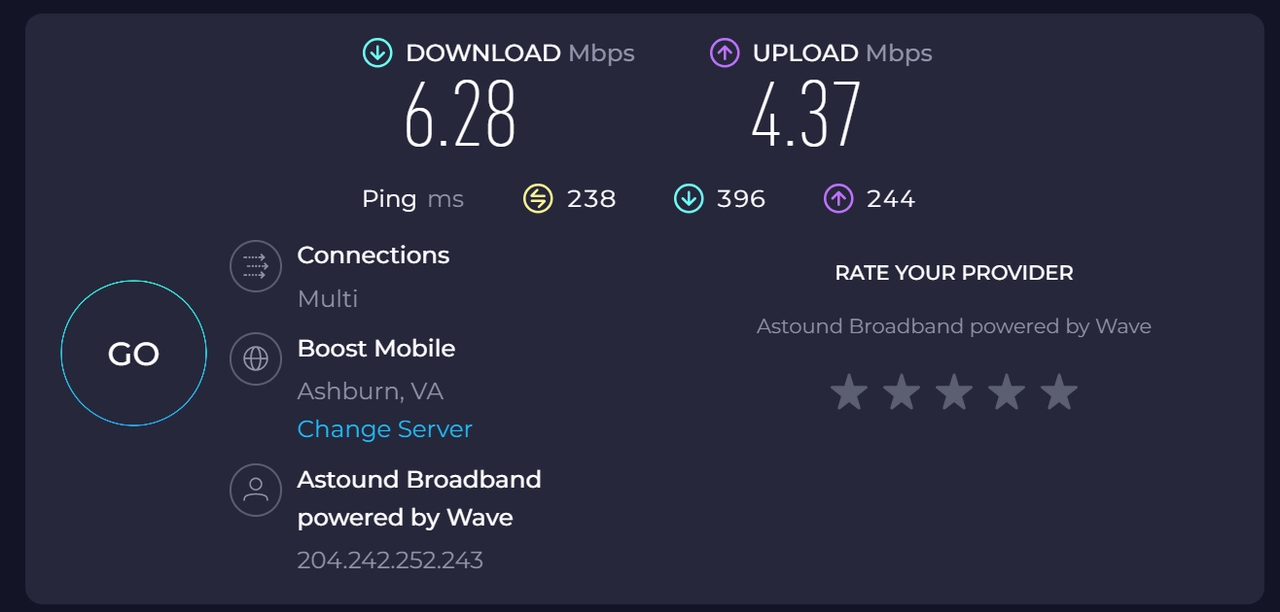
You can also use curl to download a test file through your proxy and measure the transfer rate:
curl -x http://username:password@proxy_ip:port -o /dev/null -s -w "%{time_total}\n" https://speed.hetzner.de/100MB.binHere the -w "%{time_total}" flag reports how long the download took. Comparing times with and without the proxy gives you a clear idea of the speed impact.
Monitor Long-Term Stability
Short tests can’t reveal whether a proxy holds up over time. To check stability, you can run continuous monitoring. A simple way is to ping the proxy IP at regular intervals and record the results:
ping proxy_ipIf response times fluctuate heavily or requests time out, the proxy may be unstable.
For more advanced monitoring, you can use tools like ProxyBroker or write a script that checks the proxy every few minutes and logs failures. This approach helps you see whether the proxy stays online for hours or days, which is critical if you use proxies for web scraping, SEO monitoring, or automated tasks.
Method 5: Proxy IP Test for Geo-Restrictions
One of the most common reasons to use a proxy is to access content available only in certain regions. A reliable proxy should let you appear as if you’re browsing from another country. Testing this is simple: try using services that are normally restricted to specific locations.
Test on Streaming Platforms
Streaming services like Netflix, Hulu, or BBC iPlayer use region locks to control what content is available. Switch your proxy to a server in a different country, then log in and see what library loads.
For example, if you connect to a US proxy and open Netflix, you should see the US catalog. If the proxy isn’t working properly, Netflix may either block access or fall back to your original region.
Check Online Stores and Marketplaces
Another way to test geo-restrictions is by visiting e-commerce or digital marketplaces. Sites like Amazon, Steam, or Google Play often display different products, prices, or availability depending on your location.
Connect through your proxy and visit the site. If the pricing or product availability changes to match the proxy’s region, the proxy is successfully bypassing geo-restrictions.
Conclusion
Testing proxies doesn’t have to be difficult. With the right methods, you can quickly check if your proxy is active, private, fast, stable, and capable of bypassing geo-restrictions. A few simple tests are enough to tell whether your connection is truly reliable.
Still, the results often depend on the quality of your provider. For consistent speed, stability, and privacy, IPcook offers rotating proxies and geo-targeted options that make testing and everyday use much easier.
