


Scrape eBay: How to Scrape 1,000+ eBay Listings with Python


If you're trying to scrape eBay with Python, you probably already have something working. A few pages load fine, you recognize the HTML patterns, and pulling titles or prices feels manageable. Things change once you try to scale. When you scrape eBay listings in bulk, add pagination, or let the script run longer, requests start failing, responses become inconsistent, and the data itself grows unreliable. The script keeps running, but the output no longer holds up.
This article is written for that exact situation. It shows how to scrape eBay listings with Python in a way that stays stable as volume grows, even past 1,000 listings. Instead of focusing on one-off examples, it lays out a workflow centered on listing pages, pagination, and keeping access consistent over time. If your goal is to move beyond small tests and get results you can trust, the sections below focus on what affects scalability and how to handle it.
What You Can Scrape from eBay: Listing Pages vs Product Pages
Scraping eBay listings means collecting product information directly from eBay’s public pages instead of using official APIs. The data is already visible to regular users and follows patterns you see on most marketplace pages, which is why this approach works well for scraping data.
Listing Pages (Best for Scale)
Listing pages include eBay’s search results and category views. They return multiple items in a single response, which makes them a strong choice when you need to scrape eBay listings at scale.
From a typical listing page, you can usually extract:
title
price
shipping cost
seller name
item URL
rating or review count, when available
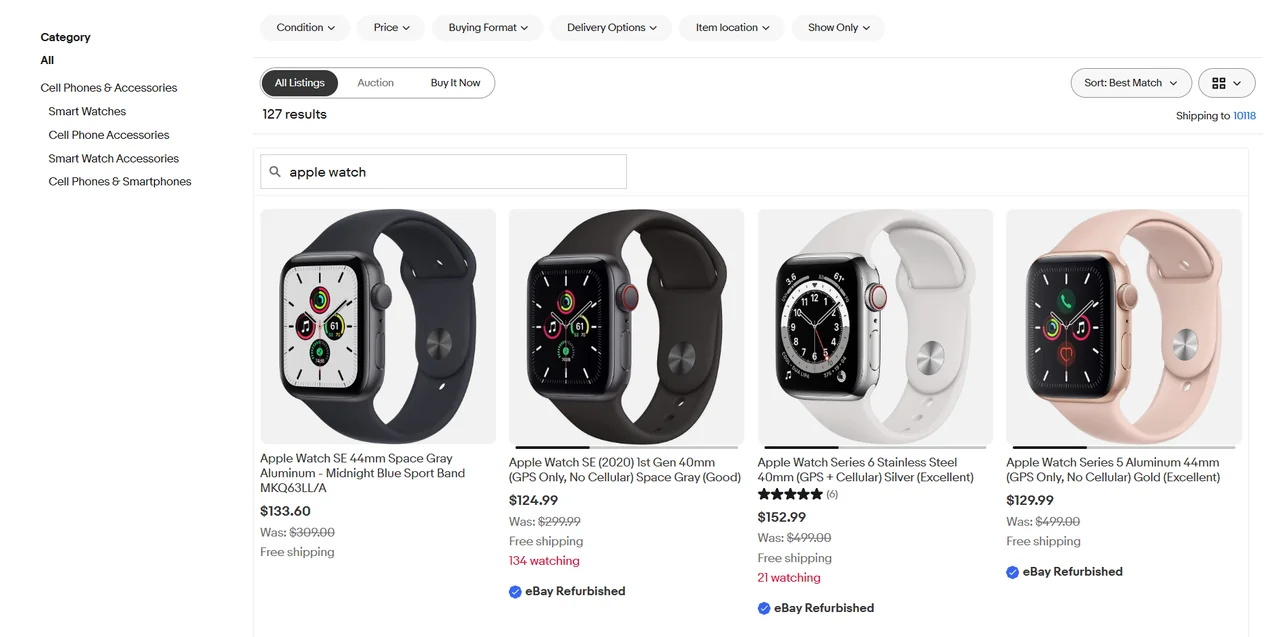
Each request covers many products, so request volume stays lower as datasets grow. The HTML structure across listing pages is also more consistent, which makes selectors easier to keep working over time. For bulk monitoring, price tracking, or market-wide scans, listing pages are usually the right starting point.
Product Pages (Use Selectively)
Product pages focus on individual items and expose more detailed information.
Typical data available on these pages includes:
item specifics
variants such as size or color
availability or stock status
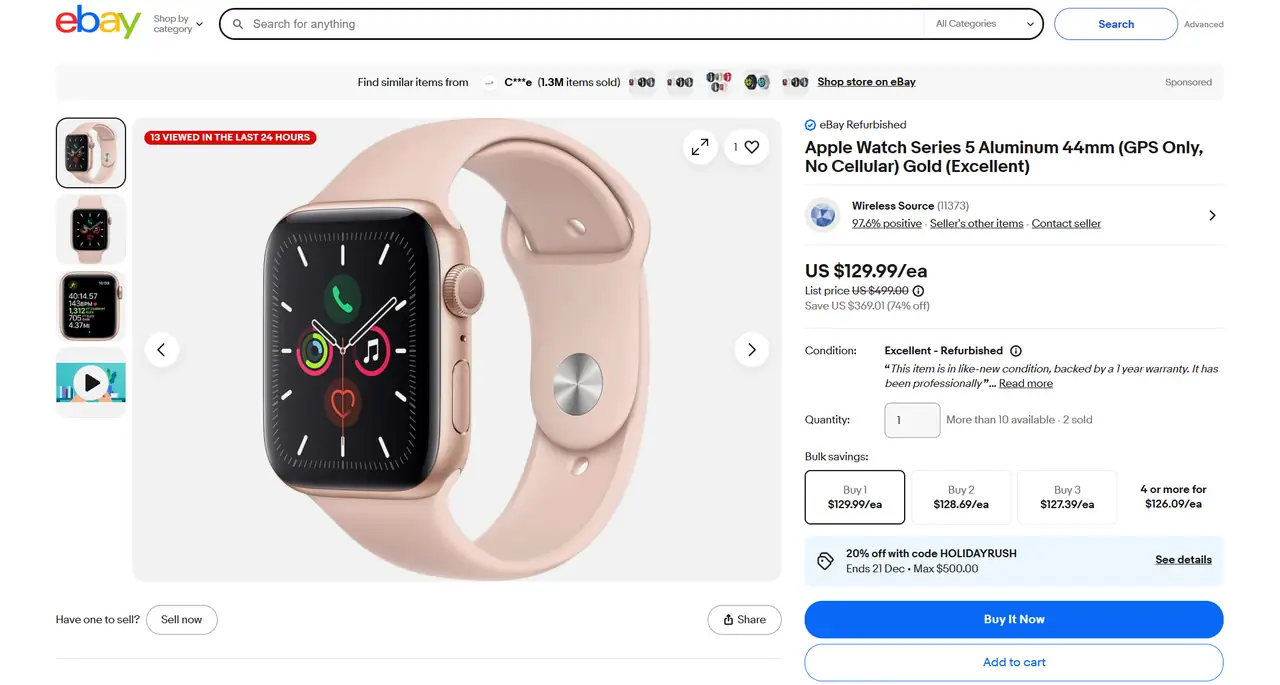
The main limitation is scale. Each product needs its own request, page layouts vary more, and handling variants adds complexity. Product pages work better when you want deeper insight into a smaller set of items, not when you are collecting data in large volumes. This distinction matters because targeting specific pages is different from crawling an entire site, which follows a different process and often gets mixed up with scraping.
Which Should You Use?
A simple rule of thumb:
bulk monitoring or market-wide scans favor listing pages
detailed analysis of selected items fits product pages
If your goal is to scrape eBay listings reliably as volume increases, focus on listing pages first. Product pages can be added later when depth becomes more important than coverage.
How to Scrape eBay Listings with Python: A Complete Workflow
An ebay web scraper python workflow depends less on tricks and more on a few fundamentals. If you can request pages consistently, extract stable fields, and scale across pages without collapsing under errors, you already have the core of a usable ebay scraper.
Step 1: Prepare Requests and Headers to Access eBay Pages
Requests have an identity. A single test request may succeed, but repeated access without context quickly starts to look unnatural.
A basic setup uses a session and a small set of headers that match how browsers normally access eBay pages. The goal is not to hide requests, but to avoid sending ones that appear incomplete or inconsistent.
A minimal example looks like this:
import requests

session = requests.Session()

headers = {
    "User-Agent": "Mozilla/5.0 (Windows NT 10.0; Win64; x64)",
    "Accept-Language": "en-US,en;q=0.9"
}

url = "https://www.ebay.com/sch/i.html?_nkw=apple+watch"
response = session.get(url, headers=headers, timeout=10)
html = response.text
Using a session keeps cookies and request context consistent once you start loading more than a single page.
Step 2: Parse Listing Data from eBay HTML
With the HTML available, the next step is extracting structured fields, which is the same idea behind most data parsing workflows.
On listing pages, eBay repeats the same item layout across results, which makes extraction predictable if you target the right container.
A simple example using BeautifulSoup focuses on the repeated listing blocks:
from bs4 import BeautifulSoup

soup = BeautifulSoup(html, "html.parser")
items = soup.select(".s-item")

for item in items:
    title = item.select_one(".s-item__title")
    price = item.select_one(".s-item__price")
    link = item.select_one(".s-item__link")

    if not title or not price or not link:
        continue

    title_text = title.get_text(strip=True)
    price_text = price.get_text(strip=True)
    item_url = link["href"]

    print(title_text, price_text, item_url)
This approach works because listing pages are designed to present many products in the same structure. As volume increases, normalizing prices and handling currency formats becomes necessary, since listings may mix formats even within a single result set.
Step 3: Handle Pagination When You Scrape eBay Listings
Single pages are easy. Volume comes from pagination.
On eBay listing pages, pagination is usually driven by URL parameters, which allows controlled movement through result sets.
A basic loop might look like this:
base_url = "https://www.ebay.com/sch/i.html"
params = {
    "_nkw": "apple watch",
    "_pgn": 1
}

for page in range(1, 11):
    params["_pgn"] = page
    response = session.get(base_url, params=params, headers=headers, timeout=10)
    html = response.text

    # parse listing data from html
Reaching 1,000 plus listings comes down to combining pagination with clear stop conditions. Empty pages, repeated items, or missing listing blocks are signals to stop rather than continue.
Step 4: Handle Errors, Timeouts, and Failed Requests
Failures are unavoidable once requests scale. Failures are usually related to access limits, not parsing logic.
Common signals include 403 responses, 429 rate limits that indicate request pressure, and connection timeouts. Among these, 429 is often one of the earliest warnings, as explained in this overview of proxy error 429.
A minimal example keeps error handling simple:
import time
import requests

def fetch_page(url, params):
    try:
        response = session.get(url, params=params, headers=headers, timeout=10)
        response.raise_for_status()
        return response.text
    except requests.exceptions.RequestException:
        time.sleep(2)
        return None
When failures appear intermittently, the cause is often request identity rather than broken selectors, which is closely tied to how dynamic IPs behave over time.
💡 Related Reading
How to Scrape eBay Product Data: 3 Common Web Scraping Methods
How to Scrape Amazon Reviews at Scale: A Simple Step-by-Step Guide
How to Scrape Shopify Stores: 3 Step-by-Step Methods That Work
3 Common Problems When Scraping eBay
Most scrape eBay projects fail in a predictable way. Early tests usually look fine. Pages load correctly, data appears complete, and the script behaves as expected.
Problems appear once scale increases. Pagination is added, requests repeat, and the scraper runs longer. At that point, issues that were invisible at small volume start to surface, such as:
403 or 429 responses after sustained access
Requests timing out without clear errors
Listing data becoming incomplete or inconsistent
These symptoms often look like parsing bugs, but they are usually caused by how requests are sent rather than how data is extracted.
When all traffic comes from a single IP, activity accumulates under one access identity. Fixed request patterns make behavior easier to recognize, especially when requests repeat in the same order and at similar intervals. Without session continuity, each request appears disconnected from the last, which further separates scraping traffic from normal browsing behavior.
As these patterns repeat, blocks become more frequent and data quality gradually degrades. The real challenge of scrape eBay projects is request identity.
How to Avoid IP Bans and Scrape eBay Listings Reliably
Once request identity becomes the limiting factor, stability depends on how requests are distributed over time. For long-running scrape eBay listings workflows, controlling access identity has a greater impact on reliability than adjusting parsing logic or adding retries.
Why Most eBay Scrapers Get Blocked
Most ebay scraper setups get blocked because access behavior becomes easy to group and classify over time. This usually comes down to a small set of recurring patterns:
Requests sent too frequently over extended periods
All traffic originating from a fixed IP
No session continuity between related requests
Uniform pacing that makes access behavior predictable
Blocking is typically triggered by the combination of these signals rather than by any single request.
How IP Rotation Helps Keep eBay Scrapers Running
IP rotation addresses request identity by separating repeated requests across multiple access sources. Instead of accumulating pagination, retries, and long-running loops under a single network identity, traffic is distributed over many identities, reducing long-term correlation.
This separation makes access behavior less uniform without requiring changes to request structure or parsing logic. As scraping runs extend, IP rotation allows stability to scale independently of any individual IP, which is why it remains effective for sustained eBay listing collection.
Using Rotating Proxies in a Python eBay Scraper
In an ebay web scraper python workflow, proxies operate at the request layer alongside sessions and headers, controlling how listing requests, pagination, and retries are routed. By distributing traffic across multiple IP identities, scrapers avoid concentrating access behavior under a single source, which helps maintain consistent responses during long-running listing scans.
Rotation strategy depends on scraping patterns. Per-request rotation fits large result-set scans, while time-based sessions help preserve short-term continuity when page order or filters matter. When rotation, session control, and automation are combined, eBay scrapers can run longer with fewer interruptions. In these scenarios, IPcook’s rotating residential proxies are commonly used to support stable scaling without modifying existing scraping code.
Key capabilities supporting stable eBay scraping include:
55M+ real residential IPs with rotation at request or time level
Sticky sessions configurable up to 24 hours for pagination continuity
City- and country-level geo-targeting to match localized search results
Non-expiring traffic suitable for long-running scraping jobs
HTTP(S) and SOCKS5 support for Python-based tools and frameworks
API-based control for automated rotation and session management
Conclusion
Reliable eBay scraping at scale depends less on parsing logic and more on managing request identity over time. Once scraping volume increases, stability becomes a distribution problem rather than a data extraction problem.
By decoupling request identity from scraping logic, Python-based eBay scrapers can run consistently across thousands of listings. IPcook enables this with rotating residential IPs, flexible session control, and a large global IP pool. Start with IPcook’s 100 MB residential traffic free trial to validate scraping stability under real workload conditions before scaling further.
