


HTTP 451 Error: Why It Happens and What to Do


You click a link to watch a news video or read an article shared on social media, only to find an "Error HTTP 451 Unavailable for Legal Reasons" instead of the content. The page may be accessible to other users but unavailable to you, leaving you wondering why access is restricted and whether you can do anything about it.
But what does this error actually mean, and why is the content unavailable in the first place? The answer lies in the meaning of HTTP status code 451.
What Does HTTP 451 Unavailable for Legal Reasons Mean?
HTTP 451 is an HTTP status code indicating that a server denies access to a resource because of a legal demand. Defined in RFC 7725, it distinguishes legally restricted content from resources that are unavailable for other reasons.
The error code 451 refers to Ray Bradbury's 1953 dystopian novel Fahrenheit 451, in which books are outlawed.
The status code does not mean that the requested page has been deleted or that the entire website is unavailable. Instead, access to the resource is restricted due to a legal requirement.
A typical response may look like this:
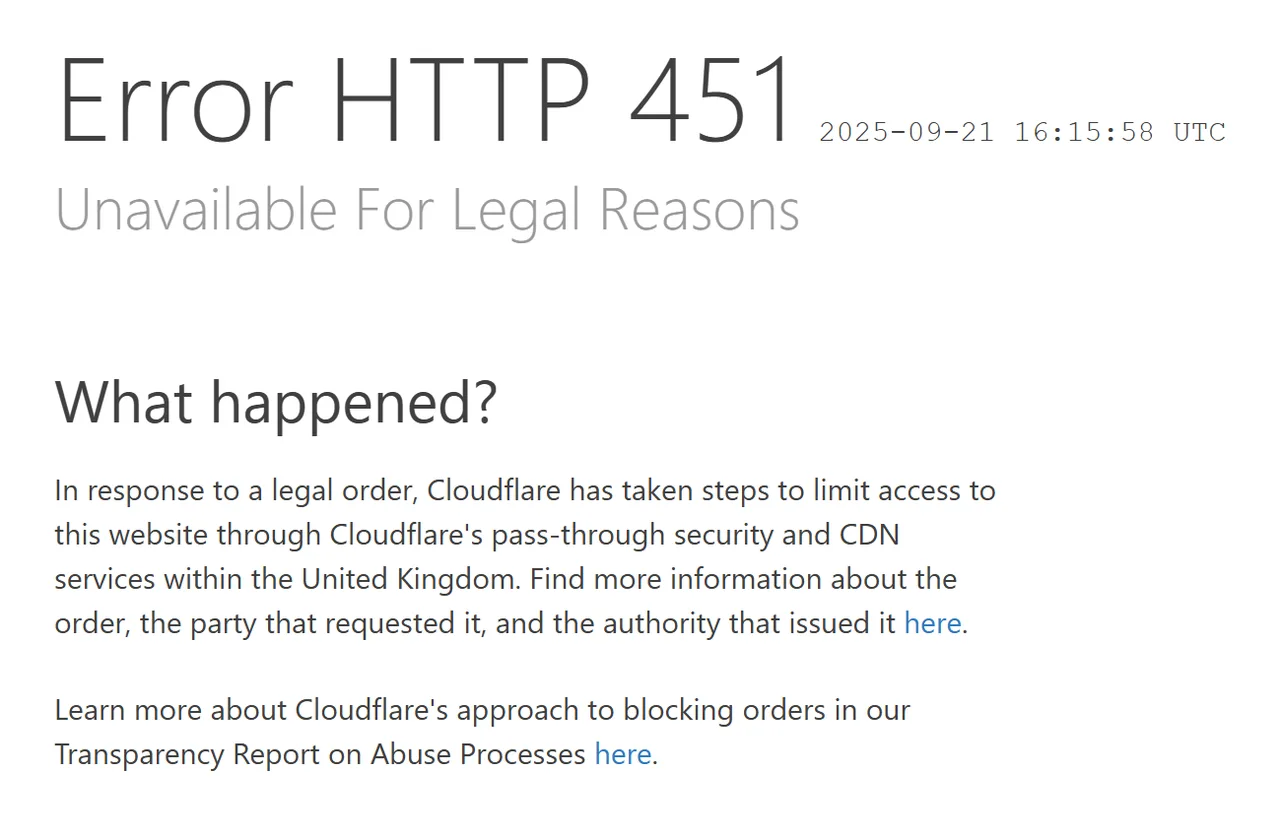
The response message may provide additional information about the restriction, such as the applicable law or the organization enforcing it. However, the amount of detail depends on how the server or intermediary implements the restriction.
What Causes HTTP 451 Errors?
An HTTP error 451 occurs when access to a resource is restricted for legal reasons. The specific cause depends on the applicable law, the content involved, and the organization responsible for enforcing the restriction.
1. Government or Court Orders
Governments and courts may order websites, hosting providers, or internet service providers to restrict access to content that violates local laws or is subject to a legal prohibition. Common reasons include national security concerns, court-ordered injunctions, and the distribution of illegal content.
Depending on the scope of the order, the restriction may apply to a specific webpage, an online service, or a broader category of information. Users in affected jurisdictions may be unable to access the restricted content even when it remains available elsewhere.
2. Copyright and DMCA-Related Restrictions
Copyright disputes may lead to access restrictions when online content is alleged to infringe someone’s rights. For example, a copyright holder may submit a notice under the Digital Millennium Copyright Act (DMCA), a U.S. law governing copyright infringement online, requesting the removal of unauthorized videos, images, or other protected material. A website or intermediary may respond by removing the content or restricting access to it.
3. Regional Legal Requirements
A website may restrict access to certain content in countries where local laws prohibit its distribution or require it to meet specific regulatory conditions. As a result, a page that is accessible in one country may be blocked in another, even when the content itself has not changed.
For users in affected regions, the restriction may appear as an HTTP 451 error rather than a notice explaining the specific legal requirement.
4. Hosting Provider or Intermediary Restrictions
An HTTP 451 response may come from an intermediary rather than the website’s original server. For example, an internet service provider, content delivery network (CDN), or hosting provider may enforce a legal restriction by blocking access to the affected content.
In such cases, the organization returning the error may not be the one that requested the restriction.
How to Fix HTTP 451 Errors
If you encounter an HTTP 451 error, you may be able to resolve it by identifying where the restriction comes from and whether it affects only your access or the resource itself. Start with the error message and website notices, then check your network settings or contact the website if the cause remains unclear.
The following steps can help you identify the source of the error and determine which actions are worth trying.
1. Check the Error Message and Website Notices
Read the error page carefully. It may explain why access is restricted, identify the affected content, or provide details about the organization enforcing the restriction.
You can also check the website’s official announcements or support pages for information about regional availability. If the cause remains unclear, contact the website using its published support details.
2. Compare Access Results Across Different Network Exits
If you suspect the error is related to your location, compare responses to the same URL from different regions you are authorized to test. Keep the URL and request settings consistent, and check whether the HTTP status code or page content changes.
You can use IPcook Residential Proxies to conduct these tests across different regions. IPcook provides residential IPs in 185+ countries, making it possible to compare website responses from different geographic locations.
To compare results using IPcook, follow these steps:
Select a country in IPcook: Open your IPcook dashboard and choose the country you want to test.
Configure your proxy connection: Retrieve your proxy details, including the endpoint, port, username, and password, then enter them into your browser or HTTP client using the supported connection format.
Test the same URL: Send the same request through the selected proxy location and record the HTTP status code and returned page content. Repeat the test with another country for comparison.
📚IPcook Proxy Configuration Guide
If you're unsure how to configure and use a proxy, refer to our step-by-step guide:
If the responses differ by location, the results can help you investigate whether regional access rules are involved. However, they do not establish the exact legal basis for the restriction.
3. Check DNS, Browser, and HTTPS Settings
DNS or browser issues are not typical causes of an HTTP 451 response, but a few basic checks can help rule out unrelated access problems.
Open the page in another browser or a private browsing window to see whether the behavior changes.
Check whether the domain resolves correctly by running
nslookup example.comin a terminal.Inspect the HTTP response headers with
curl -I https://example.comto confirm the returned status code.
Replace example.com with the domain you want to test.
A consistent HTTP 451 response from the server usually means that further browser or DNS changes will not resolve the issue. Focus instead on identifying the source of the restriction.
For other proxy-related issues, see our guide to Fixing Proxy Error Codes for additional troubleshooting tips.
4. Contact the Website or Service Provider
If you cannot determine why access is restricted, contact the website’s support team or service provider for clarification.
Include the following details in your request:
Affected URL: The exact page you tried to access.
Error message: The complete message displayed in the browser.
Request time: When the error occurred, including your time zone if possible.
Response headers: Any relevant headers collected during testing.
This information can help the provider investigate the response, clarify whether the restriction is intentional, and explain whether any options are available.
The next step depends on the cause: a technical configuration issue may be fixable, while a legally required restriction may need to be addressed through the website or the relevant authority.
How to Resolve HTTP 451 Errors on Your Own Website
If you manage the affected website, first identify which component returns the HTTP 451 response and verify whether the restriction matches the applicable legal requirements.
The response may come from your application, hosting provider, CDN, or another intermediary, so checking the origin server alone may not be enough.
1. Verify the Server Response and Blocking Rules
Start by requesting the affected URL and checking the returned status code and headers.
curl -I https://example.com/affected-pageThen review your application logs, web server configuration, CDN rules, and access-control settings to identify where the response is generated.
If the origin server returns a different status code from the public-facing endpoint, an intermediary may apply the restriction. Identify the component responsible before changing any configuration.
2. Check Hosting Provider or Legal Restrictions
Contact your hosting provider or CDN support team when your application does not return the 451 response. Ask whether a legal notice, regional restriction, or account-level policy affects the resource.
For restrictions based on a legal demand, confirm which content and regions are covered. Consult qualified legal counsel for help interpreting the demand or determining whether a change is permitted.
Keep the access restriction in place until you have confirmed that removing it is appropriate.
3. Return the Appropriate HTTP Headers and Error Message
If your website intentionally returns HTTP 451, provide a clear response that explains why the resource is unavailable. Where appropriate, include information about the legal basis or affected content, without disclosing details you cannot verify or are not permitted to share.
RFC 7725 defines the Link header with the rel="blocked-by" parameter to identify the entity implementing the restriction. This entity may differ from the organization that requested or legally mandated the restriction.
For example:
HTTP/1.1 451 Unavailable For Legal Reasons
Link: <https://example.com/legal-restrictions>; rel="blocked-by"
Content-Type: text/html
Replace the example URL with a valid URI identifying the entity responsible for implementing the restriction. Ensure that the response body accurately describes the situation.
After updating the response, test the affected URL and review its status code, headers, and page content. If the restriction varies by region, compare results from the relevant locations.
For authorized cross-region monitoring, IPcook Residential Proxies can help compare responses from different locations. These tests can help identify regional differences, while server-side logs and legal review are still needed to determine the source and basis of a restriction.
HTTP 451 vs. 403 vs. 404: What Is the Difference?
HTTP 451, 403, and 404 all indicate that a requested resource cannot be accessed as expected, but they communicate different situations.
Status code | Meaning | Typical reason |
451 Unavailable for Legal Reasons | Access is denied because of a legal demand. | A court order, copyright restriction, or regional legal requirement. |
403 Forbidden | The server refuses to fulfill the request. | The requester lacks permission or is blocked by an access policy. |
404 Not Found | The server cannot find the requested resource or will not confirm that it exists. | The URL is incorrect, the page has been removed, or the resource is not available at that address. |
The main distinction is the reason communicated by the response.
A 451 response specifically indicates a legal restriction, while a 403 response generally indicates that access is forbidden and a 404 response indicates that the resource cannot be found or is not being disclosed.
A status code alone may not reveal every detail about the underlying configuration or circumstances.
👀Learn More About Other HTTP Errors
HTTP 451 is just one of the errors you may encounter online. Read our guide to HTTP 429 Proxy Errors to learn what causes this error and how to troubleshoot it.
Conclusion
An "ERROR HTTP 451" message usually indicates that a resource is unavailable for legal reasons. Understanding the response and identifying where the restriction is applied can help you determine the appropriate next steps, whether you are accessing a website or managing one.
For teams monitoring regional website availability, IPcook offers Residential Proxies to help you compare access results across different locations and identify regional differences. These insights can help you better understand regional access issues and make more informed decisions when troubleshooting website availability.
