


Webshare Proxy Review 2026: Pricing, Performance & Limits


With affordable pricing and a wide range of proxy options, Webshare attracts users looking for cost-effective proxy solutions. However, it is not always easy to know how well a proxy service performs in real-world scenarios or what limits may affect your usage before you commit. In this Webshare Proxy Review, we will evaluate Webshare's pricing, performance, features, and limitations, along with an alternative option if Webshare does not meet your needs.
Introduction to Webshare
Webshare is a US-based proxy provider founded in 2018. Oxylabs acquired the company in late 2022, but Webshare continues to operate as a separate service. It focuses on self-service proxy infrastructure, with affordable starting prices and flexible plan customization aimed primarily at entry-level and mid-market customers.
Webshare currently offers 3 proxy products: Proxy Servers, Static Residential Proxies, and Rotating Residential Proxies. The names are slightly different from the terms commonly used across the proxy market:
Proxy Servers: These are Webshare Datacenter Proxies. They provide fast, cost-effective IPs for data collection, automation, and other tasks that require a large number of proxies. You can choose shared, private, or dedicated IPs based on the level of exclusivity you need.
Static Residential Proxies: Also known as ISP proxies, these use ISP-registered IP addresses hosted on server infrastructure. They keep the same IP across sessions, making them suitable for longer workflows that require a stable identity and consistent connection.
Rotating Residential Proxies: These route traffic through IP addresses associated with real residential devices. They provide a much larger pool, broader geographic coverage, and more targeting options for tasks that require requests from different locations or frequent IP changes.
📌You May Also Like:
What Is a Residential Proxy? Everything You Need to Know
Static vs Rotating Proxies: Full Comparison Guide for Beginners
Datacenter Proxy Options
Webshare markets its Datacenter Proxies as Proxy Servers. The IPs originate from datacenter infrastructure and use hosting ASNs. This generally makes them faster and more affordable than residential proxies, but also easier for websites to identify as proxy traffic.
Coverage extends across more than 50 countries, with support for HTTP and SOCKS5 connections. Webshare advertises 99.97% uptime and over 100 Gbps of aggregate network capacity. You can download the IPs as a proxy list, connect through an endpoint, or access them in Chrome using Webshare's browser extension.
Webshare offers 3 levels of datacenter proxy access:
Option | Sharing Model | Main Advantage | Best For |
Proxy Server | Shared with more users | Lowest-cost access | Scraping and price monitoring |
Private Proxy | Shared with up to two users | Better cost and consistency | Automation and ongoing data collection |
Dedicated Proxy | Used exclusively by you | Greater privacy and IP control | Account-specific and demanding workflows |
Residential Proxy Options
Webshare offers two residential products: Rotating Residential Proxies and Static Residential Proxies. The main difference is whether the IP comes from a home device and changes automatically or remains fixed on server infrastructure.
Rotating Residential Proxies
Webshare's rotating network includes more than 80 million ethically sourced residential IPs across 195 countries. The IPs come from real home devices and refresh automatically every few hours. Its Endpoint Generator supports rotating and sticky sessions, with targeting by country, city, ASN, and US state or ZIP code. Webshare supports HTTP and SOCKS5 connections and provides developer-written Proxy API documentation with code examples for Python, cURL, or PHP.
Static Residential Proxies
These proxies use ISP-issued addresses hosted on servers. Webshare advertises more than 100,000 IPs from providers such as AT&T, Sprint, and Cox Communications. The service offers speeds up to 1 Gbps, HTTP and SOCKS5 support, and plans with up to unlimited bandwidth. Shared, private, and dedicated tiers are available. Dedicated IPs are assigned exclusively to one customer and remain fixed for as long as they are assigned to the account.
Webshare Pricing and Plan Limits
Webshare uses two pricing models. Rotating Residential Proxies are billed per GB of traffic, while Proxy Servers and Static Residential Proxies are priced per IP. The table below compares Webshare's current rates and bandwidth options.
Metric | Rotating Residential | Static Residential | Proxy Servers |
Pricing model | Per GB | Per IP | Per IP |
Pricing | Monthly: $1.40 - $3.50/GB | Shared monthly: $0.225 - $0.30/IP | Free: 10 proxies with 1GB/month |
Bandwidth options | 1GB to 3,000GB | 250GB, 1TB, 5TB, or Unlimited | 250GB, 1TB, 5TB, or Unlimited |
Shared plans cost the least because the same proxy may be available to several customers. Private proxies limit access to no more than two other users, so their monthly price is higher. Dedicated proxies are reserved for one account and carry the highest per-IP rate. Rotating Residential does not use these sharing tiers. Instead, customers pay for the amount of traffic included in the plan. Larger IP or traffic packages receive lower unit prices. Webshare also offers yearly subscriptions with a stated 30% discount.
Bandwidth is shared across all proxies in a plan, resets every 30 days, and does not carry over. Reaching the limit disables the proxies until the next reset or a plan change, while Unlimited plans remain subject to Webshare's Fair Usage Policy.
📌Refund eligibility:
Apply within 48 hours, use less than 1GB on Proxy Server or Static Residential plans or 0.1GB on Rotating Residential, and use fewer than 1,000 proxies.
Cancellation alone does not trigger a refund.
Proxy Pool, Speed, and Real-World Performance
Proxyway's 2025 research evaluated Webshare across rotating, static residential, and datacenter proxy categories.
Among entry and mid-market rotating residential providers, Webshare scored well for its proxy pool and performance. However, its pricing and feature scores trailed providers with lower traffic rates or more connection and targeting options.
Webshare Datacenter Proxies received the highest scores for coverage and pricing, while performance remained near the middle and features received the lowest score. At the 1 TB and 2 TB levels, Webshare was priced well below every other provider in Proxyway's comparison.
Its dedicated ISP proxies, sold as static residential proxies, earned the highest pricing score of 5 points. Customers could adjust their plans with more traffic, threads, network priority, and IP refreshes.
For rotating residential proxies, Proxyway recorded a 99.58% infrastructure success rate, slightly above the 99.56% median. However, Webshare's 1.49-second response time ranked 12th among 13 providers. Against Amazon, Google, and Instagram, it completed 92.19% of requests with an average response time of 5.44 seconds. Its IPQualityScore results were stronger, placing fifth globally and fourth in the US.
Privacy, Verification, and Usage Rules
Webshare provides several account security features to help protect user access. Two-factor authentication (2FA) is available for accounts, with email-based verification enabled by default and TOTP authentication available for users who want an additional security layer. Webshare may also require identity or payment verification in certain situations, such as confirming payment methods or reviewing specific account activities.
In terms of privacy, Webshare collects information needed to operate and maintain its services, including account details, billing information, IP addresses, cookies, and usage data. Its privacy policy explains how this information is used for service management, security monitoring, fraud prevention, and customer support. While Webshare provides privacy-related policies for handling user data, users should note that this does not mean no information is collected or retained.
How to Use Webshare and Manage Proxies
Getting started with Webshare is relatively straightforward, even for users with limited proxy experience. This section walks through the setup process step by step, followed by a closer look at the dashboard.
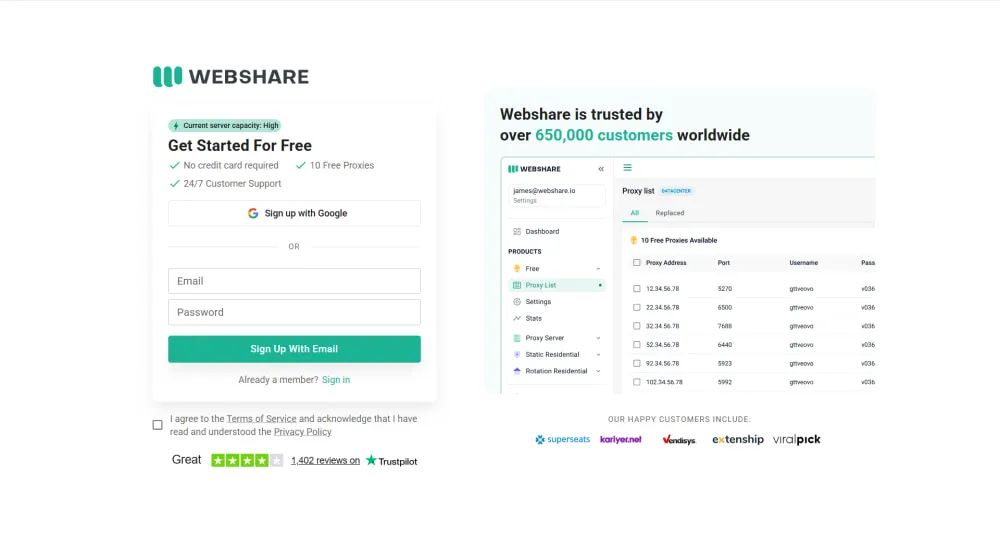
Step 1. Go to its official website and register an account with your email address. After completing the registration process, Log In to access the main dashboard.
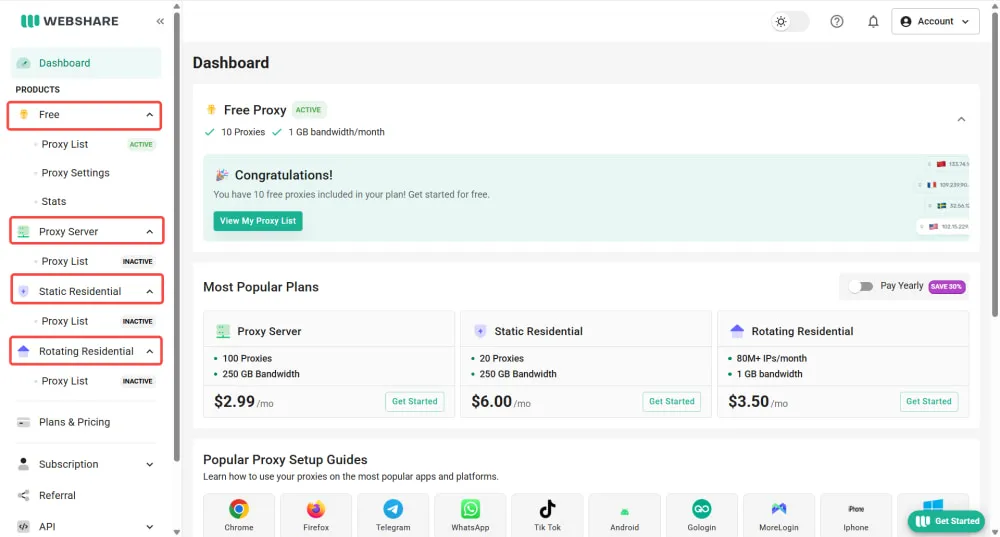
Step 2. Navigate to the left sidebar and expand your preferred proxy type. Click Proxy List to access the corresponding proxy page, where you can purchase a plan or manage your available proxies. Free proxies can be used directly, while paid proxy types require an active plan before use.
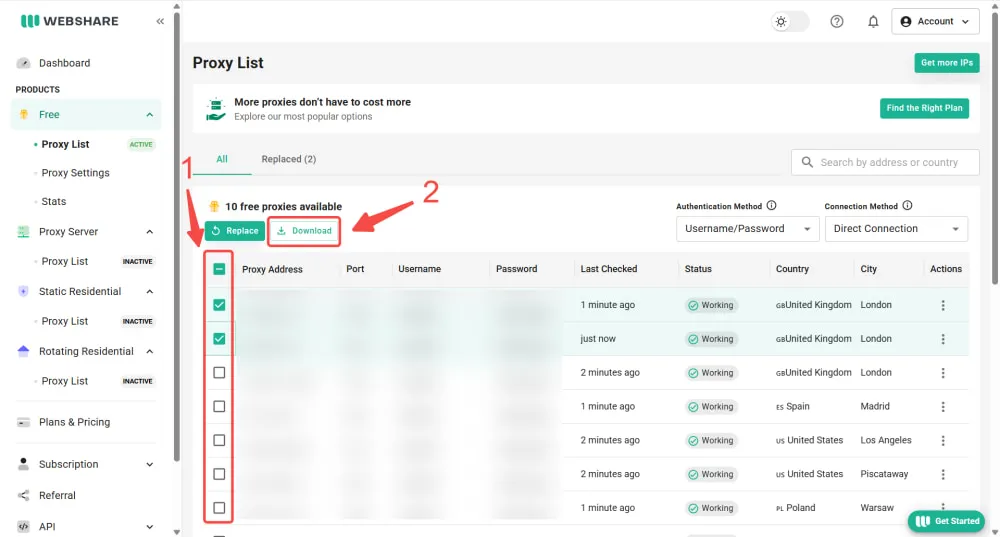
Step 3. Select the proxies you need by checking the boxes next to each IP address, or select all proxies at once. You can either copy the API link below the proxy list for automated access or click Download to save the proxy details as a TXT file.
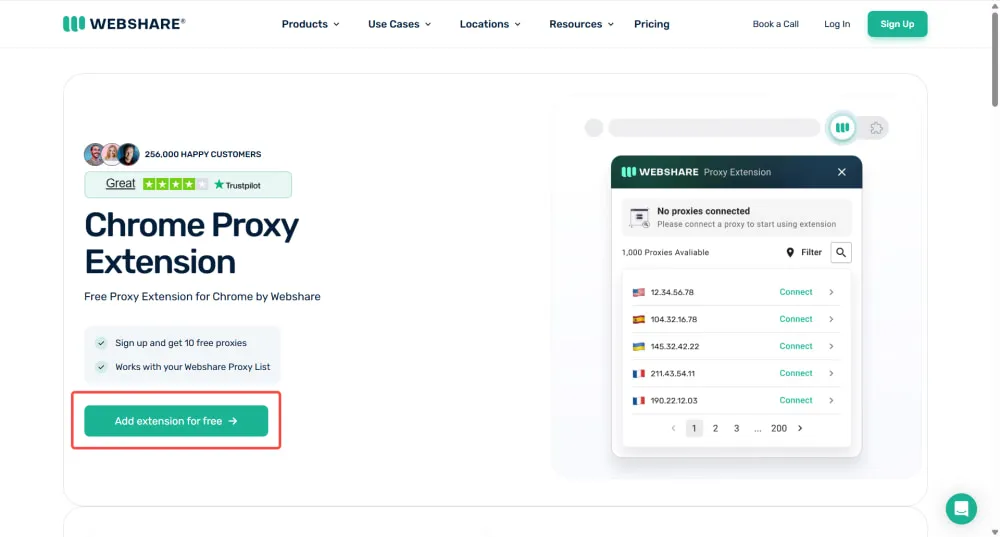
Step 4. Add the Webshare extension to your Chrome browser for a faster proxy setup. For more technical workflows, you can configure proxy settings directly in Python scripts or cURL commands.
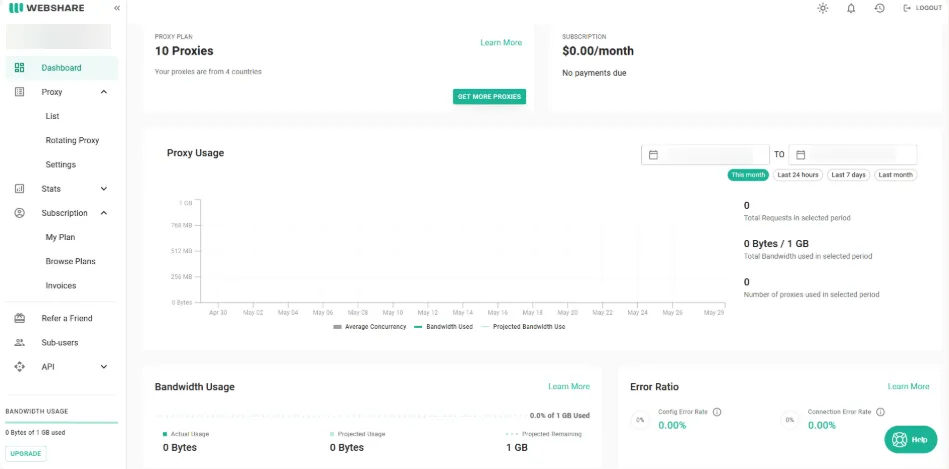
Step 5. Manage and monitor your proxies through the Webshare dashboard. The dashboard provides an overview of active subscriptions and key usage data. The homepage displays essential metrics such as traffic usage, requests, and connection errors, while the left-side navigation allows you to access different management sections.
User Feedback and Common Concerns
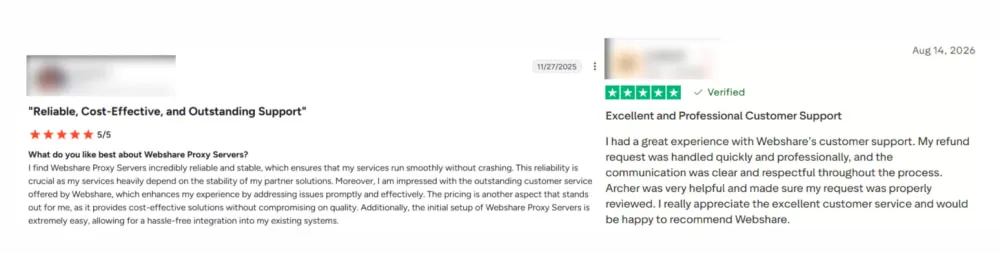
User feedback for Webshare is generally positive across major review platforms. On Trustpilot, Webshare receives a 4.1/5 rating, while G2 users rate the service at 4.5/5.
Positive reviews generally praise Webshare for its affordability, ease of use, and convenient proxy management. The most frequently mentioned strengths include:
Affordable pricing
Simple dashboard and easy proxy configuration
Convenient proxy list downloads and API access
Free plan for testing the service
Responsive and helpful customer support
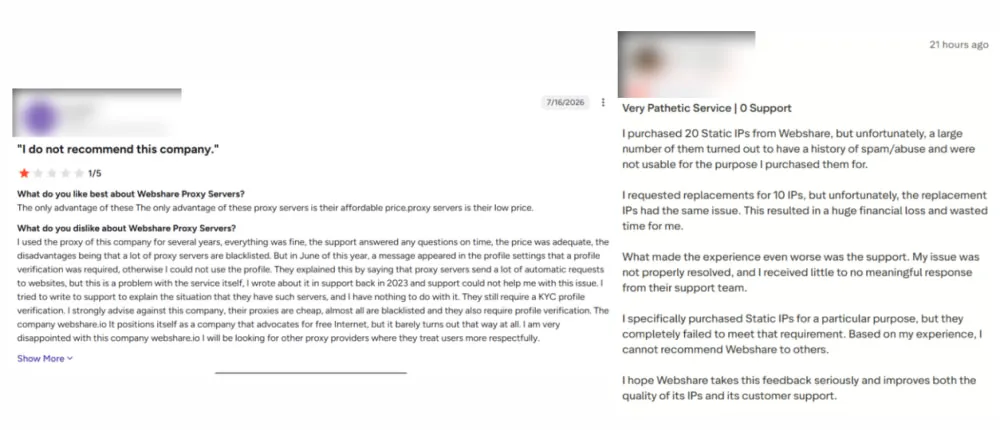
Negative feedback mainly focuses on proxy quality, IP reputation, and performance in certain use cases. While these issues do not affect every user, they may matter to users with more demanding proxy requirements.
Some IPs may be flagged by target websites
Inconsistent performance for sensitive workflows
Account verification requirements
Concerns about the quality of replacement IPs
Slower response times in latency-sensitive scenarios
Webshare Alternatives: One Practical Option to Consider
Webshare remains an affordable choice, but it may not suit projects that need flexible traffic usage or stronger performance on protected websites. Its bandwidth resets every 30 days and does not roll over, which can leave paid traffic unused when workloads are irregular. Reports of flagged IPs and slower requests may also matter for demanding data collection. IPcook is a practical alternative for teams seeking more control over proxy usage and project access while keeping costs affordable.
IPcook Residential Proxies offer a practical alternative with more than 55 million IPs across 185 countries, as well as rotating and sticky sessions lasting up to 24 hours. Purchased residential traffic does not expire, allowing customers to use it when a project requires it instead of losing unused data at the end of a billing cycle. IPcook also includes up to 10 free subaccounts, compared with 3 free sub-user accounts on any Webshare plan. This higher limit gives teams more room to assign separate credentials and traffic limits across projects.
For tasks that require a consistent IP, IPcook ISP Proxies use ISP-issued addresses that remain fixed throughout the rental period. The service pairs these static IPs with 99.9% uptime and low-latency connections to support longer, more stable sessions. Unlimited traffic makes extended use more practical, while HTTP and SOCKS5 support keeps integration flexible.
Final Verdict: Who Should and Shouldn't Use Webshare?
Webshare is a good fit for budget-conscious developers and small to midsize teams running routine scraping or scheduled data collection. Its lower prices can be worthwhile when cost matters more than speed, especially for high-volume datacenter traffic. However, slower responses may require retries that consume more traffic and narrow the savings. Its 30-day traffic cycle may also limit teams with uneven residential workloads.
IPcook is a budget-friendly alternative for teams managing diverse workflows, with residential proxy prices ranging from $0.30 to $3.20 per GB and purchased traffic that does not expire. For longer sessions, IPcook ISP Proxies start at $0.05 per IP per day and provide fixed IPs with unlimited traffic.
- Introduction to Webshare
- Webshare Pricing and Plan Limits
- Proxy Pool, Speed, and Real-World Performance
- Privacy, Verification, and Usage Rules
- How to Use Webshare and Manage Proxies
- User Feedback and Common Concerns
- Webshare Alternatives: One Practical Option to Consider
- Final Verdict: Who Should and Shouldn't Use Webshare?
