


How to Get YouTube Music Unblocked From Anywhere

Whether you're a student stuck on school Wi-Fi, an office worker behind a corporate firewall, or a traveler seeing "YouTube Music isn't available in your country," having your music cut off right when you want it most can throw off your whole flow. Fortunately, this guide will help you figure out exactly why you're blocked and show you the most effective ways to get YouTube Music unblocked.
What you'll learn:
Why YouTube Music is blocked or unavailable on some networks
Which fix to try first based on your specific situation
How to set up a proxy for stable YouTube Music access on your device
What to do if YouTube Music still doesn't load after trying the basics
Why Is YouTube Music Blocked or Unavailable
YouTube Music may fail to load for several different reasons, and not all of them are true network blocks. Here are the most common causes to help you understand where the problem is coming from.
1. School or Work Network Filtering
Schools, universities, and corporate offices commonly use firewalls and web filtering software to block entertainment and streaming sites. YouTube Music gets swept into this along with social media, gaming, and other non-work domains. The same applies to public Wi‑Fi in airports, libraries, and coffee shops — these networks often restrict streaming to save bandwidth for everyone.
You can test whether this is the cause by switching to mobile data or a different Wi‑Fi connection. If YouTube Music works on another network, the problem is your current network's filtering rules. A proxy or VPN is the right fix here.
2. YouTube Music Is Not Available in Your Region
YouTube Music is only available in certain countries. If your IP address or Google account region isn't on the supported list, you'll see "YouTube Music isn't available in your country." You can check YouTube's official availability page to confirm whether your country is covered.
If this looks like a location issue, try switching networks or using a proxy from a country where YouTube Music is available. Since some proxy and VPN traffic may be blocked, you may need to test different servers or use a more stable proxy service like IPcook, which provides real, trusted residential IPs.
🔥 Short on time? Try IPcook’s free 100 MB trial to see whether a residential IP can unlock YouTube Music right now.
3. Restricted Mode, Account Type, or Premium Limits
Even without a network block, account settings can limit what you can play:
Restricted Mode filters certain content and can be enforced at the network level, overriding your individual account setting.
Supervised accounts, such as Family Link or school-managed Google Workspace accounts, often restrict YouTube Music entirely.
Brand Accounts sometimes cannot access YouTube Music at all.
⚠️ Note: an expired subscription won't block the site itself, but it can remove Premium features like offline downloads, background play, and ad-free listening. If these features stop working, verify your status on YouTube's Paid Memberships page.
4. IP Reputation Issues
YouTube may restrict traffic from suspicious or heavily shared IPs. Shared VPNs and free proxies frequently use IP addresses that have already been blacklisted due to abuse, so access gets denied regardless of your location. If you're using a shared or low-quality proxy and still seeing errors, switching to IPcook ISP proxies gives you a dedicated, static IP that isn’t shared with other users, which usually resolves it.
Best Ways to Get YouTube Music Unblocked
Now that you know what's likely causing the issue, start with a quick network test, then choose the fix that best matches your situation.
Method 1: Test a Different Network First
Before setting anything up, switch from Wi-Fi to mobile data. If YouTube Music works immediately, you've confirmed the issue is your school or office network. Then you can decide whether to keep using mobile data or set up a more permanent fix like a proxy for YouTube. This step takes ten seconds and saves a lot of troubleshooting time.
Method 2: Use a Proxy
A proxy is the most effective way to get YouTube Music unblocked, especially when the issue comes from school or work network filters or regional availability errors. It works by routing your connection through another IP address, so YouTube Music sees the proxy IP instead of your current network or unsupported region.
Free proxies exist, but shared IPs on free services are frequently flagged or blacklisted by YouTube Music. Using a reliable YouTube proxy service like IPcook helps you bypass restrictions and keep your listening uninterrupted.
Why IPcook proxies work well for YouTube Music:
55M+ residential IPs worldwide to access YouTube Music from supported regions.
<0.5s response time for faster loading, smoother playback, and quicker playlist switching.
99.99% uptime to reduce disconnects, failed loads, and mid-session interruptions.
HTTP(S) and SOCKS5 support for easy setup on Chrome, Windows, Android, and more.
Method 3: Use a VPN
A VPN changes your IP address and encrypts your traffic, which can work around both network blocks and region restrictions. While a VPN is easy to install, many school and corporate networks now detect and block common VPN traffic. Streaming services are also getting better at identifying VPN IP ranges. It's a solid option to try, but less reliable than a residential proxy for ongoing use.
Method 4: Use Offline Listening or Alternative Music Sites
If you have YouTube Music Premium, you can download songs ahead of time on an unrestricted connection and listen offline wherever you are. This doesn't unblock the service, but it gives you your music without needing a live connection. If none of the above methods work in your situation, the alternatives section at the end of this article covers other music platforms that may be accessible on your network.
How to Unblock YouTube Music With IPcook Proxies
Just follow these three easy steps, and you’ll have YouTube Music unblocked in no time.
Step 1: Get Your Proxy Credentials
Log into your IPcook dashboard and choose your preferred proxy type, such as Residential Proxies. Then select a country where YouTube Music is available. The United States, United Kingdom, Germany, Japan, and Australia are all solid choices.
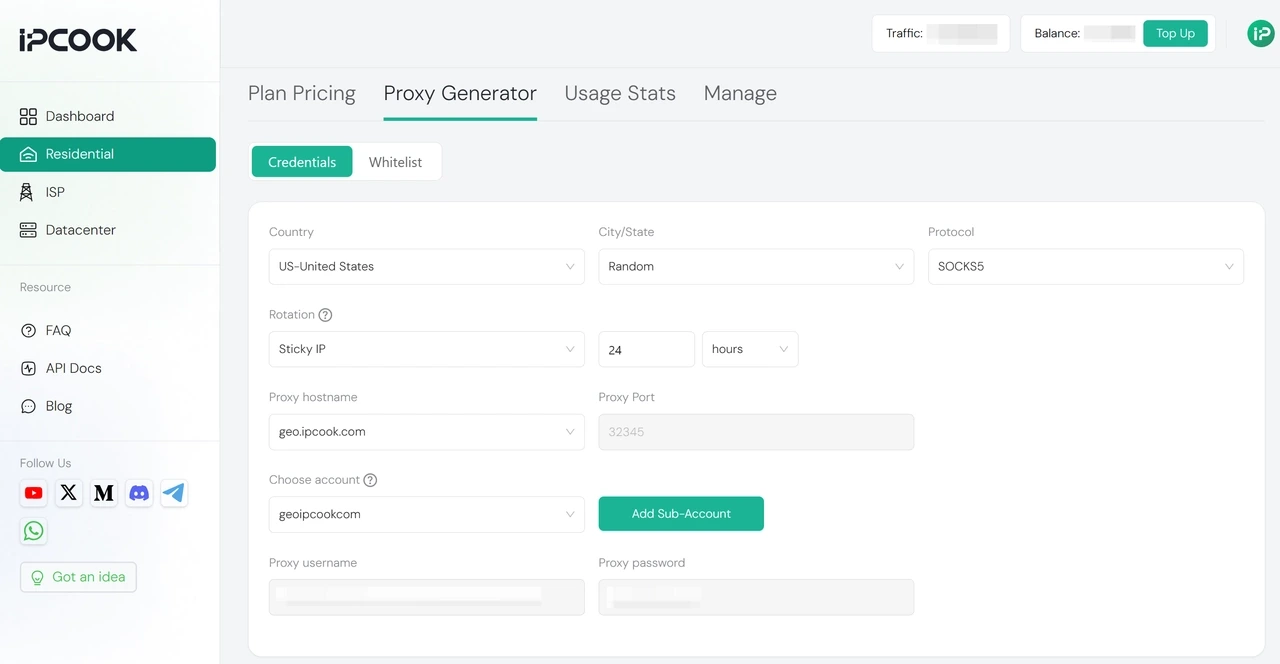
Copy your proxy host, port, username, and password from the dashboard. Keep this information open and you'll need it in the next step. For more details on generating your proxies, see our User Guide.
Step 2: Configure the Proxy on Your Device
On Chrome — two options:
Chrome proxy extension: Install a proxy extension like ZeroOmega from the Chrome Web Store, enter your IPcook credentials, and activate it. This keeps the proxy browser-only and doesn't affect other apps on your device.
Follow system proxy settings: Chrome automatically uses your system's proxy settings. Set them up at the OS level, and Chrome will route through the proxy without any extra configuration in the browser.
On Windows:
Go to Settings → Network & Internet → Proxy
Under Manual proxy setup, toggle Use a proxy server to On
Enter the Address and Port from your IPcook dashboard
Click Save
On Android:
Go to Settings → Wi-Fi
Long-press your current network and tap Modify Network or the gear icon
Under Advanced options, set Proxy to Manual
Enter the Proxy hostname and Port
Tap Save
💡 Need more detailed setup guides? Read following:
Step 3: Test Your Location Before Opening YouTube Music
Before opening YouTube Music, visit an IP checker (search "what is my IP") and confirm that the country shown matches the location you selected in Step 1.
If the location is correct, open music.youtube.com and test playback. If you are using a browser, clear old YouTube Music cookies first. If you are using the mobile app, restart the app after saving your proxy settings.
This extra check saves you from troubleshooting YouTube Music when the real issue is that the proxy is not connected properly yet.
What If YouTube Music Still Doesn't Work
If you've followed the steps above but YouTube Music still isn't cooperating, here are the most common post‑setup issues and how to fix them.
The country error still appears after connecting the proxy
Your browser cookies or Google account region may still be pointing to your original location. Clear all YouTube Music site data, not just cache but also cookies, then log out of your Google account and log back in while the proxy is active. If the error continues, switch your proxy to a different country IP.
YouTube Music opens but songs won't play
This is more likely a Restricted Mode or account issue than a network block. In your Google account settings, go to YouTube settings and check whether Restricted Mode is turned on. If it's on and greyed out, it may be enforced by your network, in which case switching to mobile data or a proxy will bypass it.
The proxy connects but streaming is slow or keeps buffering
Choose a proxy location that's geographically closer to you. If you're using residential proxies, switch to a sticky session. Alternatively, try a static ISP proxy. A fixed IP often performs better for streaming than one that rotates frequently. If speed is still an issue, try a different IP within the same country.
Nothing works on any network or device
This points to a Google account or YouTube Music account issue rather than a network problem. Check whether your account is in good standing, whether your YouTube Music subscription is active, and whether the issue reproduces across different Google accounts. If it does, contact YouTube Music support directly.
Best Alternatives When YouTube Music Is Blocked
If YouTube Music isn't accessible in your situation and you need music now, here are a few reliable music platforms worth trying. Some of these unblocked music websites and free music websites for school slip past network filters more easily than YouTube.
Spotify is a widely used music streaming service with a free ad-supported tier. It may still be accessible on some school or work networks, even when YouTube is blocked. If YouTube Music won't load, Spotify is the first alternative users try.
SoundCloud is strong for independent artists, DJ mixes, and discovering new music. The free version is generous, and it tends to be lower-profile on network filters than major streaming platforms.
Audiomack offers free streaming with a solid catalog of hip-hop, R&B, and Afrobeats. No subscription is needed to listen.
Apple Music has broad international availability and deep Apple device integration. It is worth trying if you already use Apple devices or have an active subscription.
Free Music Archive and Jamendo provide fully licensed, royalty-free music available to stream at no cost. These sites may be less commonly filtered than mainstream streaming platforms, though access still depends on your school, workplace, or public Wi-Fi rules.
Summary
YouTube Music being blocked at school or work is annoying, but it's not a dead end. More often than not, changing your IP to one from a supported location is enough to get YouTube Music working again.
If you need something quicker in the moment, a mobile hotspot or one of the alternative music platforms can get you through. But for a reliable long-term fix, the proxy setup above is worth the five minutes it takes to configure.
