


Is DataImpulse Proxy the Low-Cost King? Review & Better Value Picks


DataImpulse gets attention for one clear reason: its low price. Its residential proxies start around $1/GB, and the pay-as-you-go model makes it easy for small scraping teams, solo developers, and test-stage projects to start without a high upfront cost. Beyond the cheap rates, users frequently report hurdles like inconsistent IP quality and a dashboard where traffic tracking feels a bit vague.
Is this service a hidden bargain or a potential bottleneck for your workflow? In this guide, we’ll break down the technical details and help you decide if this is the right fit for your workflow. Also, stay tuned for a comparison at the end, where we measure DataImpulse against other affordable providers at the same level.
😞Still struggling to find an alternative to DataImpulse?
Looking for lower pricing than DataImpulse or more stable IP resources? Try IPcook, which offers more options at a more affordable price point. We currently have a 100MB free trial available. Test its performance firsthand before making a decision!
Who Should Try DataImpulse Proxy?
Pros | Cons |
Low entry cost | Unclear traffic tracking |
Simple to use | IP distribution and quality issues |
Best for lightweight scraping | Non-intuitive port forwarding |
DataImpulse entered the market in 2022, offering a suite of residential, mobile, and datacenter proxy services. The brand positions itself firmly within the budget-friendly tier, occupying a similar space to providers like Webshare and IPcook. DataImpulse's product structure is built on a traffic-based billing system, with dynamic residential IP prices typically starting around $1 per GB.
Since DataImpulse offers flexible proxy plans starting at 5GB and 50GB, it’s well-suited for small-scale businesses with temporary or one-off proxy needs. That said, the cost savings do come with notable drawbacks. Users frequently report inconsistent IP quality, and the clunky port forwarding setup creates unnecessary barriers for anyone seeking a polished, professional deployment workflow.
DataImpulse Proxy Networks
DataImpulse offers three proxy types: residential, mobile, and datacenter proxies. More specifically, its residential proxies are divided into Standard Residential and Premium Residential tiers. To help you choose the right tool for your project, here is a breakdown of the proxy categories.
Feature | Residential & Premium | Mobile | Datacenter |
Advertised pool size | 90+ million | 16+ million | 90+ million |
Locations | 220 | 185 | 146 |
Filtering options | Global, country, state, city, ASN targeting, ZIP code | ||
Other filters | Exclude country, ASN | ||
Residential Proxies
DataImpulse advertises a pool of 90+ million residential IPs. This is the most popular choice for general and small tasks. Starting at just $1 per GB, these rotating proxies are ideal for lightweight scraping on platforms like Bing or Amazon.
Premium Residential
Premium DataImpulse residential proxies offer a more refined selection of IP addresses aimed at improving reliability and security. These IPs come from business-grade networks, offering faster connection speeds and more precise geographic targeting for sensitive operations that require a higher trust score.
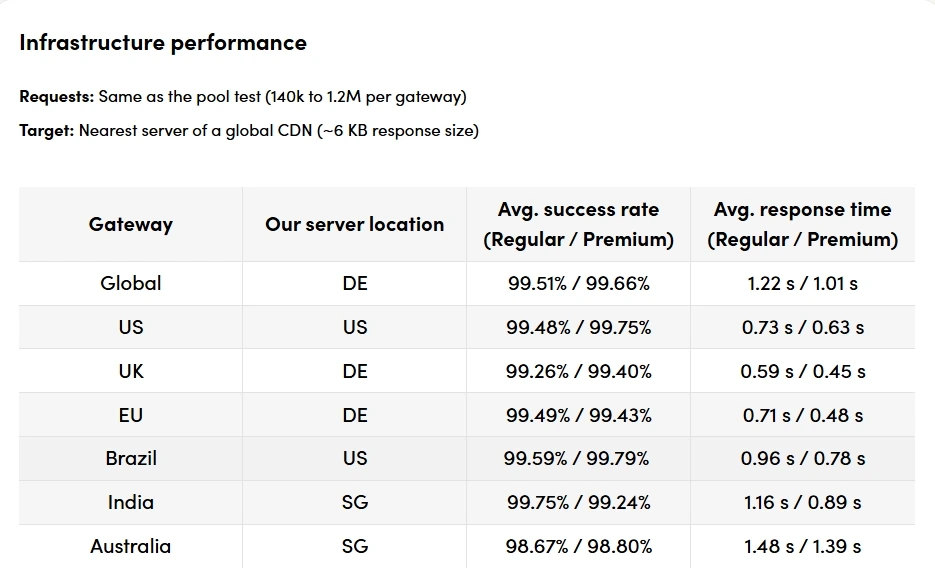
According to test data from Proxyway, both regular and premium pools maintain exceptionally high success rates across global gateways.
Datacenter Proxies
With response times averaging around 1 second, these proxies are built for tasks requiring high speed and fixed IP access, such as large-scale public data collection. Note that DataImpulse uses a traffic-based billing model for these, which is different from the flat-rate pricing many other datacenter providers use.
Mobile Proxies
Mobile proxies carry the highest price per gigabyte but offer the strongest defense against strict mobile security systems. They are the primary recommendation for managing accounts on platforms like TikTok and Instagram, where mobile device authenticity is mandatory to prevent account flagging and bans.
DataImpulse Pricing Plans
It uses a transparent pay-as-you-go model where you pay only for the traffic you consume. Below is a breakdown of their primary offerings:
Feature | Residential | Premium Residential | Mobile | Datacenter |
Model | Pay as you go | Pay as you go | Pay as you go | Pay as you go |
Format | Traffic | Traffic | Traffic | Traffic |
Modifiers | Extra filters (2x) | — | Extra filters (2x) | Extra filters (2x) |
Basic plan price | $50 for 50 GB ($1/GB) | $50 for 10 GB ($5/GB) | $50 for 25 GB ($2/GB) | $50 for 100 GB ($0.5/GB) |
Trial | $5 at starting rates | |||
DataImpulse has built its reputation on budget-friendly pricing. With affordable starter packs like 5GB and 50GB, it serves small teams and solo developers perfectly, letting them run initial tests without a high upfront cost. For projects needing more precise, small-volume control, IPcook offers 10GB and 25GB tiers of residential proxy plans. Built on a flexible pay-as-you-go model, these plans are ideal for ultra-light scraping tasks.
This service does not offer a completely free trial. In contrast, IPcook gives new users a 100MB free trial to test connectivity immediately, and Webshare offers a set of free proxies for basic verification. To get started with DataImpulse, you can purchase entry-level traffic using several payment methods, including credit cards, Google Pay, Apple Pay, or cryptocurrencies. But the non-expiring nature of traffic is an advantage over competitors like NetNut, where purchased bandwidth is often subject to a strict 30-day expiration policy.
What Are the Strengths of DataImpulse?
DataImpulse focuses on balancing affordability with essential functionality for everyday users. Below are the key advantages.
Low Entry Cost
DataImpulse is one of the most accessible providers on the market, famously offering residential traffic starting at just $1 per GB. This minimal financial barrier makes it an excellent choice for users who need to manage their overhead while still accessing residential-grade IPs.
Simple to Use
The platform is designed for simplicity, allowing users to purchase traffic and get their proxies running in minutes. The streamlined dashboard avoids the overly complex configuration settings often found in enterprise proxy platforms, like Oxylabs or Bright Data, making onboarding fast for new users.
Best for Lightweight Scraping
This provider is highly effective for basic web automation and lightweight data collection tasks. It performs well on platforms like monitoring price shifts on eBay or tracking localized business trends on Yelp, where premium-tier features are not the primary requirement.
👀Related Reading
NetNut Full Review: Best For Enterprise, Not Small Teams
Top 4 Best Oxylabs Alternatives You Should Not Miss [Tested!]
What Are the Limitations of DataImpulse?
While the low costs are attractive, certain technical limitations remain. Here are the primary areas where the service could improve to better serve its customers.
Unclear Billing and Traffic Tracking
One of the most common complaints is the lack of transparency in the dashboard. Users often find that traffic tracking is not updated in real time, and the billing breakdown is vague, which makes it difficult to monitor exactly how and when your data is being consumed.
IP Distribution and Quality Issues
The network distribution is heavily skewed. Egypt has over 1.4 million IPs, while the US has only 400,000. This imbalance causes instability in high-demand regions where users often receive recycled or blocked addresses. Also, logs have shown discrepancies where traffic originates from Azure IPs rather than the user's own IP. This activity occurs even when the user's laptop is powered off, following a pattern of spam attacks against Microsoft login endpoints.
Non-Intuitive Port Forwarding Mode
DataImpulse uses a system of different ports to switch or assign proxies rather than providing a direct list of IP addresses. Many users who are accustomed to exporting a clean IP: Port list find this mandatory port-forwarding logic far from user-friendly. Forcing users to manage rotation through specific port assignments can be confusing. It also adds an unnecessary technical hurdle for users without a development background.
How to Use DataImpulse Proxy (Step-by-Step Guide)
Getting started with DataImpulse is a straightforward process designed for quick deployment. Follow these steps to configure your proxies and begin your data collection tasks.
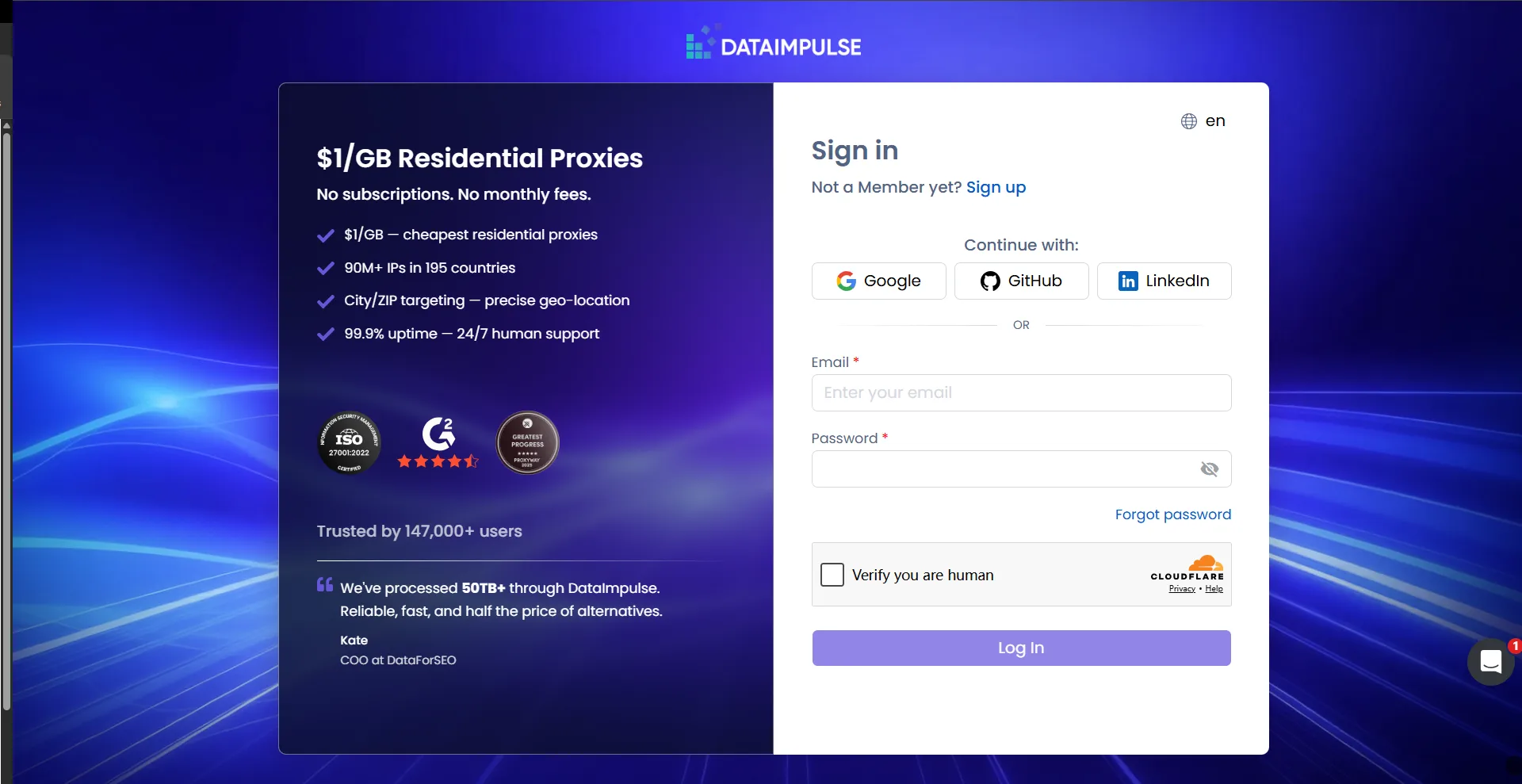
Step 1: Visit the official website and Sign Up for a new account. Complete the email verification to activate your access.
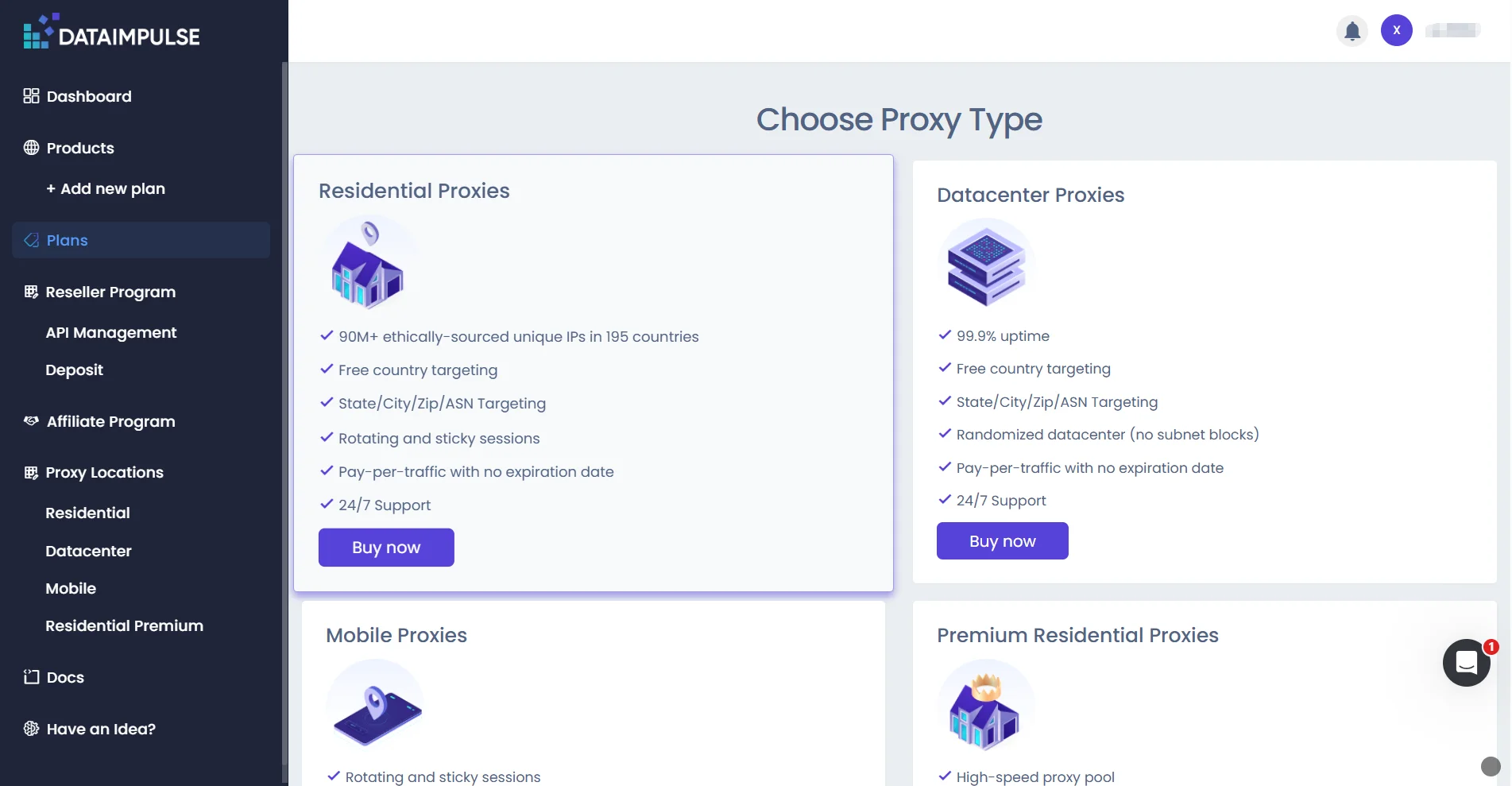
Step 2: Go to the products tab, select your desired proxy type, and click Buy Now to add funds and purchase traffic. Supported payment methods include cards, PayPal, and crypto.
Step 3: Use the setup tools on the configuration page to filter by location or rotation settings. Customize your endpoints and save the configuration to generate your credentials.
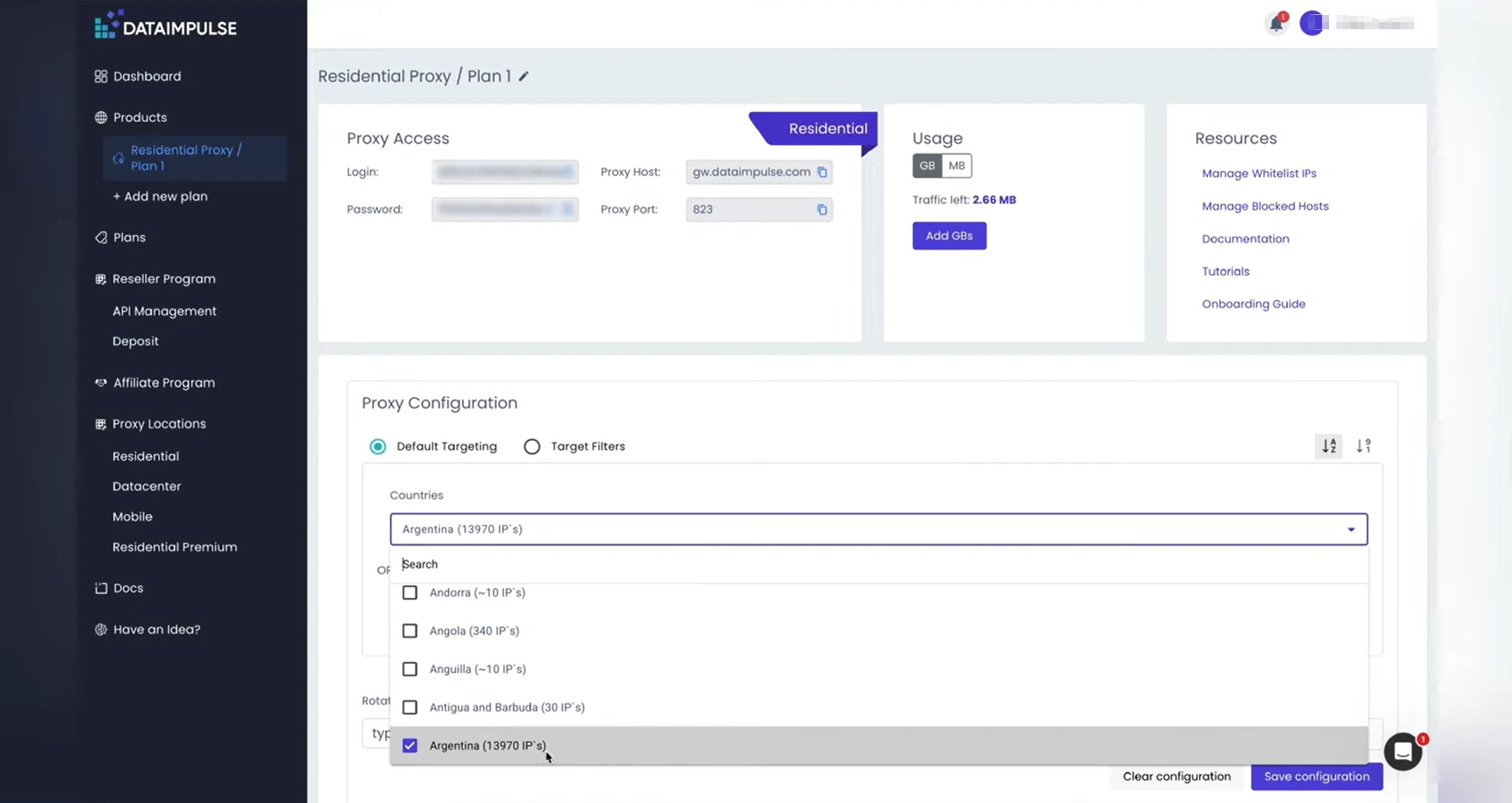
Step 4: Copy the displayed proxy details directly from the dashboard. Alternatively, export the information as a TXT file for easy integration into your software.
Compare 3 Cheapest IP Providers for Teams & Individuals
While DataImpulse is a top contender for budget-conscious users, other providers like IPcook and Webshare also offer affordable proxies and are tailored specifically for small teams and individuals. To give you a clearer picture of which provider best fits your specific technical requirements, here is an expanded comparison focusing on network scale and performance metrics.
Quick Comparison: DataImpulse vs IPcook vs Webshare
Feature | DataImpulse | IPcook | Webshare |
Residential Price | $1 / GB | $0.5 / GB | $1.4 / GB |
Response Time | ~1 second | < 0.5 seconds | ~1.8 - 2.4 seconds |
Success Rate | 99.51% | 99.99% | 99.97% |
Pool Size | 90M+ Residential IPs | 55M+ Residential IPs | 80M+ Residential IPs |
Location Count | 195 Countries | 185+ Locations | 195+ Countries |
FAQs about DataImpulse
Q1: Does DataImpulse proxy offer a free trial?
No. It does not currently provide a free trial for all users. Instead, they offer a highly accessible entry point through a $5 introductory residential proxy package. While it isn't strictly free, this low-cost traffic bundle allows you to test the service's speed and site compatibility without a significant financial risk. It acts as a paid trial that ensures only serious users access network resources while maintaining a very low barrier.
Q2: Is the DataImpulse proxy review reliable?
Yes, but with caveats. For small to medium projects, reviews praising its reliability are generally accurate. The provider's main strengths are specifically the $1/GB pricing and the fact that traffic never expires. However, users should remain realistic. Some reviews also point out that IP quality can be inconsistent, and the effective pool size in certain regions is smaller than advertised. It is a dependable choice for budget-conscious tasks.
Q3: Is it suitable for scraping?
Yes. DataImpulse is particularly well-suited for small-scale scraping projects and routine web automation. If you are collecting data from common targets, the service provides a cost-effective way to manage your requests. The low price per GB makes it ideal for developers running lean operations or hobbyists who need residential anonymity without a huge overhead.
Final Verdict
DataImpulse proxy is a solid entry-level choice for lightweight scraping, offering a simple interface and low startup costs. However, users must navigate challenges such as unclear traffic tracking, non-intuitive port forwarding, and uneven IP quality. As a low-cost proxy provider in the same price segment, IPcook delivers more stable performance. Ready to upgrade your task quality? Claim your 100MB free trial at IPcook today to experience premium proxies with zero risk.
- Who Should Try DataImpulse Proxy?
- DataImpulse Proxy Networks
- DataImpulse Pricing Plans
- What Are the Strengths of DataImpulse?
- What Are the Limitations of DataImpulse?
- How to Use DataImpulse Proxy (Step-by-Step Guide)
- Compare 3 Cheapest IP Providers for Teams & Individuals
- FAQs about DataImpulse
- Final Verdict
